

PLEASE WATCH THE PROMO VIDEO .
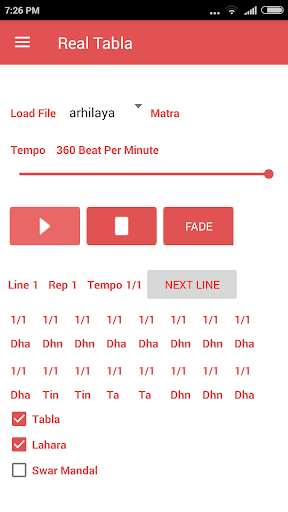
STOP BUTTON STOPS IMMEDIATELY, THE FADE BUTTON DOES IT GRADUALLY.
WHILE FADING USE STOP BUTTON TO STOP THE SOUND IMMEDIATELY.
VARY THE
PITCH OF THE LEFT TABLA USING "PITCHES AND REVERB" FOR CLARITY.
USE EARBUDS / HEADPHONES.
Supports through Menu items:
(1) Percussion
--- Tabla/Dholak
(2) Accompaniment - Lahara
/ Swarmandal /Drone/Beat/Vocal Count
Checking/unchecking HalfDbl checkbox controls tempo change behavior.
LAHARAS AVAILABLE FOR 6/7/8/12/16
BEAT ( notations courtesy www.chandrakantha.com)). SELECT PROPER LAHARA FOR AMIR TAAL AND BHANGRA CHAL.
OPTIONS:
Teen taal ,Tilwada 16
Dadra , Khemta
-
6
Roopak , Pashtu, Tivra, Amir-
7
Kaharva -
8
Matt taal - 9
Dadra to Kaharva
Jhaptaal
- 10
Rudra
- 11
Ektaal
-
12
Deepchandi - 14
Pancham Savari - 15
Chakradar Tihai
Arhi Laya -
3/2
ArhiLaya-smooth
Anagat Tihai - finishes 1 beat before the "Sam"
Many in One- many taals demonstrated
Bhangra Chaal(2)
Bhajan Taal
8
Sitarkhani 16
Kayda
- teentaal
Bedam Tihai (2) - teentaal
Nauhakka teentaal
Chachar Laya
Arhi Kuarh
3/2, 9/4
Savaiyya
5/4, 5/2
Biarh
7/4
jhaptal in roopak
10/7
roopak in jhaptal
7/10
teental in deepchandi 8/7
rise_fall
5/4 6/4 7/4 8/4 8/4 7/4 6/4 5/4
rela_1 , Peshkaar and tihai8beat teental
chakradar laykaaris teental
(1/1 2/3 1/3 = 2),(1/1 3/5 2/5 = 2);
(1/1 4/7 3/7 = 2), (1/1 5/8 3/8 = 2)
ArhiLaya2
Many-in_Roopak
tihai8beat_diff(icult) 4/8.5/8.6/8.7/8.8/8 and some more
For every
composition there is a Maxtempo for clarity.
The last few structures are for very experienced players.
The range for tempo 30 BPM to 360 BPM .
The default tuning is
C# but can be changed by selecting "Pitches and Reverb" from menu. The Right side can be fine tuned
in steps of cents (0-100) also.
Select "User Taal" from menu to make your own taal .Tap at "Compose". Here the number of lines is equal to number o beats. Each line has one beat. If the line has 3 cells then each cell represents 1/3 beat. The number of cells can be 1 to 4. After composing tap at BACK button. Here you can play the composed taal at different tempo. There can never be an error in the number of beats of the taal.
On the main page if you select user taal from the drop down list , then your composed taal will play with proper lahara.
A displayed line on the main page can be
edited from menu item "Edit Line Bol " and "Edit Line Volumes". Loading it again will restore the original line.
.
IN THE "BEAT" SUPPORT USE SET EMPHASIS
API Level 28






9Apps 4.9













