With the development of technology, more and more apps appeared in the mobile market. 20,000+ users downloaded Smart Screen latest version on 9Apps for free every week! Although you probably won't notice it at first. This hot app was released on 2018-12-07. Certainly you will love it after play.
Your unlock button is hard to press, paralyzed? Pressing the power button to lock or turn on the monitor may damage the key, causing difficulty in pressing or worse paralyzing the button. With this Smart screen on off - Auto screen on application you can minimize the pressing of the power button, which allows you to lock / unlock the machine quickly and smartly.
Make sure this is the best screen lock app with the least resource consumption and the most battery life.
Smart screen on off - Auto screen on application is simple utility to automatically On or Off screen using proximity sensor and double tap on Home Screen, instead of having to press the power button manually. Smart screen on off - Auto screen on have a power head floating in a convenient location is also provided to quickly turn off the screen.
Sometimes difficult to press the power button, or you want to preserve the physical power button. Smart screen on off - Auto screen on application and the power head floating can help you minimize the use of the power button anytime, anywhere.
"The Smart screen on off - Auto screen on app uses the Device Administrator permission." It is necessary and used only for locking the device when you use feature turn off the screen. You need to enable Administration before it can be used that feature. To uninstall the app, please open my app and click the "Uninstall" button.
Smart screen on off - Auto screen on uses Accessibility services." It is necessary and used to detect home screen.
Function have in Smart screen on off - Auto screen on app:
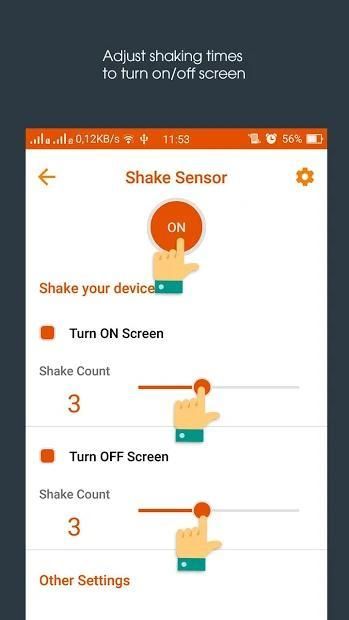
★ SHAKE SENSOR ★
► Shake to screen ON/OFF.
► You can set shake count to turn ON/OFF screen
★ PROXIMITY SENSOR ★
► Use Proximity sensor to turn ON/OFF screen (usually at the top of the phone)
► Swipe over Proximity sensor to Turn ON/OFF the screen.
► You can set time off delay to turn OFF screen.
► You can set Swipe count to Swiping over the proximity sensor to turn ON/OFF screen.
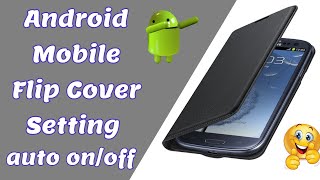
★ SMART FLIP COVER ★
Proximity Smart Cover feature for user using Flip Cover (If you use a phone case with cover).
► Just close the cover to turn screen OFF. and open the cover to turn screen ON
► With this feature when you put the phone in a pocket to turn screen OFF, and take the phone out your
pocket the screen will be turn ON.
★ POCKET SENSOR ★
► Turn OFF screen when you put your Smartphone on table
► Turn ON when you hold it in your hands and more
Manual Smart screen on off - Auto screen on
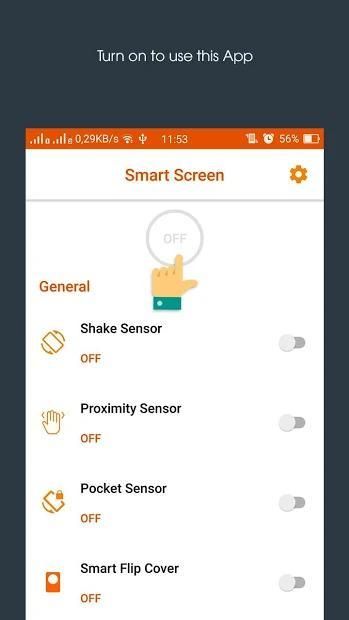
► Start the Smart screen on off - Auto screen on
► Choose the features you want to use
► Start the application by selecting the switch button on the right corner of the screen.
► When you want to pause the application or reset the settings, touch the switch button on the right corner again.
tombol unlock Anda sulit untuk menekan, lumpuh? Menekan tombol power untuk mengunci atau menghidupkan monitor dapat merusak kunci, menyebabkan kesulitan dalam menekan atau lebih buruk melumpuhkan tombol. Dengan layar Pintar ini pada off - layar Auto pada aplikasi Anda dapat meminimalkan menekan tombol power, yang memungkinkan Anda untuk mengunci / membuka mesin dengan cepat dan cerdas.
Pastikan ini adalah yang terbaik kunci layar aplikasi dengan konsumsi sumber daya sedikit dan masa pakai baterai.
layar cerdas pada off - layar Auto pada aplikasi adalah utilitas sederhana untuk secara otomatis atau Mati layar menggunakan sensor jarak dan double tap pada Home Screen, daripada harus menekan tombol power secara manual. layar cerdas pada off - layar Auto pada memiliki kekuasaan kepala mengambang di lokasi yang nyaman juga disediakan untuk cepat mematikan layar.
Kadang-kadang sulit untuk menekan tombol power, atau Anda ingin melestarikan tombol daya fisik. layar cerdas pada off - layar Auto pada aplikasi dan kepala listrik terapung dapat membantu Anda meminimalkan penggunaan tombol power kapan saja, di mana saja.
"Smart layar pada off - layar Auto pada aplikasi menggunakan izin Perangkat Administrator." Hal ini diperlukan dan hanya digunakan untuk mengunci perangkat bila Anda menggunakan fitur mematikan layar. Anda perlu mengaktifkan Administrasi sebelum dapat menggunakan fitur itu. Untuk meng-uninstall aplikasi, silahkan buka aplikasi dan klik tombol "Uninstall".
layar cerdas pada off - Auto layar pada layanan aksesibilitas penggunaan "Hal ini diperlukan dan digunakan untuk mendeteksi layar awal..
Fungsi memiliki layar Smart off - layar Auto pada aplikasi:
★ SHAKE SENSOR ★
► Kocok untuk layar ON / OFF.
► Anda dapat mengatur jumlah shake untuk mengaktifkan ON / OFF layar
★ PROXIMITY SENSOR ★
► Gunakan Sensor jarak untuk mengaktifkan / layar OFF (biasanya di bagian atas ponsel)
► Babatan lebih sensor Proximity Turn ON / OFF layar.
► Anda dapat mengatur waktu off delay untuk mematikan layar.
► Anda dapat mengatur Babatan menghitung sampai Menyapu atas sensor kedekatan dengan mengaktifkan layar / OFF.
★ SMART FLIP SAMPUL ★
Fitur kedekatan Smart Cover untuk pengguna menggunakan flip penutup (Jika Anda menggunakan kasus telepon dengan cover).
► Hanya tutup penutup untuk mematikan layar. dan membuka penutup untuk mengaktifkan layar
► Dengan fitur ini ketika Anda meletakkan ponsel di saku untuk mengubah layar OFF, dan mengambil telepon keluar Anda
mengantongi layar akan menyala.
★ POCKET SENSOR ★
► NONAKTIFKAN layar ketika Anda menaruh Smartphone Anda di atas meja
► Hidupkan ON saat Anda memegangnya di tangan Anda dan lebih
Manual Cerdas layar pada off - layar Auto on
► Mulai layar Smart off - layar Auto on
► Pilih fitur yang ingin Anda gunakan
► Mulai aplikasi dengan memilih tombol saklar di sudut kanan layar.
► Bila Anda ingin menghentikan aplikasi atau mengatur ulang pengaturan, sentuh tombol switch di pojok kanan lagi.
fix bus




9Apps 4.9