

Hot applications make large number of downloads. 20,000+ users downloaded Call Recorder - Automatic Phone Voice Record latest version on 9Apps for free every week! It is a wonderful app that amazes every player. This hot app was released on 2018-05-07. You’ll want to use it on your own phones after you know more.
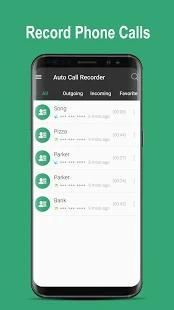
Record any phone call you want and choose which calls you want to save.
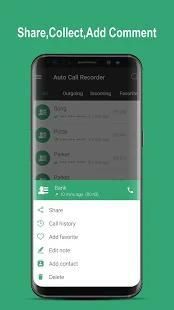
You can set which calls are recorded and which are ignored. Listen to the recording, add notes and share it.
[HOW TO USE]:
If you encounter any recording issues or wish to improve voice quality, try recording from a different audio source, or use auto-on speaker mode.
Recorded calls are stored in the Inbox. You can set the size of the inbox.
The number of saved calls is limited only by your device memory.
If you decide that a conversation is important, save it and it will be stored in the Saved Calls folder.
If not, old recordings will automatically be deleted when new calls fill up the inbox.
You can enable a Call Summary Menu with options to appear immediately after a call.
Search for recordings by contact, phone number, or note.
There are 3 default settings for automatic recording:
Record everything (default)
– This setting records all calls except for contacts pre-selected to be ignored.
Ignore everything
– This setting records no calls except for contacts pre-selected to be recorded.
Ignore contacts
– This setting records all calls with people who are not contacts, except for contacts pre-selected to be recorded.
[Note]:
Please note that call recording does not work on certain handsets and can result in inferior quality recordings.
Merekam setiap panggilan telepon yang Anda inginkan dan memilih memanggil Anda ingin menyimpan.
Anda dapat mengatur panggilan yang dicatat dan yang diabaikan. Mendengarkan rekaman, menambahkan catatan dan berbagi.
[BAGAIMANA CARA MENGGUNAKAN]:
Jika Anda mengalami masalah rekaman atau ingin meningkatkan kualitas suara, cobalah merekam dari sumber audio yang berbeda, atau menggunakan auto-mode speaker.
panggilan direkam disimpan dalam Inbox. Anda dapat mengatur ukuran kotak masuk.
Jumlah panggilan disimpan hanya dibatasi oleh memori perangkat Anda.
Jika Anda memutuskan bahwa percakapan penting, simpan dan akan disimpan dalam Disimpan Panggilan folder.
Jika tidak, rekaman lama akan secara otomatis dihapus ketika panggilan baru mengisi kotak masuk.
Anda dapat mengaktifkan Panggilan Ringkasan menu dengan pilihan untuk segera muncul setelah panggilan.
Mencari rekaman melalui kontak, nomor telepon, atau catatan.
Ada 3 pengaturan default untuk merekam otomatis:
Rekam semuanya (default) - Pengaturan ini mencatat semua panggilan kecuali untuk kontak pra-dipilih untuk diabaikan.
Abaikan segala sesuatu - Pengaturan ini mencatat ada panggilan kecuali untuk kontak pra-dipilih untuk direkam.
Abaikan kontak - Pengaturan ini mencatat semua panggilan dengan orang-orang yang tidak kontak, kecuali untuk kontak pra-dipilih untuk direkam.
[Catatan]:
Harap dicatat bahwa panggilan rekaman tidak bekerja pada handset tertentu dan dapat menghasilkan rekaman berkualitas rendah.
Minor bug fixed.





9Apps 4.9