
Introducing Falcon GFX Tool - Your Ultimate Gaming Companion!
Experience peak gaming performance with the Falcon GFX Tool designed for PUBGM and BGM. This app offers you a range of cutting-edge features that are exclusively tailored to enhance your favorite games. Elevate your gaming experience with 90 and 60 FPS options, no grass and no grass tree features, BlackSky, iPad view, and much more.
Discover the Game-Changing Features:
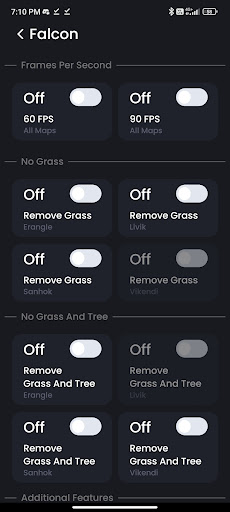
🚀 90 & 60 FPS: Unleash smoother gameplay at higher frame rates.
🌿 No Grass & No Grass Tree: Gain a competitive edge with clearer visibility.
🌅 BlackSky: Immerse yourself in enhanced atmospheric visuals.
📱 iPad View: Enjoy a wider perspective for a more immersive experience.
💡 Fully Control Graphics: Adjust resolution, anti-aliasing, shadows, and more.
🎮 All PUBG Versions Supported: BGM, GL, TW, and KR versions included.
🥔 Potato Graphics: Optimize graphics for smoother performance.
🔓 Unlock FPS: Switch between 60 and 90 FPS as you desire.
How to Get Started:
1. Download and install the Falcon GFX Tool from the Google Play Store.
2. Open the app and grant the necessary permissions.
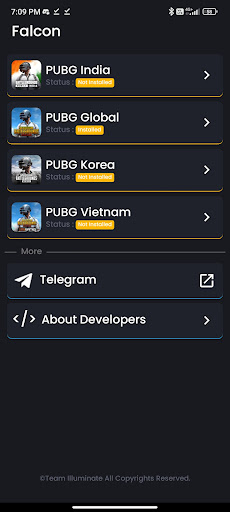
3. Select your game version from the provided list.
4. Choose your desired settings, such as 60 FPS, Potato Graphics, and more.
5. Immerse yourself in the enhanced visuals and optimized performance of your game.
Disclaimer:
Falcon GFX Tool is an independent app created to enhance specific games. We are not affiliated with any other brands or developers. Our goal is to provide you with an exceptional gaming experience while ensuring your game account's safety.
If you have any concerns about intellectual property rights or agreements, please reach out to us at jagdeepsekhon101@gmail.com. We are committed to taking prompt action.
Elevate your gaming experience today with Falcon GFX Tool - Your Gateway to Enhanced Gaming!
Fixed issue: Ads no longer appear repeatedly after one interaction.


9Apps 4.9












