


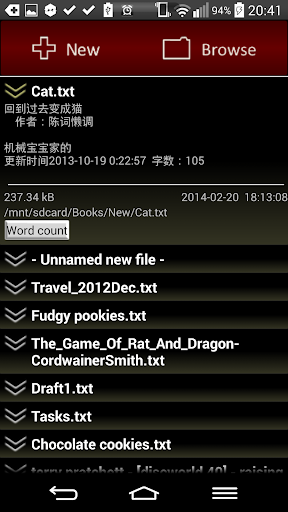
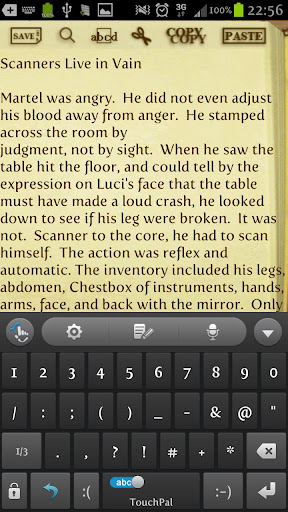
Comes with both English interface and 简体中文界面 options, NTW edits text files of UNLIMITED size! Search (with wildcards!), replace, undo, redo, HTML mode, Text to speech, full customizability, and more!
NTW bookmarks your editing progress for every file. With NTW Shelf, every file is at your fingertips.
Paid version mainly adds lotsa poweruser options, not essential, but looks very useful, right ;D
1) Remembers up to 9999 undo/redo operations
2) Control over the End-Of-Line characters (Apple, Unix and Windows tend to handle different End-Of-Line differently when doing plain text editing)
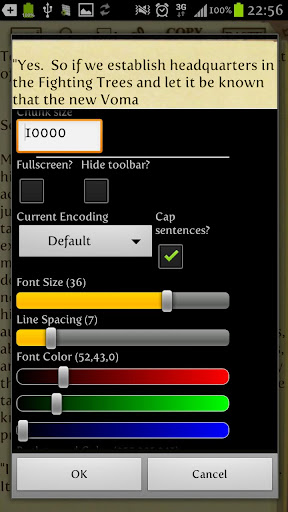
3) Allows user to specify buffer size
4) Allows custom fonts and background images
5) Allows user to customize 6 extra Themes in addition to the built-in 3 Themes.
6) Allows toggling of word wrap
7) Continuous Text to Speech in paid version. Free version will play single paragraphs, then stop until play button is pressed again.
Features:
- Edits text files of any size by loading small segments of the file at a time. To navigate between file segments, either use the goTo command, or tap the arrow icons on the top left and right corners.
- Text to speech synthesizer!
- Page scroll or move cursor using volume buttons
- Supports HTML view! And allows text justification along both left and right
- Shelf system that works like a sortable Task list.
- Save/autosave and auto bookmark/backup features works in the background so your changes are never lost, but neither are you forced to irrevocably save changes you still feel ambiguous about.
- Undo/Redo, Search(with full *wildcards* functionality! :D) and Replace, GoTo.
- Themes! Customizable display, fonts, and colors for both paid and free versions. And for the paid version, you can even specify your own background images and custom fonts.
- Supports multiple encodings including, ISO8859-_, windows 125_, Japanese, Chinese and Korean.
- Work with text files for easy transfer between your phone and PC.
- End of Line control when saving
- Toggleable word wrap
- Counts words and characters
If you are upgrading, you should save the files you are editing with NTW first.
Startup Crashes
If NTW crashes after you update your firmware to ICS, this is due to directory restructuring by ICS, thus clashing with NTW's own log data. Simply delete the /.NeedToWrite folder to fix this.
If you encounter any other startup crashes, either switch to a smaller(
Text to speech for SVOX classic will only work if you enable both the SVOX Classic engine under your phone's TTS settings, as well as enable Language Override inside SVOX Classic TTS settings.
TTS with SVOX is buggy for IceCream Sandwich, users are advised to use Google's own built in TTS engine.
For more information, pls refer to Help in the menu.
Important! 2013-02-20
I just encountered this sudden bug on my SGS3. Cut and Copy buttons will crash my phone everytime in any version of NTW Lite or Pro.
So after some digging, I found that there is a bug in how certain phone models especially Samsung's implements the clipboard.
The temporary solution is either a factory reset, or to do this:
1. boot into recovery > advanced > wipe cache
2. reboot phone > ES Explorer (enable root mode)> delete /data/clipbord/*
3. reboot recovery again > advanced > fix permissions
4. reboot phone > it's fine again, but until Samsung fixes their firmware, the same problem will eventually recur for apps that implement their own cut/copy/paste buttons.
References
http://androidforums.com/samsung-galaxy-s3/565061-galaxy-s3-crashing-when-copying-text-clipboard.html#post4724673
http://code.google.com/p/android/issues/detail?id=35732
http://veetipaananen.fi/dear-samsung-please-fix-your-clipboard/
Don't hesitate to email me if you still have problems.
v1.91
- Introduced dedicated menu buttons in file browser and on the toolbar. Also, long pressing "New" or "Browse" will trigger a popup menu.
- Minor bug fixes










9Apps 4.9












