

This article is about hot apps for android. 20,000+ users downloaded Whatstop latest version on 9Apps for free every week! It works great even on 2G. This hot app was released on 2018-08-09. To know more information, read the paragraph below.
Desconecta por un momento de WhatsApp y úsalo sin estrés, así protegerás tu atención de las interrupciones para estar presente con tu familia, amigos y en tu trabajo.
Decide cuándo leer los nuevos mensajes, cuándo recibirlos, cuándo escribir mensajes sin que te vean en línea, cuando liberar tus mensajes, corregir o eliminar tus mensajes ya escritos y no enviados, qué hora de última vez quieres que vean los demás, cuándo te vean en línea, cuando confirmar tu lectura, cuando confirmar la recepción de un mensaje a tu dispositivo.
Detalle de los beneficios de usar WhatStop:
* El estar fuera de línea te permite:
+ Enfocarte:
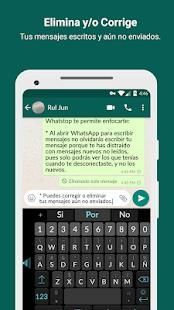
* Al abrir WhatsApp para escribir mensajes no olvidarás escribir tu mensaje porque te has distraído con mensajes nuevos no leídos, pues solo podrás ver los que tenías cuando te desconectaste, y no los nuevos.
* si tienes activa la opción de notificaciones, no te distraerás con nuevos mensajes
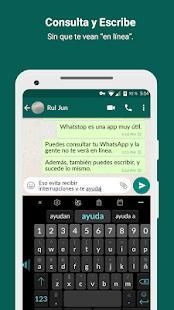
+ Escribir mensajes sin que los demás te vean en línea.
+ Corregir o eliminar tus mensajes ya escritos y no enviados.
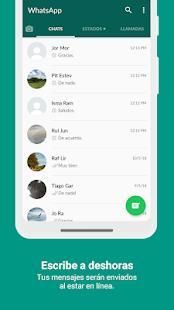
+ Escribir mensajes a deshoras, que serán enviados al estar en línea
+ Si tienes activa la opción de “hora última vez”, podrás escribir y leer tus nuevos
mensajes mientras los demás ven la última hora de cuando estuviste en línea.
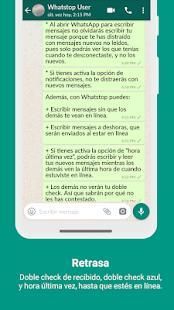
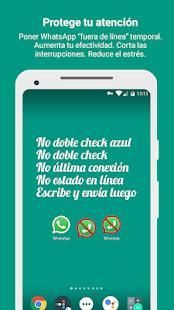
+ Si tienes activa la opción de “confirmaciones de lectura”, y has leído el mensaje, tu doble check se pondrá azul hasta que estés en línea.
+ Avisar indirectamente que no estás en línea, pues quien te envió un mensaje verá que no le apareció el doble check de que ya recibiste su mensaje. Así que comprenderá el motivo de que no le has respondido.
Características Premium:
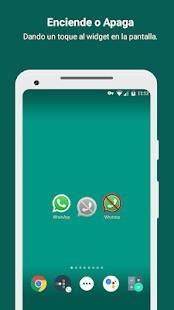
+ Widget para apagar y encender la app con un toque en la pantalla
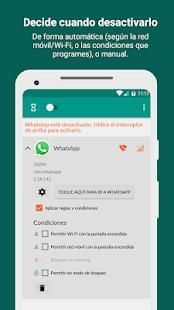
+ Habilita reglas y funciones
+ Entra a WhatsApp desde WhatStop
+ Elimina publicidad
+ Con tu aportación agradeces el desarrollo de la app
Disconnect for a moment of WhatsApp and use it without stress, so you will protect your attention from interruptions to be present with your family, friends and at work.
Decide when to read the new messages, when to receive them, when to write messages without being seen online, when to release your messages, correct or delete your messages already written and not sent, what time of the last time you want others to see, when they see you Online, when you confirm your reading, when you confirm receipt of a message to your device.
Detail of the benefits of using WhatStop:
* Being offline allows you to:
+ Focus:
* When opening WhatsApp to write messages you will not forget to write your message because you have been distracted by new unread messages, because you can only see what you had when you disconnected, and not the new ones.
* If you have the notifications option active, you will not be distracted by new messages
+ Write messages without others seeing you online.
+ Correct or delete your messages already written and not sent.
+ Write messages at odd hours, which will be sent when online
+ If you have the "last time" option active, you can write and read your new ones
messages while others see the last hour of when you were online.
+ If you have the option of "read confirmations" active, and you have read the message, your double check will turn blue until you are online.
+ Indirectly warn that you are not online, because who sent you a message will see that you did not see the double check that you already received your message. So you will understand why you have not responded.
Premium features:
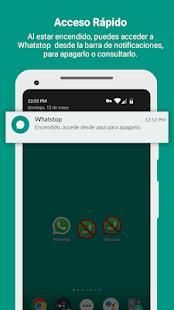
+ Widget to turn the app on and off with a touch on the screen
+ Enables rules and functions
+ Enter WhatsApp from WhatStop
+ Remove advertising
+ With your contribution you appreciate the development of the app
Es la versión final.

9Apps 4.9















