
✰✰ Sponsored & Authorized by Apex Apps ✰✰
Best App Backup Restore Tool
- Backup your apps to SD card or RAM or cloud drive. FREE UP your device storage!
Super Apk Backup & Restore Tool
- Apk Extractor & Apk Editor & Apk Installer & Apk Sharer!
App Backup & Restore is a
Small, Simple, Easy
backup tool developed by Trust Lab, who aims to develop useful Tool & Productivity apps for Android devices.
What can you do with App Backup & Restore?
- Bulk
Back-up & Restore
apps that are not used frequently to save more space .It is a appsaver and APK backup restore assistant.
- Auto
Back-up & Restore
multi-versions to avoid unnecessary or dissatisfied updates.
- Batch
Back-up & Restore
your apps to enhance data security.
- Customize
Back-up & Restore
apps to create your own local appstore and transfer & share apps to others.
Highlights of App Backup & Restore
◈
Apk Extractor
- Extract & Retrieve apk files and export as duplicates.
◈
Apk Editor
- Downgrade app versions if you dislike updated ones.
◈
Apk Installer
- Receive & Restore & Recover apks after factor resetting or in a new device.
◈
Apk Assistant
- Create your own local Playstore.
◈
Apk Sharer
- Migrate & Send apps to different devices. Receive apps from other devices while traffic is limited or the network is not in good condition.
Features
· Backup & Restore to Local by default
· Easy Backup & Restore to external SD card
· Super Backup & Restore to Cloud drive
· Simple Backup & Restore to Cloud drive to keep multiple version
· Scan apk & files on your device
· Auto backing app up with notifications
· Easy Backup apps without closing them
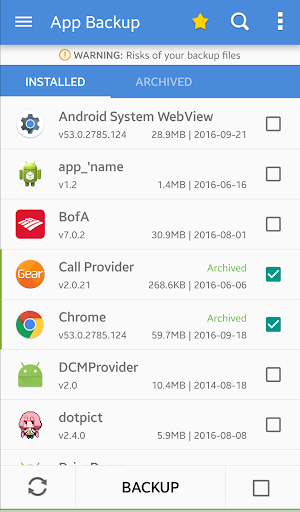
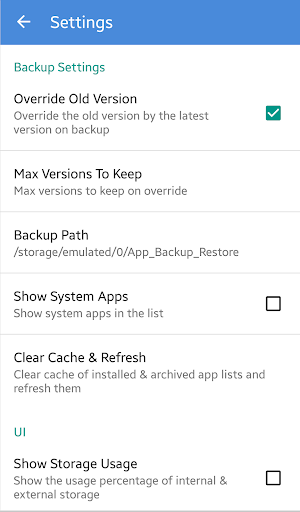
· Show & Backup & Restore system apps
· Schedule auto backup
· Auto List refresher
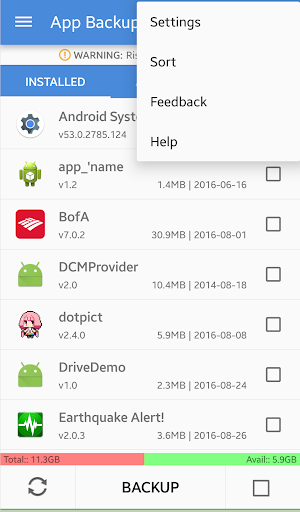
· Show backups’ size & time & version & name
· Protect backup & restore against deletion
· Bulk & Batch backup, restore, send, receive, upload
· Upload & Download apps to at Google Drive, Dropbox, etc
· Send & Share & Receive backups through Email or other channels
· Overwrite & Downgrade & Backup old versions
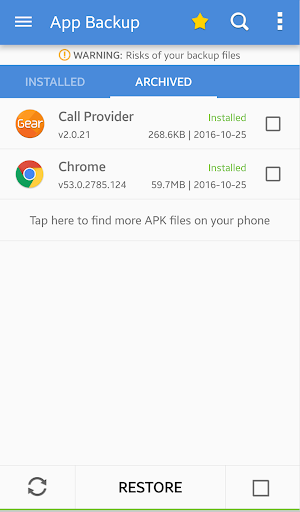
· Manage apps by installed/archived
· Sort installed & archived by name, date, size
· Show Local & SD card storage usage
· Hypershell speed
· Cache Cleaner & App List Refresh Manager
· Scan virus/malware for mobile security
· Touch & Hold apps to check details
· Share market links and see detailed information about the app
· Search apps in Playstore
· Options to change daily schedule, disable automatic schedule.
· Types of app & apk supported including Game, Tool, Social Media etc.
· App Restore & Phone Recovery, Samsung/Xiaomi/Lenovo/Motorola backup supported
Notice:
1- App Backup & Restore CANNOT backup/restore data or settings of apps, it only backup/restore apk files.
2- App Backup & Restore is a APK, Game Extractor that can only restore apk files that have been backed up BEFORE.
3- If you want to auto backup apps, please open our app before updating apps.
4- Please backup apps to sd card or cloud before factor resetting, or backups will be removed due to system restriction.
5- For some devices, our app backup & restore cannot support SAF permission so it cannot switch to SD card. Please try with Backup Restore - Apk Extractor.
Requested Permissions:
- READ SD CARD to modify or delete the contents of your SD card
- READ PHONE STATUS AND IDENTITY to enable auto backup
Like us on Facebook: http://bit.ly/2fWMvS7
Join our Google Community: http://bit.ly/2fchGrv
Contact us: support@trustlab.mobi









9Apps 4.9














