Volume   (Easy Control) icon

Volume (Easy Control)

3.1.3.27 for Android
4.0 | 5,000+ Installs | Reviews

yapps

Description of Volume (Easy Control)

Volume (Easy Control) is a volume and sound manager. Use the Volume (Easy Control) smart easy access notification to change the volume right from the notification. Open the Volume (Easy Control) via the smart notification.
Volume (Easy Control) is the easiest and fastest way to control your media volume.
You sound controls broken? You don’t need them! Roll your notifications down and change the sound options!
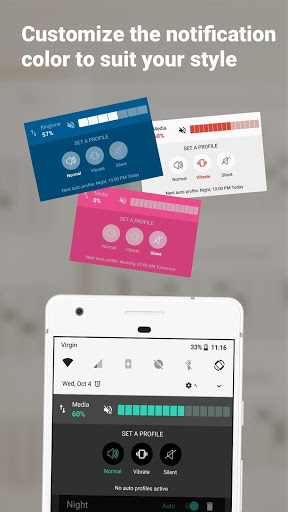
Customize the notification view and color, use a color to show your style
Tired of switching to silent profile at night and normal in the morning?
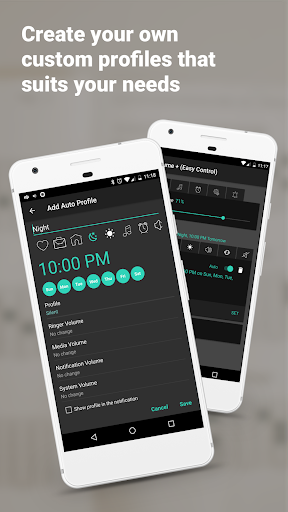
Use the Auto Profiles feature in order to set the profiles and you will never forget to turn it off at night and on in the morning.
Going into a meeting? Want to take a nap and be left alone?
Use profile selector to create One-Time Profile and move to silent/vibrate for a time.
THIS IS NOT VOLUME AMPLIFIER/ BOOSTER, IT WILL NOT MAKE YOU PHONE LOUDER THEN IT IS.
Features:
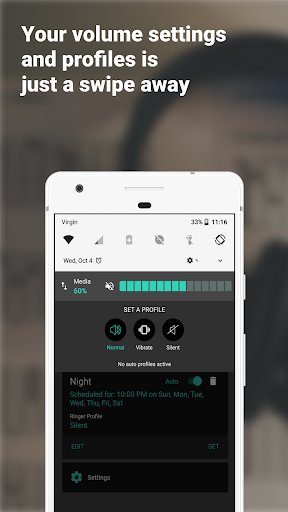
★ Control your media volume right from notification, with the smart notification media volume manager widget.
★ Use Auto Profiles feature to create pre-sets of profiles changes.
★ Mute your media volume with one click from the notification panel
★ Change the profile right from notification, with the smart notification profile widget.
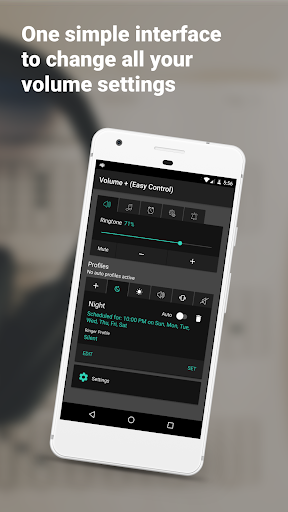
★ Easy access the Ring volume control, media control, system control, notification control and the profile manager after clicking the smart notification.
★ Start the smart Volume (Easy Control) notification on device start up.
★ Press the mute button - to mute the volume
If you dont like the smart profile feature:
You can minimize the notification by Swiping from top to bottom (like to open it)
and then bottom again, without raising you finger. This is a how android handles it.
★ Or go to settings and disable it
Supported languages:
★ English
★ Spanish
★ Russian
Pro version:
★ Adfree.
★ Support the dev.

What's New with Volume (Easy Control) 3.1.3.27

Added new screen to customize notification in an easy way

Information

  • Category:
    Video Players & Editors
  • Latest Version:
    3.1.3.27
  • Updated:
    2018-09-11
  • File size:
    4.6MB
  • Requirements:
    Android 4.0.3 or later
  • Developer:
    yapps
  • ID:
    il.yavji.volumecontrol
Reviews
  • avatar
    Don't buy this app! Just DON'T DONT DONT! NO SUPPORT FROM DEV . Has NOT been updated since 2018! Android has changed 3x since app was last updated.
    2021-01-31 10:12
  • avatar
    Good looking, but not working app. It just stop working. Please fix it.
    2020-10-03 07:18
  • avatar
    Update: I was able to hide on the lockscreen in Android 10 notification settings. ______________________________________________________ This gets me almost all the way there. The perfect scenario would be to have a volume slider next to the brightness slider but this works too. Some things I would change: more color options, hide on lock screen, more granular volume level controls that more closely mimic where you touched the volume "slider".
    2020-05-25 09:52
  • avatar
    Great, and here's something even further that I_might wish for ::: Upon muting, if or when subsequently we hit the mute button again, at that point I might expect the volume to be re-established to exactly the former level, so we simply return to the state we were in when we originally had pressed Mute. 🔉 Or perhaps I'd wish for a configuration option to switch the app between either behaviour_: unmute from 0, vs_unmute to previous level. [ HuP.SmZ, Android 9 ] 2020.02.28.Fr.
    2020-02-28 06:32
  • avatar
    Everytime it updates the notification close and i have to manuallly open the app to make it reappear. Can you please make it so that it will automatically load after updates please. I'll change the review after.Thank you!
    2020-02-08 12:30
  • avatar
    Please custom colors
    2020-01-16 05:45