

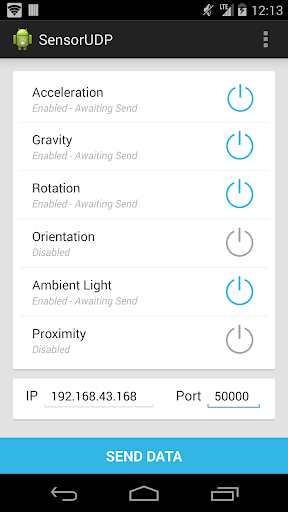
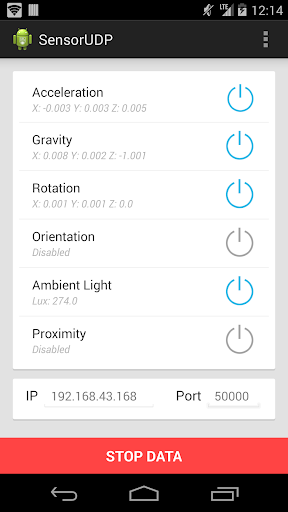
Sensor UDP allows the user to send sensor data wirelessly via UDP on their Android device. Users can use this sensor data for a wide variety of motion tracking applications, or simply read-out the sensor data from their phone.
• Includes support for Linear Acceleration, Gravity, Rotation, Orientation, Ambient Light and Proximity sensors
• Displays sensor values on screen during wireless transmission
• Checks device for sensor availability. It is important to note that not all devices support all sensors.
• Includes a keyboard to 'create notes' for performance
• Values are stored in a float array, with ordering consistent to the user interface.
USAGE INSTRUCTIONS:
The data is stored within the app as a float array. See the format below.
Format: [ X Acceleration, Y Acceleration, Z Acceleration, X Gravity, Y Gravity, Z Gravity, X Rotation Rate, Y Rotation Rate, Z Rotation Rate, X Orientation (Azimuth), Y Orientation (Pitch), Z Orientation (Roll), deprecated, deprecated, Ambient Light, Proximity, Keyboard Buttons 1 - 8]
Here is an example python script written by a colleague that receives the data and displays it. This should give you an idea how to utilize the data.
https://www.dropbox.com/s/4fc3ccuam03n99a/UDPR24.py?dl=0
Sensor UDP was developed for UBC SUBCLASS/Laptop Orchestra.
V3
• Major UI overhaul
• Small bug/ui fixes
V2
• Added a keyboard to create 'notes'
• Converted acceleration to linear acceleration
• Converted units of gravity to G-Force
• Fixed Proximity label bug
V1
• Application released! See description for basic features.









9Apps 4.9














