Audio Manager icon

Audio Manager

1.1.1 for Android
4.2 | 5,000+ Installs | Reviews

Tuogol.inc

$0.99

Description of Audio Manager

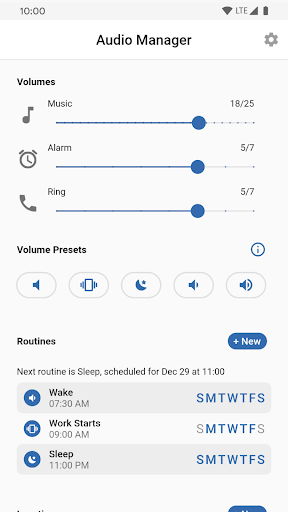
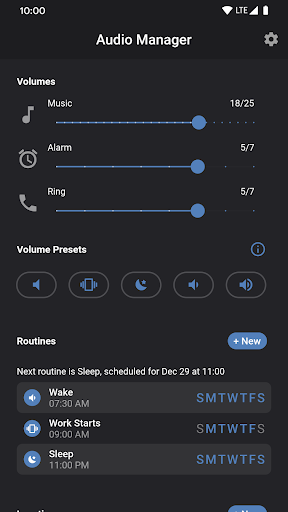
Audio Manager is a tool to automatically adjust your phones volumes and ringtones without any need for interaction.
Whether it's home, work, school or any other location you can have Audio Manager adjust your phones volumes when entering or exiting a location.
Schedule a time for your volumes and ringtones to be automatically adjusted. Never wakeup because of a late night text message again.
Privacy Policy: https://www.tuogol.com/audio-manager-privacy-policy/

What's New with Audio Manager 1.1.1

Fixes for devices that aggressively kill notifications.

Information

  • Category:
    Tools
  • Latest Version:
    1.1.1
  • Updated:
    2021-02-23
  • Requirements:
    Android 0 or later
  • Developer:
    Tuogol.inc
  • ID:
    com.tuogol.audio_manager
  • Available on:
Reviews
  • avatar
    Great audio manager. Does what I need it to do when I need it to. Periodically shuts off though and have to restart the app. We'll see if this latest update fixes that issue. If it does, it'll go up 1 more star.
    2024-01-30 01:53
  • avatar
    was my go-to phone audio/sound profile management app for years while I had my LG ThinQ. but I just got the Samsung Galaxy A52, and the app doesn't seem to be playing nice w this phone. :(
    2022-04-26 03:12
  • avatar
    Ramdomly closes leaving the phone in what ever state it was set to, causing missed calls. Choosing vibration mode does not vibrate phone on recieving call.
    2021-11-24 06:44
  • avatar
    It was working fine in Android 10. After my mobile [Samsung M30s] updated to Android 11, this app auto schedule stopped working. I need to change sound setting manually in the app. Please update app so that auto schedule works properly.
    2021-03-05 05:59
  • avatar
    Maybe I'm missing the obvious but I have no idea how this works. There do not appear to be any in app instructions and I dont see the app on their website. I played around with the app for several minutes after installing but i have no idea what is going to happen. If they add some detailed instructions on how to set it all up so I can turn off sounds at night and turn them back on in the morning, then I'll come back and update the review. Until then, save your money.
    2020-01-31 09:49
  • avatar
    So far so good. I figured I'd try this since Audio Profiles is a little long in the tooth. I look forward to enhancements over time. I'd love to see the app be able to take a typed address so I can set it up for various places before traveling TO that place. :)
    2020-01-04 06:18