Wear Screen Lock icon

Wear Screen Lock

1.1.0 for Android
3.0 | 5,000+ Installs | Reviews

SoftXperience

$0.99

Description of Wear Screen Lock

Ever tried to run through the rain with your Wear watch? Noticed that the watch is going crazy if rain drops land on the touchscreen?
There is the theater mode in Android Wear, but this also turns the screen completely off.
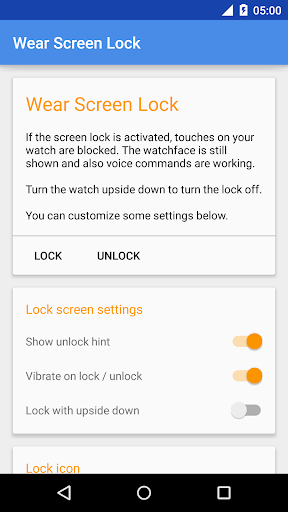
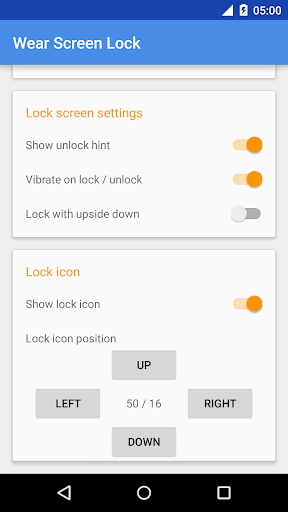
This app is the solution! It blocks the touchscreen, but lets you see the watchface and incoming notifications. You can activate the lock from the companion app on your mobile or from the apps list on your wearable. If you activate the "upside down" detection you can turn the lock on by turning your wearable upside down for 2 seconds.
To unlock the screen you also turn the device upside down for 2 seconds or use the companion app.
While the screen is locked, everything is working except for the touchscreen. I.e. the watchface is visible and even the voice commands will work.

What's New with Wear Screen Lock 1.1.0

- Custom unlock time

Information

  • Category:
    Tools
  • Latest Version:
    1.1.0
  • Updated:
    2015-11-03
  • Requirements:
    Android 0 or later
  • Developer:
    SoftXperience
  • ID:
    com.softxperience.wearscreenlock
  • Available on:
Reviews
  • avatar
    I can't lock or unlock my watch by turning it upside down. Only by phone. Any updates to fix this? (maybe a combination, like pressing side button 5 times, or holding it 3 seconds, etc.) I own a Moto 360.
    2016-09-06 07:49
  • avatar
    Seems to work pretty well. The only problem is that it is a pain to lock and unlock it. You can do it with your phone, which sucks, or you can turn it upside down which doesn't work all the time. It would be nice if there was a swipe pattern to unlock it or something that worked a bit better. Other than that, it does exactly what it says and keeps me from accidentally changing the watch face all the time.
    2016-02-05 03:12
  • avatar
    Touch screen is not blocked. App should also present an option to disable "wake on tilt". also, would be great if to enable we could use the button on the watch side instead of facing it down.
    2015-09-20 10:55
  • avatar
    Good when it works for about 10 mins, then turns itself off without warning, and turning watch upside down is very unpredictable, and annoying. It also caused my watch to become unresponsive, as per error message. S5 with lollipop and gear live.
    2015-02-23 01:34
  • avatar
    Crash a lot. SW3
    2015-02-03 08:33
  • avatar
    Great app, works like it says.
    2015-01-22 02:44