
Silent Mode for Bixby icon

Silent Mode for Bixby

1.01 for Android
3.9 | 5,000+ Installs | Reviews

Michael Litvin

Description of Silent Mode for Bixby

The app has no UI - tapping the icon will immediately toggle the sound mode to either vibrate or normal.
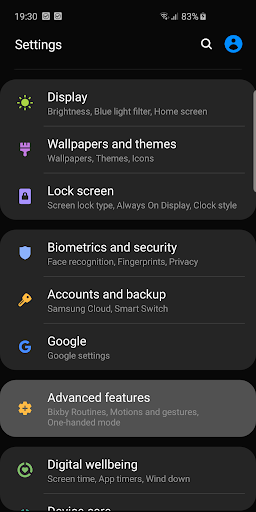
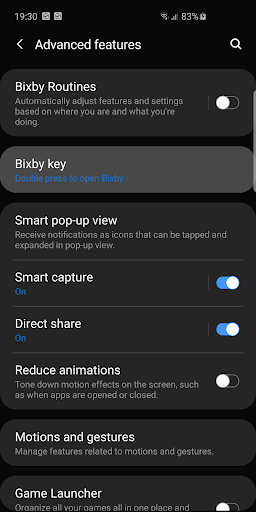
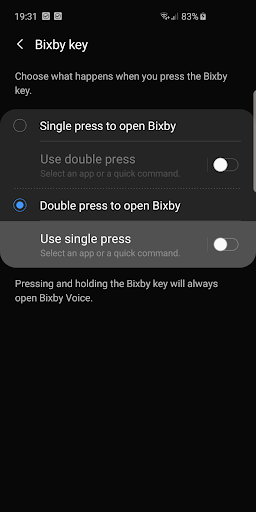
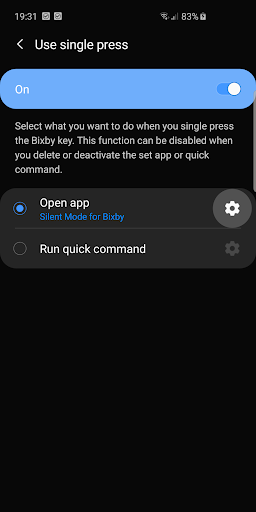
This enables mapping the Bixby key to directly toggle vibrate/normal sound mode on Android Pie 9.0
(see screenshots).
Source is available here: https://github.com/michaelitvin/SilentModeForBixby
Icon made by phatplus from www.flaticon.com.

What's New with Silent Mode for Bixby 1.01

Initial release.

Information

  • Category:
    Tools
  • Latest Version:
    1.01
  • Updated:
    2019-05-17
  • File size:
    1.2MB
  • Requirements:
    Android 4.0.3 or later
  • Developer:
    Michael Litvin
  • ID:
    com.litvin.silentmodeforbixby
  • Available on:
Reviews
  • avatar
    Simple and effective. After you assign the Bixby key to run it (with a single press) it works like iOS trigger. The only thing is that a white screen will show briefly (it's not a deal breaker). Is it possible to stop it from showing? 🤔 UPDATE: after one day it stopped working asking to grant "do not disturb" permission. On Samsung Galaxy s10e there's no way to give the app the permission UPDATE: turns out it was because of the mute mode. I had to manually set the ringer back to vibration 🤷🏻‍
    2020-05-18 10:20
  • avatar
    App may togglesilent mode, but does not block bixby, if that os what you want.
    2019-10-01 04:19
  • avatar
    Great idea, works as it should!
    2019-08-23 07:39