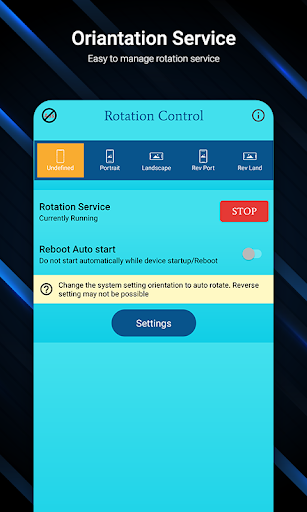
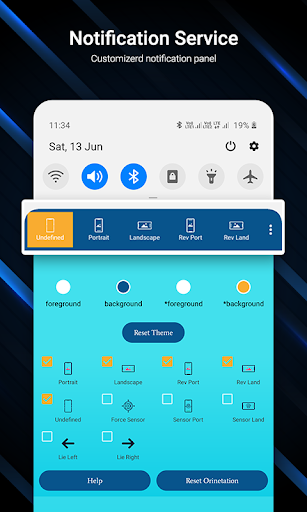
Easy Screen Rotation Manager helps to control phone screen orientation using Notification panel.
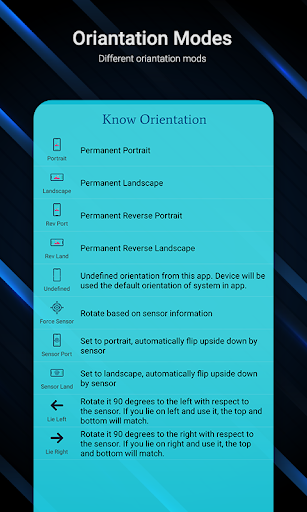
There are multiple types of screen orientation you can set with your choices.
Orientation like Permanent Portrait, Permanent Landscape, Reverse portrait and landscape, sensor based and many more..
Start Rotation Service to enable notification panel.
You can customize your notification panel by changing their colors easily.
Also you can put maximum 5 rotation control to notification panel.
Select your custom screen control to notification panel.
Reset default theme and default orientation option also available for notification panel.
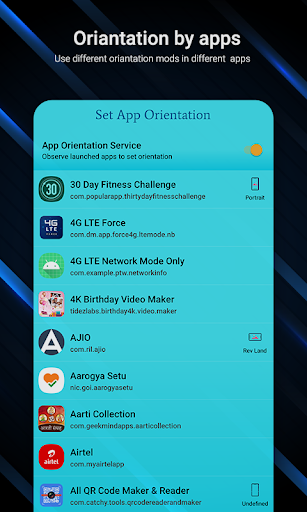
Set App Orientation:
You have to enable app orientation service to set orientation to app.
You can set individual orientation to individual app like one app i want to open in portrait then i will set permanent portrait and other app i want to open landscape then i will set to permanent landscape.
Notification Permission Settings:
System Setting Warning: Shows warning if system setting is not auto rotate.
Notification Privacy: If you want to enable notification panel lock screen using this app.
Also enable or disable system notification setting within the app.
If you want enable or disable rotation service after phone restarting can be done in the app only.
So Install app now and manage your screen orientation anywhere and anytime in your phone easily.
Required Permission List:
android.permission.RECEIVE_BOOT_COMPLETED : to start service gain after phone rebooted
android.permission.SYSTEM_ALERT_WINDOW : to display over other apps
android.permission.FOREGROUND_SERVICE : To service working in background above oreo version
android.permission.PACKAGE_USAGE_STATS : to set orientation to individual app
- New Feature Added:
-- Notification Icon Background shape.
-- Notification Icon Background & Foreground color selection available.
- Improved Performance.
- Solved Crashes.







9Apps 4.9