

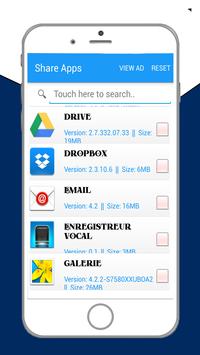
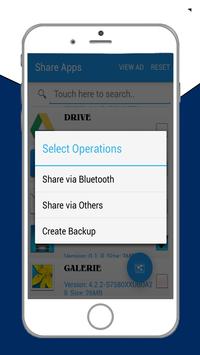
App Sharer let you to easy share your apps to your friends,
you can share by link of Google play or directly share APK (App's full package).
This support many method to share your apps, you can share by
message, Gmail, Bluetooth, what's app, Facebook Dropbox etc.
App Sharer also support share multiple apps at one time.
This App also allow you to sort your application by Name Size Time Date
It also allow you to Sort in Ascending order or Descending order.
Features:
* This App Share Apk File and google Play Links.
* Allow Multi Apks Sharing at a time.
* It Allow Sharing on Gmail Email Whatsapp Drop Box Viber and Facebook etc.
* This App Allows sorting in Ascending and descending order.
* Sort your Apps according to Name, time date and size.
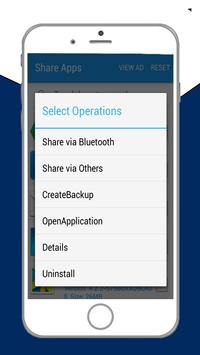
* It also allow you to check info of any install app.
* Open and visit google-play link of any app also uninstall any app you want.
Note: Its ads supported and its Free!
FEATURES:
• Share single or multiple apps at once
• Share apps by .apk files
• Share apps by Google Play link
• Save apps to external card
• Search for apps by keywords
• Uninstall apps individually or multiple at once
• Organize search results by downloaded apps, system apps, and unlaunchable apps (themes, addons, etc)..
• Create shortcuts on desktop to launch apps
• Open Google Play page for an app
• Search Google for an app by name or package
• Launch an app
Easily share one or more apps directly with friends using Share Apps. Share Apps sends the actual Android APK installation package to your friends via Bluetooth, Wi-Fi Direct, email or any other file sharing app you may have installed on your device. Using the sharing feature you can actually backup all your apps to the cloud. Simply share them to your favorite cloud storage provider app such as Google Drive, Dropbox, Evernote, Box or any other cloud storage app you have installed on your device.
Have you ever wanted to share an app with a friend but you didn't have internet access for your friend to download it immediately? Or perhaps you have an friend with a new Android phone that has yet to discover the full potential of their phone and hasn't installed any cool apps yet?
Whatever your specific reason, simply open Share Apps, click one app or long click to select multiple apps and share them via for example Bluetooth to send the Android APK installer file directly to your friends' device. Your friend can instantly install the app from their device no internet access needed.
By sharing a selected app or even all your apps to Dropbox, Google Drive, Box or any other Android cloud storage service, you are in fact backing up all your apps to the cloud. Why waste space backing up your apps to your SD Card? To restore an app simply open your cloud storage providers app, for example Dropbox, and download the app back to your SD Card and then install it again from there.



9Apps 4.9














