

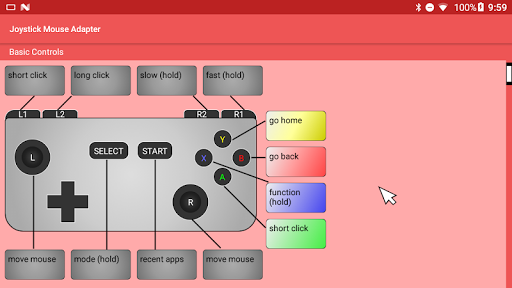
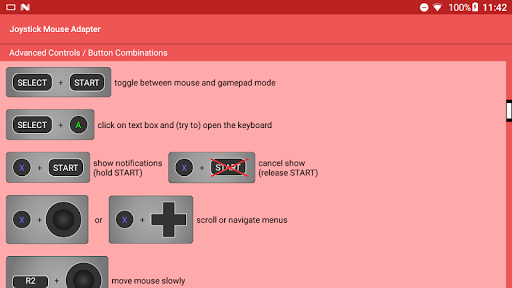
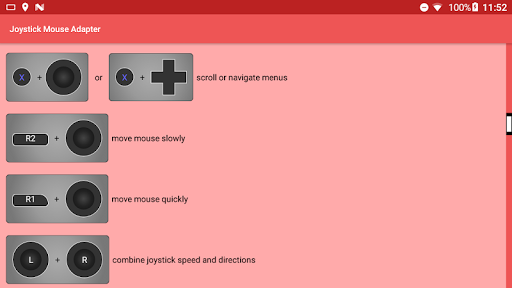
Developed for the GPD XD Plus and tested on various Bluetooth and USB gamepads. This app turns the joystick on your gamepad or controller into a PC mouse. This is especially useful for those who connect their Android-based emulation machines (e.g. GPD XD ) to an external screen via HDMI output or screencasting.
The Joystick Mouse Adapter works similar to the way the joystick on the GPD Win series of devices work in mouse mode. All you need is a controller that is compatible on your Android device. This app works with both wired and wireless Bluetooth controllers. Just make sure the controller is an Xbox or Nintendo style controller with all of the standard buttons.
This app is CONFIRMED to work on the following Android handhelds:
• GPD XD (aka GPD XD Plus)
This app will NOT work on the following Android handhelds:
• GPD XD (the predecessor)
It doesn't matter if your controller is built into your device, connected wirelessly, or connected with a USB cable. It should work as long as you perform all of the checks below.
Before you use this app, please make sure that your controller is fully compatible with Android and has the full layout of the modern console controller.
Your host device MUST be running a compatible version of Android:
• Android Nougat (or newer)
You controller MUST be one of the following types:
• Nintendo layout controller (Pro Controller)
• Xbox layout controller (X-Input)
Your controller MUST have the following buttons:
• a, b, x, y buttons
• D-pad
• left joystick with clickable center
• right joystick with clickable center
• start and select buttons
• left trigger button
• left shoulder button
• right trigger button
• right shoulder button
To activate the Joystick Mouse Adapter, you must navigate into your Android settings and grant the adapter BOTH permissions:
(1) Permission to "Draw Over Apps"
(2) Permission to "Use Accessibility Features"
NOT compatible with Chrome OS devices, Virtual Reality (VR) controllers, or Sony PlayStation controllers.
Features:
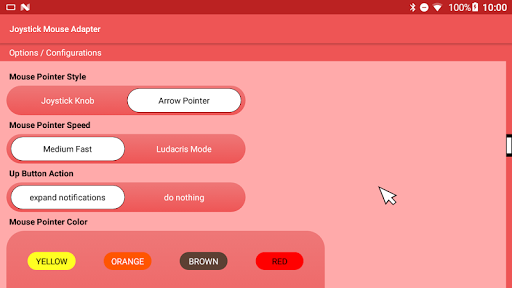
(1) Perform short and long clicks.
(2) Variable mouse pointer speed based on joystick input.
(3) Perform actions such as: go home, go back, recent apps.
(4) Control volume, expand notification tray, launch power dialog.
(5) Scroll pages and navigate menus with D-Pad.
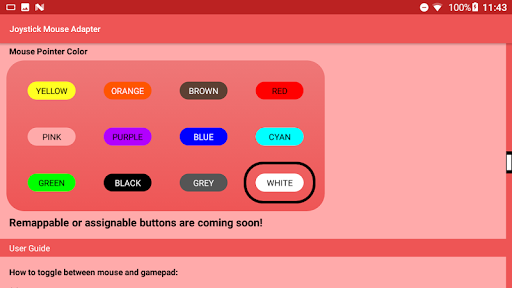
(6) Change mouse pointer style.
(7) Change mouse pointer color.
(8) Adjust mouse speed.
Bugs Squashed (Fixed)
(1) Fixed a minor bug where the hyperlink to the app's website was (still) wrong.



![How To Play All PC Games With Any Controller or Generic USB Gamepad [X360CE] screenshot 3](https://i.ytimg.com/vi/oVP70tXZHsk/mqdefault.jpg)









9Apps 4.9













