

Quickly email yourself notes and reminders.
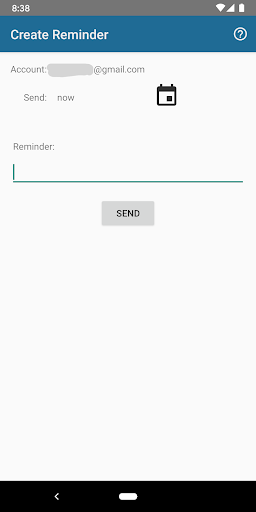
Click the icon, write the reminder, and click to send. That's it!
Supports:
* Multiple accounts with custom-named shortcuts
* Saving reminders offline
* Scheduling future reminder emails
This app is free. Help us improve! Send feedback to support@equatinelabs.com.
jEmailMe uses Google calendar events for future reminders, so there's no dependency on jEmailMe after the reminder is created. That means no lock-in! You can stop using the app at any time and still get future reminders.
How to Use:
The app has a help screen with full instructions and recommendations. The short version is:
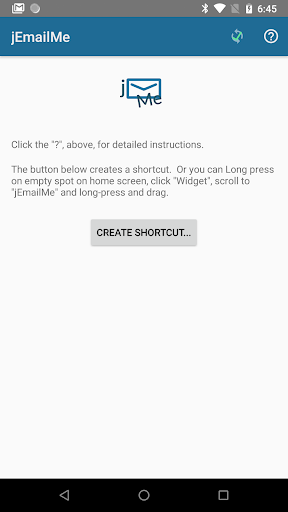
1. Open the app. Click on "Create Shortcut..."
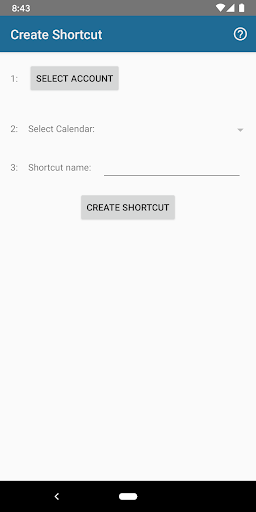
2. Configure the email account to receive reminder emails, and the Google calendar to use for scheduling future reminders. You may find it handy to create a separate calendar for reminders, so the events don't clutter up your main calendar.
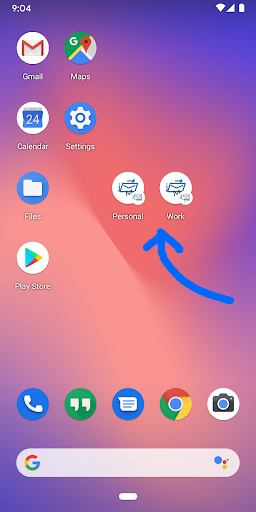
3. Name your shortcut and click "Create". This creates a shortcut on your home screen.
3. Click shortcut to enter a reminder and send!
If you have any questions, please email us at support@equatinelabs.com.
Thanks!


9Apps 4.9













