
Zendark Theme icon

Zendark Theme

1.0 for Android
4.5 | 100,000+ Installs | Reviews

Yanuar Ishaq

Description of Zendark Theme

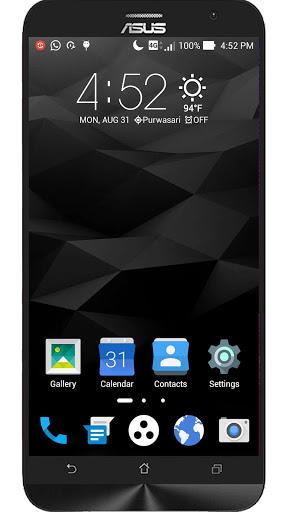
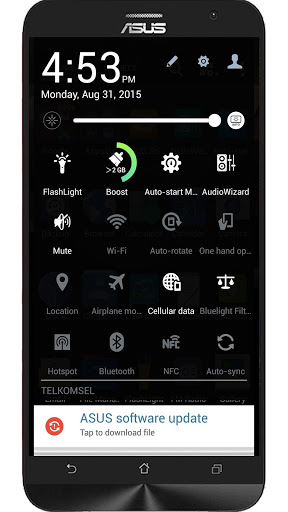
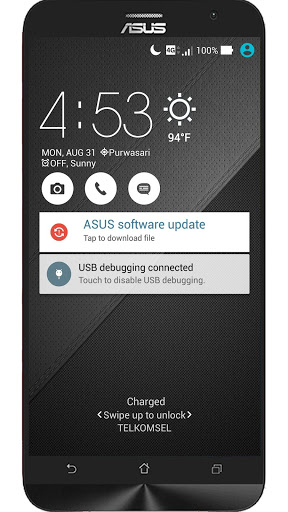
Zendark Asus ZENUI Theme
How to apply
Supported Device: Zenfone 2, Zenfone 2 Laser, Zenfone Selfie, Zenfone 2 Deluxe, Zenfone 5(firmware v3.24.40.78), Zenfone 6 (firmware v3.24.40.78),
1. Install Zendark.
2. Launch Themes > My themes.
3. Select and apply this theme.
Theme applies to:
-- HomeScreen
-- LockScreen
-- Quicksettings
-- Icons


Information

  • Category:
    Personalization
  • Latest Version:
    1.0
  • Updated:
    2015-08-31
  • File size:
    3.0MB
  • Requirements:
    Android 4.0.3 or later
  • Developer:
    Yanuar Ishaq
  • ID:
    com.asus.themes.darkmaterial
  • Available on:
Reviews
  • avatar
    how do u use it? its not coming in the home
    2019-10-09 08:18
  • avatar
    This theme was working excellent when I was using Lollipop. But recently I upgraded to Marshmallow and notice that the icons in the notification panel have white circle around them. Please Fix this.
    2016-12-13 04:57
  • avatar
    When my ZenFone 2 had Android 5 it was great, but after I went to 6.0.1 with the software update by ASUS the notification bar was black and blue instead of black and white. It doesn't look good plz fix it and I will give 5 stars
    2016-09-06 06:00
  • avatar
    Downloaded theme but it is missing from theme .can u offer solution
    2016-07-20 03:22
  • avatar
    Awesome theme for asus. But facing a problem now as I can't use this anymore due to reasons unknown . Can you include this theme in the themes app of asus
    2016-07-14 05:19
  • avatar
    I have the same issue as your last complainer... Please fix this as soon as possible, I promise will give you 5 stars after this problem fixed.. My device : zenfone 2 ze550ml
    2016-06-14 06:00