RePaper Web Highlighter icon

RePaper Web Highlighter

1.4.5 for Android
2.6 | 5,000+ Installs | Reviews

Laurent Denoue

$0.99

Description of RePaper Web Highlighter

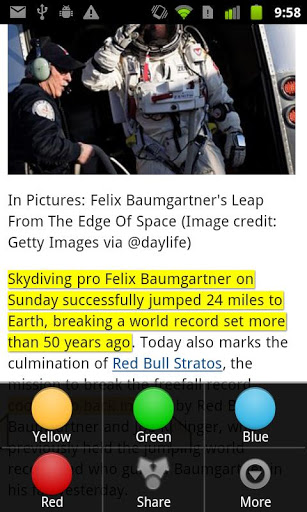
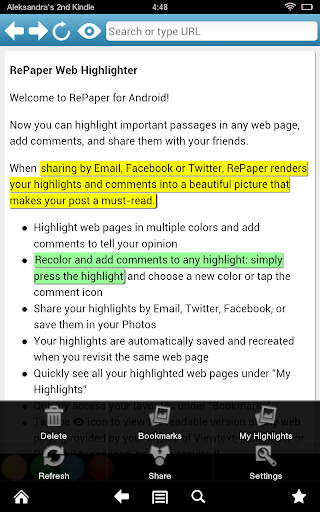
Highlight, Annotate, Comment and Share HTML web pages (not PDFs) directly from your Android phone or tablet.
No account required (such as Facebook or Twitter or creating a new account).
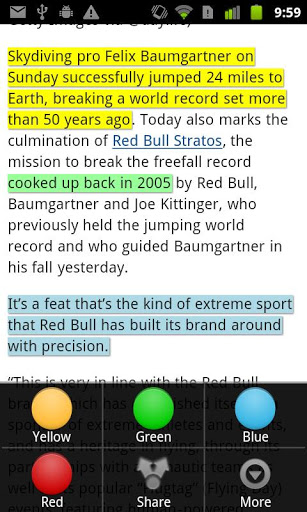
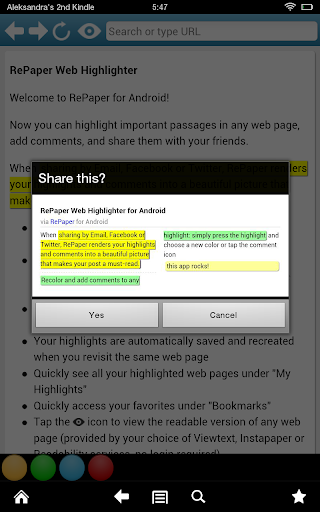
RePaper lets you highlight text in multiple colors in any web page and share them as beautiful pictures by email, Twitter, Facebook or other apps you have installed that support sharing of pictures.
RePaper is the must-have app to highlight important passages in any web page, like news and research articles, blog posts, and share your snippets with your friends or archive them. Your friends can quickly see what you found interesting in a web page without having to read it all!
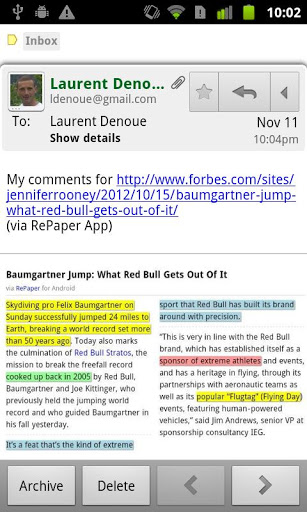
RePaper automatically renders your highlights into a beautifully formatted picture showing your highlights in context of the original paragraphs, with a link back to the original article.
RePaper automatically stores your highlighted pages and recreates them when you revisit these pages.
Key Features:
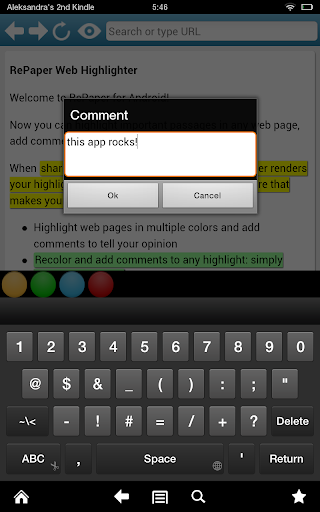
- Highlight and Comment any web page in multiple colors
- Share your highlights by Email, Twitter or Facebook with a beautiful picture attached
- Read comfortably any web page with the Viewtext.org service (no registration required) that automatically identifies the main content of most web pages

What's New with RePaper Web Highlighter 1.4.5

Now works on many Android versions, including Kindle and Galaxy Notes
Thanks to all our testers :)


Information

  • Category:
    Productivity
  • Latest Version:
    1.4.5
  • Updated:
    2013-07-21
  • Requirements:
    Android 0 or later
  • Developer:
    Laurent Denoue
  • ID:
    com.appblit.repaper
  • Available on:
Reviews
  • avatar
    -5 !!! Just don't waste your money on this app. On the BBC webpage, I managed to highlight only certain parts, but could not apply the highlighters on other parts of the article. What's more, it's hard to scroll up and down (which can make you dizzy) and the overall design of the browser is kinda outdated. If there is any possibility, please fix the stated issues as soon as possible. Thank you! Best wishes.
    2021-07-10 09:47
  • avatar
    Buggy unfinished app. Highlightings are shared as a picture, instead of text. I'd like to share multiple highlights as text to OneNone. It is almost as buggy as other reviewers said. But, I ran it on an ageing Note 3 with Android 5. I'm not using the refunding option, but I find it ethically questionable to charge for an alpha and barely working software.
    2018-07-19 12:19
  • avatar
    Doesn't work at all. Seems like there is no refund even on the day of purchase.
    2018-06-27 01:06
  • avatar
    First app Ive ever bought. My only complaints so far is when I try to highlight a smaller section of text (with a different color) within an already highlighted, larger section of text, the app instead highlights the entire, original, larger section all with the new color that was intended for just a few words within. Also, when I make a note, there is little evidence that the note even saved. The only identifying property I can see is when I click the comment box, next to the trash can. These selections, along with the choices of color, however, are always available to me clicking on them by single clicking anywhere within the text of the article. This is obviously a problem that anybody would experience, seeing as theres no specific way the app reminds me where I placed notes. I expected them to appear on the sides of the document. I also didnt expect to not be able to highlight off my choice of browser. Seeing as theres no other highlighting app that will let you directly highlight web documents, I would have hoped for some of this simple stuff to have been already addressed.
    2018-05-08 10:48
  • avatar
    this doesn't even work at all times. It works only when it feels like it.
    2018-03-07 11:52
  • avatar
    It's not working for Samsung galaxy note 4. It can highlight. But can't share or bookmark.
    2017-11-05 02:17