HLX iT icon

HLX iT

1.1.3 for Android
4.3 | 5,000+ Installs | Reviews

KiloVault

Description of HLX iT

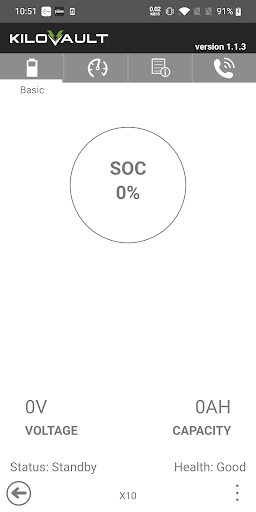
Using Bluetooth, this app enables you to get instantaneous readings of a bunch of otherwise hidden status information on your altE KiloVault lithium battery, such as:
* Voltage
* State of Charge (SOC)
* Capacity Remaining in Amp-Hours and %
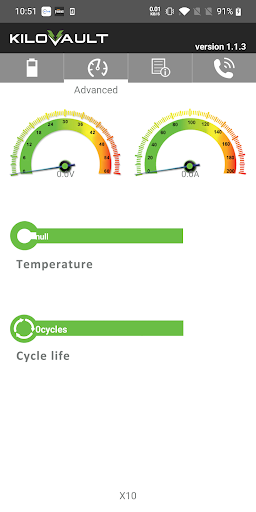
* Temperature
* Cycle Life
among other features.
We provide this app to help you or our technical support team troubleshoot the battery or to simply satisfy your curiosity on how your battery is doing.
Sssh… This App is Secret:
This app is not currently officially supported as part of the KiloVault lithium battery product line. In fact, you are pretty smart if you figured out that this otherwise secret app even exists! Someone must’ve told you about the Blue Easter Egg, huh?
Solar Geeks Only:
We at altE believe that there are those customers of ours who, like us, would love to geek out on any extra data they can get on the battery's state. So, we’ve semi-secretly made this app available to those extra inquisitive customers.
Litany of Gotchas:
Strictly speaking this app is provided on an as-is basis and has some known serious limitations and minimum requirements that you should be aware of:
* It can only work with one battery at a time
* Your iPhone or tablet must support Bluetooth 4.0 and Bluetooth Low Energy (BLE)
* The battery you are monitoring must be less than 16ft/5m away.
* If you want to monitor your battery with another phone, you'll need to exit this app on the first phone (a limitation of Bluetooth).
If you're banging your head against the wall because you can't get the app to work on Android we also have a version of this app on that other smartphone technology from the company that's named after a fruit. Give that a try if you access to one.

What's New with HLX iT 1.1.3

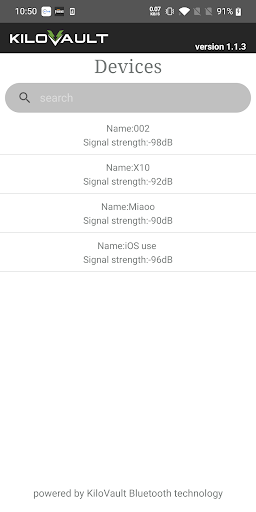
add search list and add the battery name into each of the inside pages

Information

  • Category:
    Tools
  • Latest Version:
    1.1.3
  • Updated:
    2019-12-10
  • File size:
    2.1MB
  • Requirements:
    Android 4.3 or later
  • Developer:
    KiloVault
  • ID:
    com.altekilovault.smartpower
  • Available on:
Reviews
  • avatar
    ***UPDATE*** Had an issue with the first battery I purchased... AltE acknowledged that their KiloVault V1 batteries had a defective BMS and immediately shipped me a KiloVault V3 replacement battery... This app doesn't work correctly with the new battery... Doesn't register cycles... Fully charged registers at 60%.... I had to build and install my own monitoring device because the app is useless and really no way of knowing SOC otherwise. 👎👎
    2019-10-26 01:23
  • avatar
    Update 8/23/2019: HalleluYah!! It works! Maybe it is the BLE protocol that is confusing me. I stopped monkeying with the Bluetooth menu thingie at the top of the phone and turned on Location and it works!! --- App only shows twirling icon in upper middle part of the screen. When i open the Bluetooth thingie, both batteries are visible but when i tap on one of them, Bluetooth cannot pair with it after about one minute and gives up. Motorola nexus 6 with Android 7.1.1
    2019-08-23 06:04
  • avatar
    I haven't decided whether I like my batteries communicating over Bluetooth or not but the application works well. I would like to see the option of displaying degrees F and not just C. I would also like to see some graphing in the application to record daily charge/discharge data. What does the Password box do? Just set one to make it harder to hack the batteries or does it open up more functions? Finally, altE, it would be very nice if you advertised that the batteries had Bluetooth in them (potential security problem) before you sold them.
    2019-06-20 04:28
  • avatar
    Doesn't work with my Moto z2 play. Bluetooth 4.2. please help!
    2018-10-14 07:50