

Auto Gloo Wall App is for all players looking for how to do a Fast One Shot Gloo Wall, & increase Gloo Wall Speed, you can play like a PC gamer.
This tool works like an "Auto Clicker" for Gamers, No more secrets for playing fast, & No one will tell you anymore that you are a Noob player.
Note:
- This app runs independently from your apps or games, and it never accesses any game's files.
- Need Accessibility service to work.
- Auto Gloo Wall does NOT require root access.
How To Set UP The App!
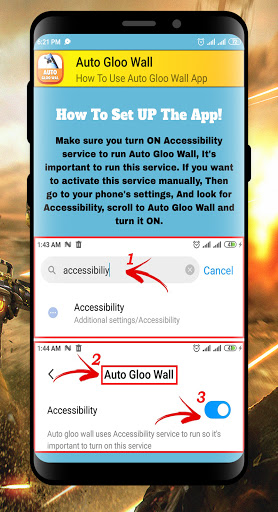
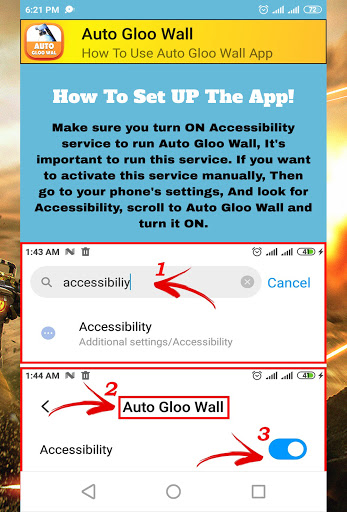
Make sure you turn ON the Accessibility service to run "Auto Gloo Wall", It's important to run this service. If you want to activate this service manually, Then go to your phone's "settings", And look for "Accessibility", scroll to "Auto Gloo Wall" and turn it ON.
How To Set UP Floating Buttons!
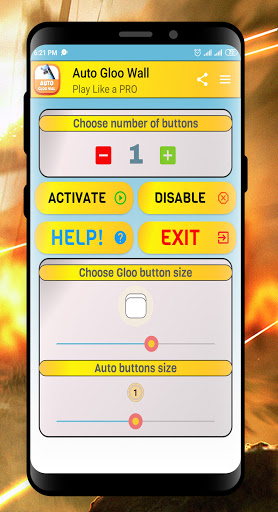
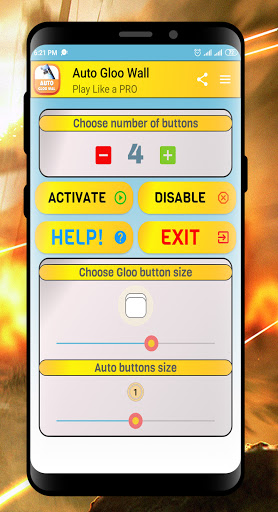
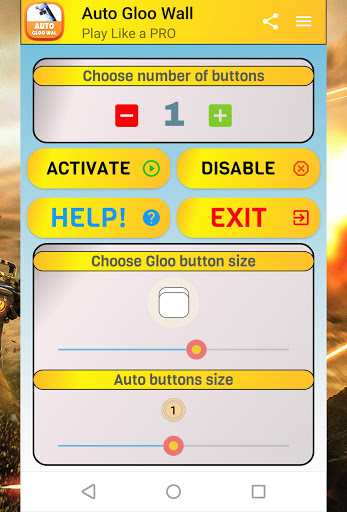
Choose how many floating buttons you want with (-/ ) to use them on your game, then click "Activate" the app will close and your floating "Auto Buttons" will show up on your screen.
How To Hide Auto Buttons!
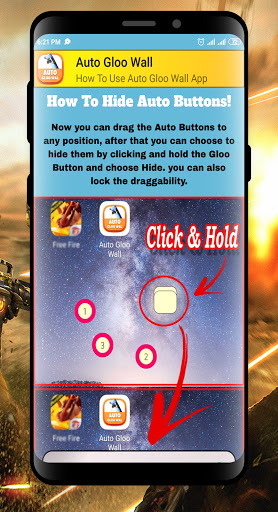
Now you can drag the "Auto Buttons" to any position, after that, you can choose to hide them by clicking and holding the "Gloo Button" and choosing "Hide". you can also lock the draggability.
Now its The Time to Play Your Favorite BatlleRoyale Game Like A Professional.
Improve UI / UX
Fix some bugs


![Super Fast Gloo Wall Trick & Setting 😈 [ Secret ] New Headshot Setting + GlooWall ~ screenshot 2](https://i.ytimg.com/vi/3j2CgMLszpg/mqdefault.jpg)



9Apps 4.9














