
REAL Shuffle Player PRO - Audio & Music Player icon

REAL Shuffle Player PRO - Audio & Music Player

10.8.9 for Android
3.5 | 5,000+ Installs | Reviews

HIG Studio

$4.99

Description of REAL Shuffle Player PRO - Audio & Music Player

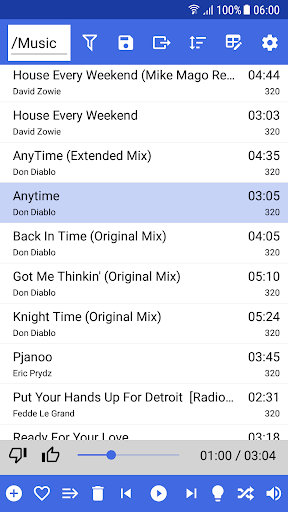
REAL Shuffle Player is a simple and efficient audio player with unique features such as a real and intelligent shuffle mode.
The main features are:

True random numbers via ANU QuantumRNG

Smart Shuffle™: Prevents double play of a song

Folder-Playlist: Set a folder as a playlist with automatic synchronization

Filters: For new songs or liked songs

Favorites and playlist management: Shifting songs between playlists

Export: Copy the songs in your playlist to a folder

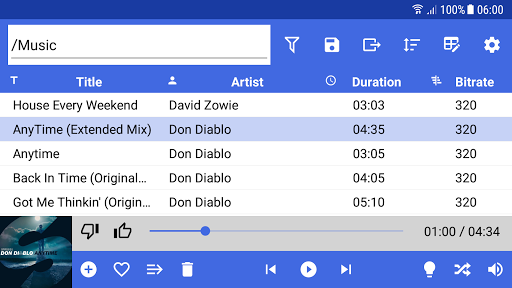
Responsive Design: Adaptable UI for phones and tablets
The PRO features are:

Advanced tag editing with smart suggestions

Casting: Cast your music to your Fire TV or Chromecast

OneDrive-Support: Stream your music from OneDrive

GoogleDrive-Support: Stream your music from Google Drive

Spotify-Support: Stream your music from Spotify (Spotify Premium required)

Youtube-Support: Add Youtube playlists or entire channels

Linked Playlists: Combine multiple playlists to one

Hot or Not mode: Pauses the playback after a song ended to let you decide if you liked the song

Smooth-Transition: Smooth as butter transitions between songs
REAL Shuffle Player supports the following audio formats:
MP3, FLAC, OGG, M4A, WAV

What's New with REAL Shuffle Player PRO - Audio & Music Player 10.8.9


Bug fixes and performance improvements

Information

  • Category:
    Music & Audio
  • Latest Version:
    10.8.9
  • Updated:
    2021-04-10
  • File size:
    33.5MB
  • Requirements:
    Android 5.0 or later
  • Developer:
    HIG Studio
  • ID:
    com.HIGStudio.REALShufflePlayerPRO
  • Available on:
Reviews
  • avatar
    Note: To: Real Shuffle Player (RSP) Pro creators, Hold down on the RSP app, click on "App info" and add an "Advance"/"Appear on top" layout button feature in the "App info" department so users are able to control their music and volume, etc. in "Media Panel" on Note9, etc. In case you're wondering where Media Panel is located, pull down notification settings, click on "Media," there. Try it, go here... "settings toggle/apps/3 dots/special access/appear on top/enable RSP. Then check "Media Panel"
    2023-09-22 09:30
  • avatar
    Always updated , years later, still my favorite player!
    2023-06-19 02:43
  • avatar
    Does almost everything - would be perfect if you just added a Shuffle Albums mode!
    2022-05-15 05:31
  • avatar
    There is a bit of an issue, the app used to work fine but not right now, the songs just won't play? Please fix this. I have the latest app version and Android's latest operating system as of yet.
    2022-05-04 02:23
  • avatar
    Pls can you also add a timer? Thank you! Real shuffle lite works but real shuffle Pro doesn't work! It's now OK, working.. Thanks
    2022-02-16 02:19
  • avatar
    The only thing left for making this app perfect would be to adjust volume playback to be equal for all tracks. The randomization of the playback list is second to none. Great app
    2021-10-20 04:07