

Lock button not working? Forget to lock your phone when you put it in your pocket/purse? Tired of making pocket calls? No problem! Just put your device in your pocket, or turn it face down, and Proximity Lock takes care of the rest!
* Proximity sensor is required for this app to work.
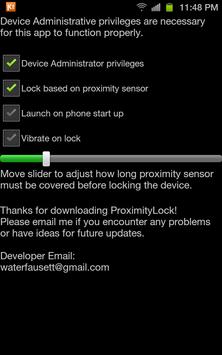
Proximity Lock will lock your device when the proximity sensor detects that it is covered for an amount of time. Putting your device in your pocket will automatically lock your device!
Proximity lock does not work in landscape mode so as not to accidentally lock when you are trying to watch a video or play a game. It also does not work when you are on a phone call (locking then would hang up your phone!)
Features:
* Lock your device with the proximity sensor!
* Custom amount of time the sensor must be covered.
* Optional vibrate when locking
* Works with any lockscreen (stock, GoLocker, WidgetLocker, etc.)
NOTICE: Device Administrator Privileges must be disabled before uninstalling.
If you have any problems, or have ideas for future updates, please contact me at adam.d.fausett@gmail.com
Thanks for looking!
Version 4.0.5
* Delay slider bug fixed
*** Thanks to everyone that has emailed me! You have been a big help. I have made it easier to do this in the future with an email the developer button in the settings screen.



9Apps 4.9














