


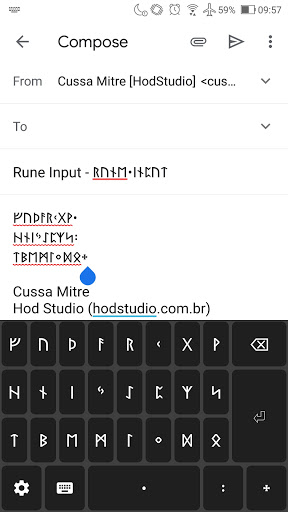
First of all, this is not just an application. Rune Input is a keyboard that works just like any other keyboard on your phone, but with Runes! Yes, any application, any smartphone!
This version supports Elder Futhark Runes, with some possible variants. See below how the runes are presented (typed directly with Rune Input)!
ᚠᚢᚦᚨᚱᚲᚷᚹ
ᚺᚾᛁᛃᛇᛈᛉᛋ
ᛏᛒᛖᛗᛚᛜᛞᛟ
Punctuation:
᛫᛬᛭
Variants:
Sowillo - ᛋ or ᛊ
Ingwaz - ᛜ or ᛝ
Hagalaz - ᚺ or ᚼ
To learn more about how this phonetic alphabet works, visit our website to see the Elder Futhark Phonetic Guide to Runes: https://hodstudio.com.br/en/rune-input-app/
=== Problems seeing the runes? ===
Most Android users use the default text fonts from it, which has complete support to the runic characters. However, it's a fact that some text fonts do NOT support them. If you are seeing the just some kind of squares on your phone, this means that the text font do not give support. If you have any question related to that, contact us via contato@hodstudio.com.br
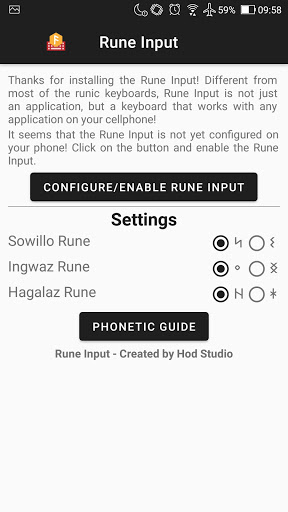
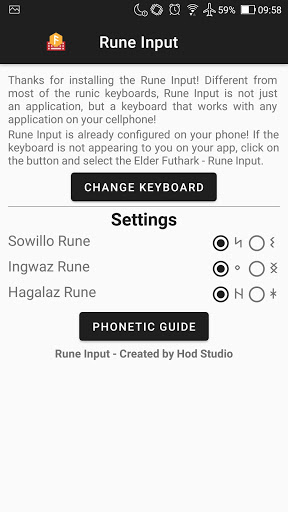
You will need to follow these steps to install and configure your Rune Input rune keyboard:
- After installation, go to "Settings"
- Select "System"
- Select "Languages and input"
- Select "Virtual keyboard"
- Select "Manage Keyboards"
- Activate Rune Input
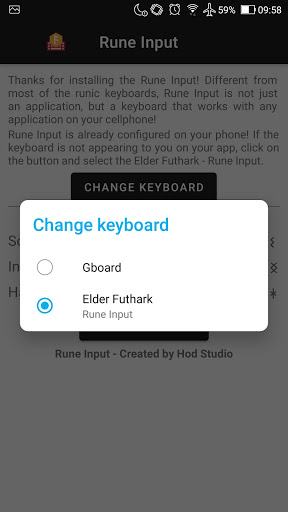
When using an app, Android will show either a keyboard icon at the top or bottom bar. By clicking on it, you can choose which keyboard you want to use. Select Rune Input and start writing in runes!
PRIVACY POLICE
Rune Input aims to spread and facilitate the use of runes by anyone. Because it’s a keyboard, operational system can display an default alerts to inform that keyboards can capture data typed by users and send them to third parties. That is not the case with Rune Input. We collect and process only data on app usage statistics, as well as error/crash information.
What does that mean?
- It is not necessary to create an account and the app will not request any personal data.
- No data typed with Rune Input is sent anywhere. Typed characters are transferred to the operational system of the mobile, which will be standard processed, like inserting them on a text field.
- No personal data is collected. Only usage statistics and error/crash information are collected, which are processed directly by Google’s servers.
Based on some research, we are changing the app name to Rune Input! This will align with other products that we will be releasing this year.








9Apps 4.9















