
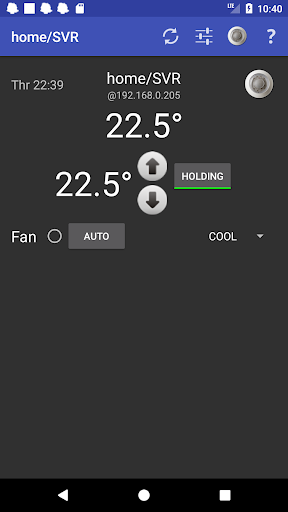

If you have a radio (wifi) enabled thermostat CT-30 (aka 3M50) or CT-80, available from home depot or online) you can control it while in your home using this app which extends your phone to be part of your home monitoring or home automation system. Use your phone as a portable thermostat control!
In contrast to the manufacturer's cloud management, this app is local with instant access and response. Being local there's no security risk to your network (externally connected devices can serve as bridges to break into your home network) so you can disable the thermostat from accessing the internet. The app allows you to access your thermostat (locally) even when that cloud service or your internet connection is down. No more shivering/sweating, waiting and wondering - you can make and see the change instantly. Keep an android phone or tablet by your bed as an alarm clock and handy thermostat.
Use the thermostat widget so you can see what's going on at a glance.
If you need to change temperature settings while away from home you can continue to use the Radio Thermostat cloud service or for secure access run your own cloud service using AutomationManager.
For advanced automation you'll want to use AutomationManager (see the developers site for details). Using it you can define enhanced schedules, control temperature using location detection, and other similar automation including voice control with Google Home or Amazon Alexa. To use AutomationManager you'll want to both it and this app in server/hub mode together on a dedicated android device.
This really is a free app, not ad supported! If you would like to support the development of this application and others like it, consider purchasing and using AutomationManager.
Note - this app only supports functions provided by the CT-30 API. Functions such as holiday mode, filter, etc, are cannot be provided. Consider using AutomationManager to provide similar advanced functions and more.
NOTE: The CT-30 API is a built in web server that tends to be a little unstable and occasionally drops requests from the app. When this happens (or when your phone is not able to connect to the thermostat) the widget and the app will show ?'s instead of the temperature. It will attempt to reconnect every few minutes (less often if not on wifi).
This app uses the internal URL (IP) and the manufacturer's unprotected local API to control the thermostat. It is for use within your home only. Do not expose your thermostat URL outside of your home network! The thermostat does not provide security to protect it's URL or data, and this app cannot add security on it's own.








9Apps 4.9














