
USB Lockit - Pendrive Password icon

USB Lockit - Pendrive Password

4.3 for Android
3.6 | 100,000+ Installs | Reviews

Nicola Bezze

⚠️ You need 9Apps App to install .XAPK File. How to install XAPK?

Description of USB Lockit - Pendrive Password

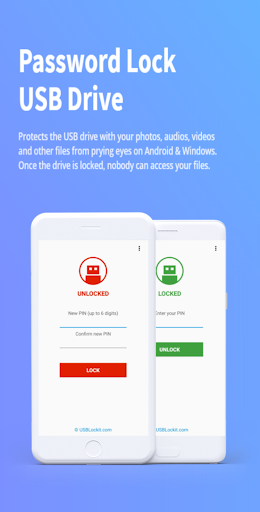
Protects the USB drive with your photos, audios, videos and other files from prying eyes on Android & Windows. Once the drive is locked, nobody can access your files.
All in 3 Easy Steps:
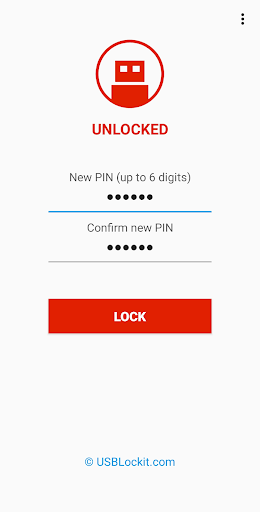
1. To lock the USB drive and protects all your files, simply set a PIN and click on LOCK button.
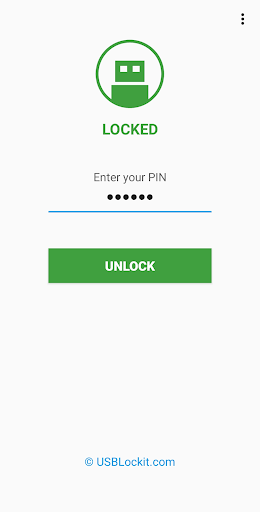
2. To unlock the USB drive and access to all your files, enter your PIN and click on UNLOCK button.
3. To relock the USB drive without entering the PIN every time, just a click on the LOCK button.
ATTENTION: If you lose or forget the PIN, it cannot be recovered. It is advisable to write it in a safe place.
Features:
• Fast Locking - Drive locking in few seconds through a simple but powerful user interface.
• Cross Platform - When the drive is locked your files remain safe in all operating systems.
• Standard Device - Works with all USB flash drives on the market formatted in FAT32/exFAT.
• Fully Portable - Designed for Android & Windows for access without root or admin rights.
Supported Language:
English, German, French, Spanish, Italian, Portuguese, Russian, Chinese.
Available on Android & Windows

What's New with USB Lockit - Pendrive Password 4.3

Requires Android 8.1 or higher.
Fixed bug in lock/unlock procedure.
Shows the last PIN digit when you enter it.
Added support for external SSD drive.
Support GPT/UEFI drives max 2TB.
Possibility to remove Ads.
Improved security.

Information

  • Category:
    Tools
  • Latest Version:
    4.3
  • Updated:
    2023-04-28
  • File size:
    5.1MB
  • Requirements:
    Android 8.1 or later
  • Developer:
    Nicola Bezze
  • ID:
    com.usblockit.app
  • Available on:
Reviews
  • avatar
    My pendrive is not opening even I entered corect pin number please help me I have data over there
    2020-10-13 02:30
  • avatar
    I have locked my 3 pendrives but my 2 pendrives is not responding 1 pendrive is running ,, please sir help me to find my data my two pendrives is not able to show The notification showing that USB DRIVE not FAT32/exFAT. What is the problem behind that
    2020-10-11 10:06
  • avatar
    I don't know why people are so angry to this app.This really works for me thanks for this wonderful application hope to see more improvement soon
    2020-10-02 02:59
  • avatar
    Lost all my data because of this app! DO NOT USE! The app is faulty & it will not accept the PIN I confirmed & their recovery email system doesn't work, it says "Your PIN is: null". & they've given up helping me & I guess I've lost all my stuff...
    2020-09-19 08:05
  • avatar
    It's amazing but nothing works 😥
    2020-09-18 11:55
  • avatar
    Question: Will this work on Android TV to privatize USB hard drive onlookers?
    2020-09-14 04:53