Toaster Cast DLNA UPnP Player icon

Toaster Cast DLNA UPnP Player

1.0.15 for Android
3.7 | 1,000,000+ Installs | Reviews

N7 Mobile Sp. z o.o.

Description of Toaster Cast DLNA UPnP Player

Stream your music, photos and video to your DLNA
Smart TV ,Chromecast or AirPlay
via WiFi. Toaster is also great in streaming YouTube and Vimeo video to DLNA
and Chromecast devices.
Any Android application can use Toaster to stream video, music and photos with share option.
User can also use Media Server feature that allows other DLNA devices to browse phone media. Media Server feature is only available for Toaster Cast Pro users.
Toaster supports a wide range of devices compatible with DLNA / UPnP standard and can cast media to:
Smart TVs
: Samsung, Panasonic, Sony, Sharp, LG, Philips and more
Hi-Fi
: Denon, Yamaha, Onkyo, Harman/Kardon, Bose, Oppo and more
Game consoles
: Xbox, Playstation (with Media Server)
PC and MAC software
: XBMC, foobar, Windows Media Player and many more
AirPlay Receivers
Toaster can also stream photo and video gallery to Chromecast and AirPlay and can change your Chromecast and Apple TV into a photo frame.
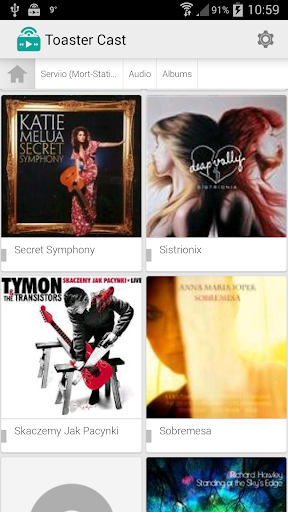
Toaster can also browse DLNA servers and NAS such as Synology, Servioo, Twonky, MediaMonkey, MediaTomb and Foobar2000.
Toaster Free API allows other applications to stream multimedia content through DLNA and AirPlay without any additional user interaction. The first app that integrated with Toaster Control API for DLNA and AirPlay is n7player.
Location permissions are used to locate and navigate to the nearest music stores & your devices via Music Locations menu.
Album Art by Sean Fournier, 2008, Licensed under CC License.

Information

  • Category:
    Music & Audio
  • Latest Version:
    1.0.15
  • Updated:
    2014-12-08
  • File size:
    6.6MB
  • Requirements:
    Android 2 or later
  • Developer:
    N7 Mobile Sp. z o.o.
  • ID:
    com.n7mobile.simpleupnpplayer
Reviews
  • avatar
    Lol, How do you expect me to pay for service that I can't know if it's working
    2020-08-24 07:59
  • avatar
    - the 1st setting under Playback is in Polish(?), no idea what is says or does - it has used GPS without me using the Music Locations option - When I try to select a music track to play, it asks "Wpisz adres video", and again I have no idea what this is supposed to do. I just tap OK and then try either my TV or receiver and in both cases it will just be "loading" forever, never actually playing - I would like to use the media server option, but there is no way to try it out
    2020-07-20 08:11
  • avatar
    Doesn't work
    2020-07-11 09:06
  • avatar
    Casting works great to my Denon amp from my phone. Just lacks good front end music player functions so I have to be in the mood for random play without much else control.
    2020-02-16 12:22
  • avatar
    Nice app! I use it for my LG smart tv. Nice job guys. Hope one day it will support wifi direct, Bluetooth and games to TV.
    2020-02-09 12:34
  • avatar
    Can't test if media server works as its a paid option. Will not purchase if I can't check if it works. You can test drive cars before buying why not an app?.
    2019-12-13 10:46