

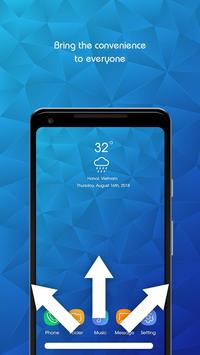
Swipe Navigation Pro - Gesture Navigation Control
uses the Device Administrator permission .
If you feel complex when having too many steps of each switch, close or open the app. Or a few keys back, home ... were paralysed but without
time to repair.
Swipe Navigation Pro - Gesture Navigation Control
is an indispensable application that helps solve these problems. All you need is swipe right, swipeup, swipe left and everything is done for you with this quick gesture 2018 !
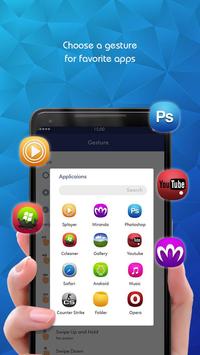
With this gesture phone control app, you can do many quick action with gesture navigation buttons, such as: gesture call answer, gesture dial, gesture call receiver,… Using gesture motion to open app, go to home screen. We also provide function gesture for open app when lock screen, or gesture on off screen.
In order to use this
Swipe Navigation Pro - Gesture Navigation Control
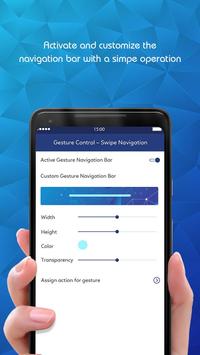
you just need to download the app and experience. Developers have designed an option bar at the bottom of the screen to facilitate the process of using some of the most basic operations. Users can fully adjust the width, height, color and transparency of the bar as desired.
Main features of Swipe Navigation Pro - Gesture Navigation Control:
★
Navigation bar customize:
width settings, bar height, color correction, and bar transparency to suit your needs.
★
Enable / Disable navigations buttons:
When the user temporarily does not use the bar function, the user can turn it off easily.
★
Convenient actions:
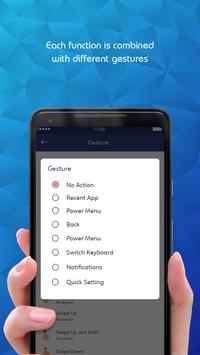
home screen, back, multitasking, startup screen, notification panel, quick settings, split screen, screen off. These are functions that developers research to find out the most common user actions.
★
Customize your actions:
In addition to the default options you can also add whatever you want.
★
Gesture Control:
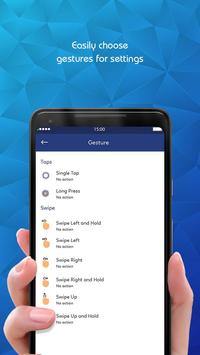
swipe up - swipe up and hold, lay left - swipe left and right, swipe right - swipe right and hold, touch once and hold. Each gesture you can assign a corresponding option
These gestures are available:
▶ Swipe up/left/right
▶ Swipe up/left/right and hold
▶ Short Swipe up
▶ Short Swipe up and hold
▶ Double tap
▶ Long tap
▶ Double tap and hold
Currently you can invoke these actions with gestures:
▶ Home
▶ Back
▶ Recent apps
▶ Notifications
▶ Quick Settings
▶ Screen off
▶ Most recent app
▶ Reset screen (above 5.0)
▶ Divide Screen (above 7.0)
With a nice interface, easy to use and no fee,
Swipe Navigation Pro - Gesture Navigation Control
will definitely bring you the best experience.
With all of our quick gesture control function above, you can easily take quick action with gesture dial, gesture call receiver, gesture call answer… Some simple but important action like gesture open app, gesture home screen will be handled in this guesture handed navigator. You will have the best experience when using function gesture for open app when lock screen, and gesture on off screen.
If you have any questions leave a comment to help the app more fluent. If you love this
Swipe Navigation Pro - Gesture Navigation Control
app, please rate 5 stars for it. Thank you so much!
- Fix bugs







9Apps 4.9














