SketchPad - Doodle On The Go icon

SketchPad - Doodle On The Go

2.2.2 for Android
3.5 | 1,000,000+ Installs | Reviews

Kaffeine Software

Description of SketchPad - Doodle On The Go

Let your imagination run wild. Unleash your creativity with SketchPad. Draw, illustrate, sketch, doodle, or scribble - the choice is up to you.
The app is extremely lightweight, at a download size of just 5 MB.
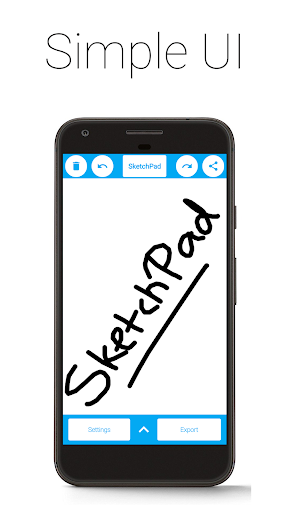
SketchPad aims to provide a simple way to turn your screen into a canvas without any hassle. Unlike most other drawing apps, SketchPad keeps it clean. It's just a canvas and you.
You can get started on your Sketch pretty much straightaway after the app is installed. No setup required. It's really that simple.
Features:
• Simple UI
• No ADs
• No In-App Purchases
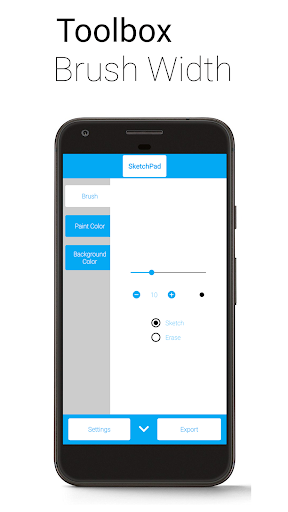
• Customizable Brush Width with Instant Preview, for those bold strokes and fine details
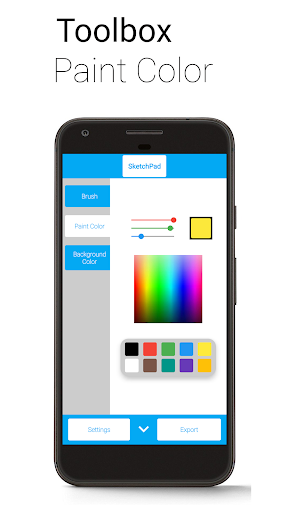
• Multiple ways to pick colors: Palette, Spectrum, and RGB Sliders
• Unlimited Undo/Redo, because it's okay to make mistakes (still limited by device capabilities)
• Optional Shake to Clear feature - just shake your device to clear the Canvas (requires accelerometer)
• Export as PNG or JPEG image
• Directly share image from SketchPad (automatically exports image to device)
"Shake to Clear" is good for when there are no sudden movements, so don't use it in the bus for serious Sketching. However, it is great when scribbling to pass the time.
SketchPad is capable of working offline. However, sharing your Sketches with others might not work without a network connection. The Storage permission is required only to save your Sketches to your device. I do not steal your precious files.
Exported images are saved to "/Pictures/SketchPad/" by default. The Storage path can be changed to a directory of your choice in Settings to suit your needs. Saving Sketches to "/DCIM/Camera/" should make the images show up in most Gallery apps. On Android 10 onwards, due to changes in how storage works, all pictures are saved to "/Android/data/com.kanishka_developer.SketchPad/files/Pictures", irrespective of the setting.
The focus of the SketchPad Project has always been on the User Experience. Do share your feedback, or just come say "hi" in the Kaffeine Community Discord server at https://discord.gg/dBDfUQk or email me at kanishka.developer@gmail.com. :)

What's New with SketchPad - Doodle On The Go 2.2.2

Bug fixes and performance improvements
Happy new year 2024!

Information

  • Category:
    Art & Design
  • Latest Version:
    2.2.2
  • Updated:
    2023-12-31
  • File size:
    4.5MB
  • Requirements:
    Android 5.0 or later
  • Developer:
    Kaffeine Software
  • ID:
    com.kanishka_developer.SketchPad
  • Available on:
Reviews
  • avatar
    Great to draw doodles but I can't get it to save and yes I pressed the permission for storage!! ITS USELESS. ALL I WANNA DO I GET A SIMPLR SKETCH DONE AND ACTAULLY SAVE IT. IVE WENT THROUGH SETTINGS MANY TIMES. IVE DONE IT ALL. NOTHING!! ALSO THE UNDO BUTTON.. ITS BROKEN IT TAKES SO LONG TO UNDO!! Also please don't argue about this review but seriously this app BROKEN. Okay today I'm adding another edit. So.. well.. I kinda crashed it by pressing export so many times. I was spamming the button.
    2020-09-27 01:42
  • avatar
    The app is fine by itself but in reality it has no car I can still draw funny things the only reason I dated at 3 is because well it's not really my art style I don't like 6 x and the settings are messed up I don't even understand what it's trying to make you draw how does anybody use this for fun? 😡
    2020-08-24 10:20
  • avatar
    Nc app, its fast and works nc ,free, no ads and its good app to have, ill recommend this to my friends
    2020-08-23 12:40
  • avatar
    It has very janky movement and also it takes ages to undo a mistake, there should be a zoom in feature. 2 horrible stars.
    2020-08-18 12:41
  • avatar
    The app works fine for me, I am able to doodle things that I've got stuck in my head with relative ease. The reason why I gave it a 4 instead of a 5 is it could use a couple of extra textures to draw with. Sure, we've got the paintbrush, but what about Pencil, Crayon, jagged brushes, or even just like a line drawing or zoom function. Not trying to nit pick, I know drawing applications are difficult, just a bit of room to grow.
    2020-08-17 09:31
  • avatar
    This app would be fine for simple doodles if it actually saved your sketch. I hit the save multiple times and nothing. I checked all the folders the app lists in settings and nowhere to be found. Junk app. Avoid this one folks.
    2020-08-09 06:01