


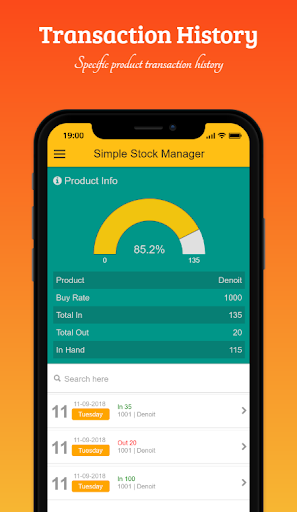


Simple Stock Manager is a simple android app for managing your product stock & inventory control. Using this app you can easily see your product store status and it provides stock-taking and inventory management most simplistic way.
Application function & features
- Simple UI & UX
No complex use. Our application is very light & user-friendly. The application use is very easy. Anyone can operate this application at the very beginning of use. Just install and use.
- Product Stock & Inventory
Our application offers you to manage your product stock & inventory in a simplistic way. Just list product, an entry in-out record of product transactions just it. It will provide all of the histories of the transaction report & more features
- Barcode
Scan a barcode to find product information easily and quick transaction via barcode scan. You must create a barcode with PID (Product ID) which you have to enter in the app.
- Low Stock Alert
The low stock warning feature is a more helpful feature for you. You can set any value for warning you about a low stock quantity of your product. When any product stock goes to the below of it then it will notify you and give you a low stock product list.
- Live & Quick Searching
This app gives you a live searching feature. Just enter the search term it will give you instant search result.
- Manage Data
You can manage your product & transaction data at any time. You can insert new data, edit and delete your data according to your need.
- Login Security
Our app provides you with login security. By default login security off state. You can easily on this feature from the app settings option.
- Data Security
Your data on your device. we don't track your data. All of your data saved on your device. The backup data is also on your device encrypted. No one can see the data.
- Backup
The Simple Stock Manager app gives you an option to backup your data on your device. Your data on your device no need to worry about your data security.
- Restore
You can easily restore your data. When you switch your phone then insert your SD card that phone and install Simple Stock Manager from PlayStore then go to the restore menu from the app. Select the latest backup data and press the backup button.
- Data Export
You can export your transactions data to CSV and PDF file format. All your exported data will store in your SD card > Android > data > com.learn24bd.ssm > files > export folder.
Other Features
- Nice and easy UI & UX.
- Overview of product stock status.
- View the last 5 transactions.
- Unlimited product.
- Low stock warning.
- Manage transactions.
- Quick live searching system.
- Data backup and restore facility.
- Password login security.
- Data Export in CSV and PDF
- More ...
Frequently Asked Questions
Q: What is the function of the Simple Stock Manage?
A: The function of the "Simple Stock Manager" to manage product stock in a simplistic way.
Q: Is the application online or offline?
A: offline.
Q: Is there login password security?
A: Yes, by default it is not enabled. You can easily enable these features from app settings.
Q: It required a password for login, what is the password?
A: The default password is 12345. You can change it from the settings menu.
Q: Where my data will be store & what is data security?
A: Your data will be stored on your device. No one gets to access your data. The backup data is encrypted.
Q: Is there any backup facility?
A: Yes.
4.3.20
- Important: Keep data backup before update.
- SD card backup added. Please create a blank folder before backup and use that folder for backup data.
- Bug fixes








9Apps 4.9














