





Note: This is not for people looking for accented characters or autocomplete functionalities. This is aimed at a niche audience that prefers things simpler.
-- Important : Configure the keyboard in order to use it. Refer to instructions below --
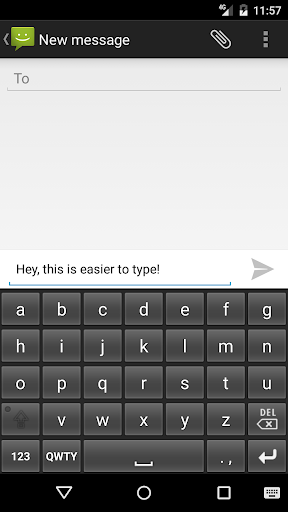
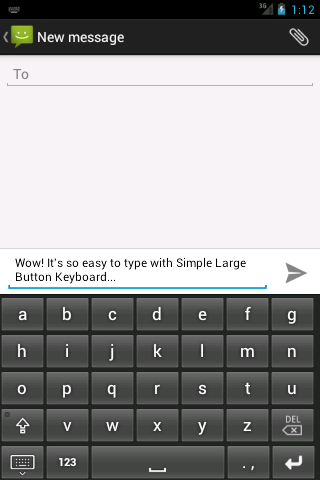
Presenting to you, for the first time on Android - a keyboard with a simple ABCDE layout.
---
Steps to configure the Simple Large Button Keyboard after installing the app,
1. Download & Install the application from Google Play
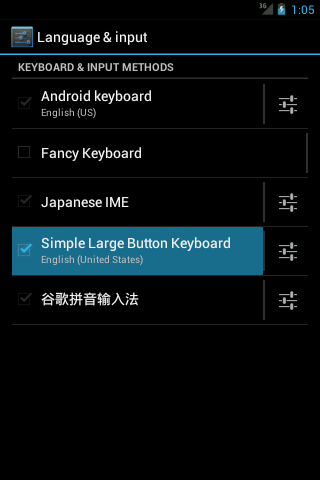
2. Go to Settings -> Language & input
3. In Keyboard & Input Methods, tick the `Simple Large Button Keyboard` option
4. Your keyboard is now enabled. To use it, open any application
5. Tap on the field where you wish to type
6.
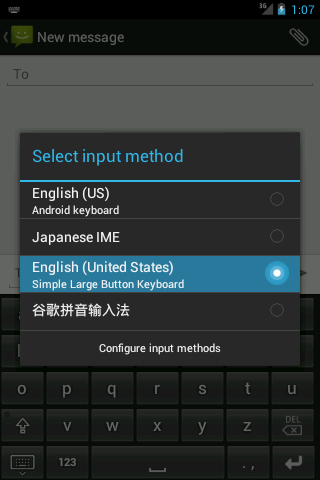
a. [Android 4.0 ] A small keyboard icon will be displayed on the top left of the screen.
Drag the notification bar down and click 'Select input method'
b. [Android 1.6 - 2.3] Long press the editable text field and select 'Choose input method'
Select 'Simple Large Button Keyboard' as the preferred input method
7. Choose 'Simple Large Button Keyboard' and start typing to use the app.
To switch back to the default keyboard, just change it from the notification bar.
For details, check screenshots attached.
--
If you feel uncomfortable using tiny, frustrating buttons on your smartphone keyboard, then Simple Large Button Keyboard is the application for you. If you think QWERTY is not your cup of coffee, then don't worry. Simple Large Button Keyboard abolishes the QWERTY layout and switches to a simple layout where the alphabets A to Z are ordered in sequence. So, sit back and enjoy the ease of big buttons coupled with the most simple layout in the world.
Advantages of using Simple Large Button Keyboard:
» big buttons which result in ACCURATE typing
» simple layout (no more QWERTY)
» no fancy gimmicks such as sounds, suggestions, etc.
Designed for users who just want a normal keyboard. Go ahead, enjoy the simplicity!
If you face any problems while configuring your keyboard, do not hesitate to email the developer. Your queries will be responded to on priority. Enjoy!
v 1.0.6
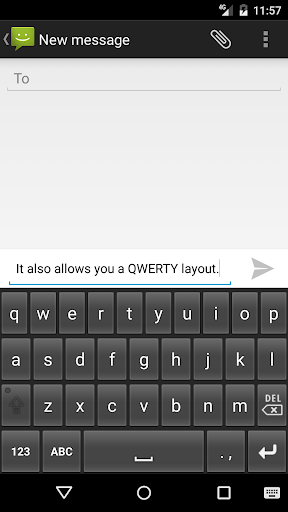
- using standard QWERTY layout with bigger keys
- clear labelling for switching between modes
- minor bug fixes / glitches while toggling between cases
- fix issue with text being replaced while entering symbols or numbers
(inclusions from previous release)
- switch between ABCDE <==> QWERTY layouts
- press A/Q key on the keyboard to toggle seamlessly







9Apps 4.9















