

- You want to change your sim card and fear of losing all sim card data ?
- Have you lost all of your data stored in SIM card?
- Don’t have a contacts backup of all your contact numbers?
Today there are numbers of sim card app available in market that can help you recover all your sim card data in no time.
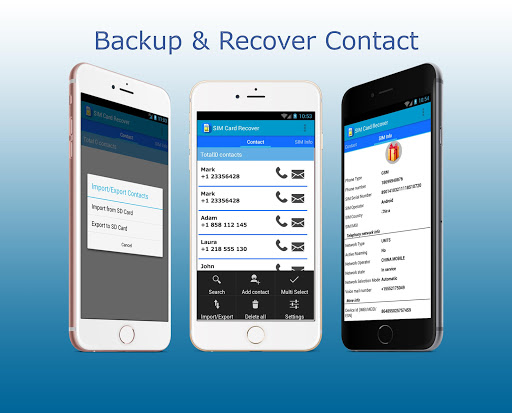
SIM card Recover & Manager is a tiny tool that helps you to manage and display all your contacts stored on SIM Card to do several operations like export and import.
All you have to do is – download then install the app today and follow the steps outlined here inside to get it done in easiest and quickest way.
⇩⇩⇩⇩⇩⇩⇩⇩⇩⇩⇩⇩⇩⇩⇩
HOW TO RESTORE:
1) First you must export a contact backup (vcf file) to SD card.
2) Press the import button in order to restore Deleted Contacts.
Let the importing finish and then you have successfully restored your contacts into the phone.
What can do this sim card app :
- Contacts backup : deleted contacts recover
- SIM Card reader.
- Add a contact.
- Searching for a contact.
- Delete all contact.
- Import and Export contacts from/to SD card for backups..
- Contact backup vcf.
- View info: SIM Card Serial, Phone number, Network state and more.
- View all contacts stored on SIM card.
⇩⇩⇩⇩⇩⇩⇩⇩⇩⇩
EXPLANATION OF PERMISSIONS REQUIRED BY THE APPLICATION:
- READ_SMS : Sim SMS listing.
- RECEIVE_SMS : Sim SMS listing.
- READ_PHONE_STATE : to read information from the SIM card
- READ_CONTACTS : to obtain the SIM card contact list
- WRITE_CONTACTS : to delete the selected contact
- READ_CALL_LOG and WRITE_CALL_LOG : for some reason, these permissions were added by Google after uploading to Google Play and SIM Card Recover does not use call logs in any way.
- I need INTERNET permission in my app to retrieve ad data. Trust at me, I dont collect your info and your contacts info.
If you need any further informations, feel free to contact me via email: coolcraftstudio2016@gmail.com.
⇩⇩⇩⇩⇩⇩⇩⇩⇩⇩
DISCLAIMER
- Note that only contacts that are saved in your SD-Card can be restored.
SIM card Recover & Manager enables you copy and export your phone contact(s) to a GSM SIM card. Good for contacts backup. It doesn't support dual sim card phones.
Using this app, you can find many helpful information about your SIM card & your device .










9Apps 4.9















