


1. Why to PPTX to Video?
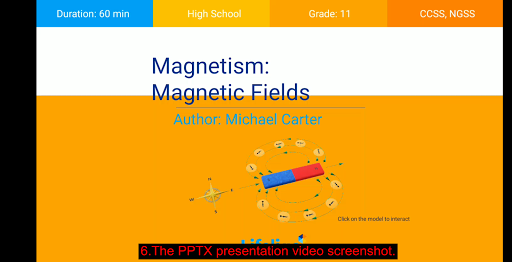
A PowerPoint presentation (PPTX) is a presentation created using slide shows and is majorly used for office and educational purposes. A PPTX file contains text, videos, images and sound content, and these files can be viewed using PowerPoint or related software. So if you want to view your PPTX files on portable devices and players, converting it to a compatible format like MP4 video is the best solution. Moreover, PPTX to video conversion makes your presentation files accessible on your mobile phones and handheld devices. Additionally, when you convert PowerPoint to MP4 video, you can easily share your content on online video sites (as YouTube) and social media platforms (as Fackbook,Twitter).
2. How to PPTX to Video?
* Microsoft PowerPoint itself is the best PowerPoint to video converter. It can be used to convert your PPTX files to MP4 video format for free.
* Commercial PPTX to MP4 Converter online website or PC software.
* Free Andriod App - 'PPTX to Video'
3. What is the 'PPTX to Video'?
'PPTX to Video' is a FREE widget to to convert your PPTX file to MP4 video with microphone recording and audio mixing.
4. How to use PPTX to Video?
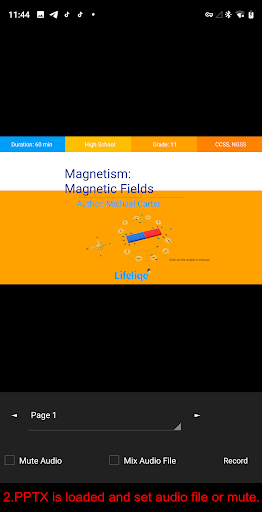
* Tap 'Make a video' and select a PPTX file.
* Set microphone on or off.
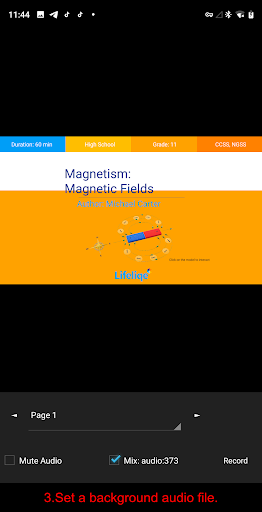
* Set a background audio file.
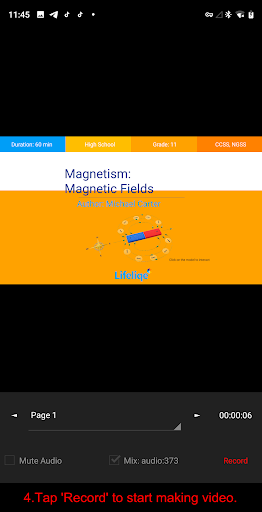
* Tap 'Record' to start making video.
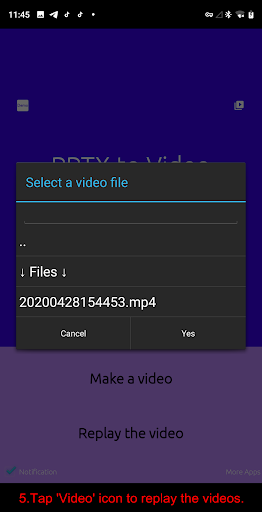
* Finally, Tap 'Video' icon to replay the videos.
5. What parts of a presentation won't be included in a video?
* Audio media
* Video media
* Macros
* OLE/ActiveX controls
6. What is a PPTX File?
A file with the .pptx file extension is a Microsoft PowerPoint Open XML (PPTX) file created by Microsoft PowerPoint. You can also open this type of file with other presentation apps, like OpenOffice Impress, Google Slides, or Apple Keynote. They are stored as a compressed ZIP file, which use a bunch of other files with formatted text, images, videos, and more to open them.








9Apps 4.9













