My PC mobile (Prepaid) icon

My PC mobile (Prepaid)

4.5.0 for Android
2.9 | 50,000+ Installs | Reviews

PC mobile

Description of My PC mobile (Prepaid)

Manage your PC mobile prepaid cell phone service more easily! Now with a completely new look and feel, the My PC mobile app is the easiest way for you to manage your PC mobile prepaid account anytime, anywhere. You can use the app over our 3G, 4G and LTE networks free of charge, without using your data plan.
PC mobile prepaid customers can use the app to quickly access key features:
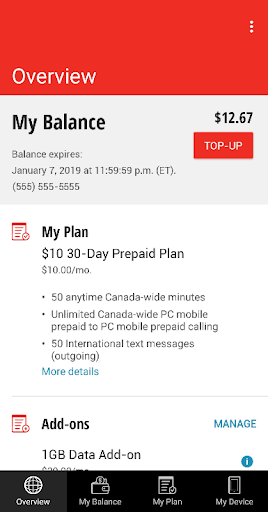
• View your PC mobile prepaid account balance and expiry date
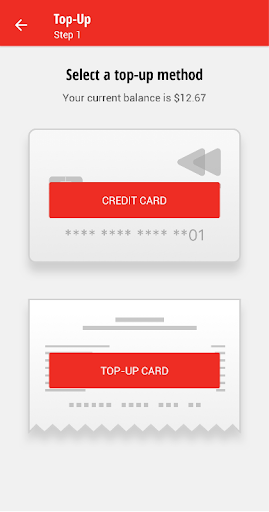
• Top up your PC mobile prepaid account
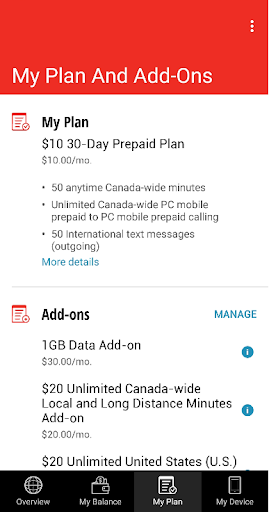
• Manage add-ons and view plan details (including voicemail reset and caller ID management)
The My PC mobile app supports Android 5.0 and above
To learn more about our privacy policy, visit pcmobile.ca/privacy.

Information

  • Category:
    Tools
  • Latest Version:
    4.5.0
  • Updated:
    2021-09-22
  • File size:
    5.6MB
  • Requirements:
    Android 5.0 or later
  • Developer:
    PC mobile
  • ID:
    ca.pcmobile.selfserve.mypcmobile
  • Available on:
Reviews
  • avatar
    worst phone company and the apps.no signal in the city and cannot use data when i want use it.after runout the money i will change the company. do not deserve 1 star.pure garbage. Thanks for the response.if PC mobile use Bell network it should be able to get stronger signal in the city.we are in the city and get poor connection.so please fix the problem.
    2020-10-21 12:22
  • avatar
    I like the app, but what's really missing is something to tell you how much data you have left, not just what add-on you have. My phone's data shows a running total of data used from the 10th of the month to the 9th of the next, but my data runs from the 21st,so I have no idea where I am for remaining data until I get a warning.
    2020-09-21 01:08
  • avatar
    When connected, it works fine. Had several issues with app use over WiFi.
    2020-08-28 10:33
  • avatar
    The only thing baffling me is why the PC rep isn't explaining to everyone that you need to turn off your wifi and turn on your data. You are are not charged any data to use the app. It is free. That is the way it is set up. Your app is working just fine. You just need to learn how to use it.
    2020-06-22 07:19
  • avatar
    Says I need to turn on data....not interested in doing that..I only use wifi edited review because now i see i need to turn on data when using the pc mobile app but i wont be charged for the data it uses...and i can turn it right off after doing what i need to do or checking what i need to check...that should be stated clearer..its a real turnoff for non-data users to download this app then the first screen says to turn on data...
    2020-06-14 03:00
  • avatar
    Unable to open App. Evidently app won't work with Wi-Fi connection---a PC Mobile data plan is required to enable connection. 18 Sept 2019 - According to the response, I must have misinterpreted the pop-ups suggesting I connect using a data connection. 24 May 2020 - Still no fix - cannot use app.
    2020-05-25 02:02