JBL Compact Connect icon

JBL Compact Connect

1.0.4(2) for Android
2.9 | 1,000,000+ Installs | Reviews

Harman Professional

Description of JBL Compact Connect

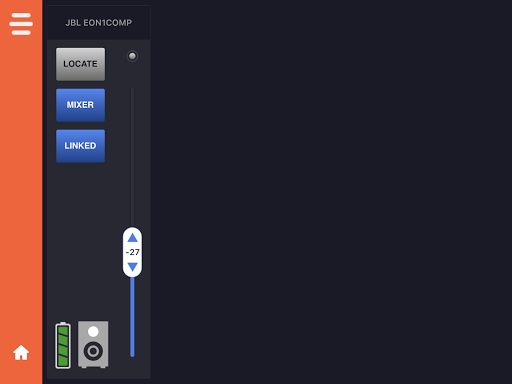
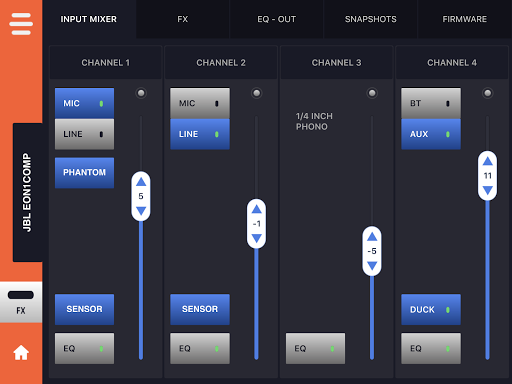
The JBL Compact Connect is an easy-to-use application for tablets and mobile devices that is designed to offer complete control of up to four JBL EON ONE Compact PA speakers at a time. Featuring Bluetooth audio control, the application gives you free reign over all of the EON ONE Compact’s setting and capabilities. From controlling the speaker’s four-channel digital mixer, to adjusting effects, saving and recalling presets and much more, JBL Compact Connect allows you to easily tailor your speaker to fit your application. Plus, JBL Compact Connect directly links to the speaker’s hardware, so any change you make from the application will reflect on your EON ONE Compact’s LED indicators, including volume levels. In addition to dialing in the perfect sound, the JBL Compact Connect application allows you to update each speaker’s firmware.
Key Features:
• Easy-to-use mixer interface for complete mixer control and added mixing capabilities
• Digital channel faders for adjusting volume levels simply and quickly
• Adjustable Lexicon effects for enhancing your audio
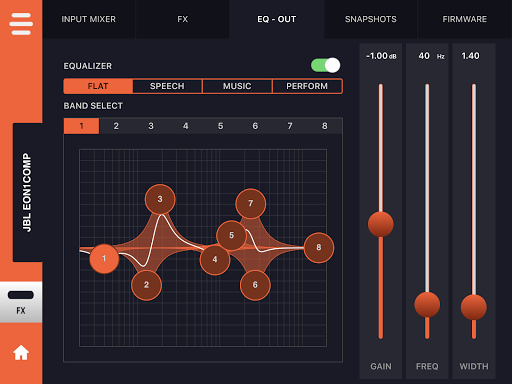
• Adjustable 8-band EQ for master output and each channel to fine tune your sound
• Synchronize and stream music to up to four EON ONE Compact units with full control over each speaker
• Software control changes are intelligently reflected on speaker’s hardware
• Customizable ducking functionality lowers background music levels when speech is detected
• Easily save your ideal sound settings and recall them at anytime
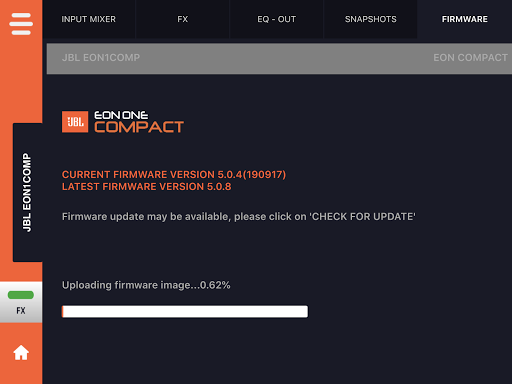
• Update firmware for all connected EON ONE Compact units

What's New with JBL Compact Connect 1.0.4(2)

Fix issue related to app download on Android 12 and above versions.

Information

  • Category:
    Music & Audio
  • Latest Version:
    1.0.4(2)
  • Updated:
    2023-07-17
  • File size:
    44.8MB
  • Requirements:
    Android 6.0 or later
  • Developer:
    Harman Professional
  • ID:
    com.harman.jbl.eoncompact
  • Available on:
Reviews
  • avatar
    Rubbish app, sending speaker back, disappointed. Does not work with pixel 3xl and Android 11. Added as trusted device and enabled location and nothing since getting it to connect when first bought it. Seems it updated and app never worked since despite being able to stream music still but cannot change settings. Given this is a premium product it's let down by a pathetic app.
    2020-10-06 11:00
  • avatar
    Very disoppointed .........today i got delivery of my eon one compact and first time it connected with app easily but after that i was unable to connect with system........everytime app is saying " its works only with eon one compact......but not connecting with it......shocking to know that how brand like jbl developed this horrible app.
    2020-08-28 12:18
  • avatar
    My review was deleted, not sure why. The effects don't work, chorus and delay do nothing, only reverb works and you don't need an app to use that.
    2020-08-15 03:52
  • avatar
    Thank you JBL - Changing my review to 4 stars as I have been finally been able to update my firmware ( after waiting about a year or so ). Minus one star because the only Bluetooth android device that will connect to the JBL is my Pixel phone....but it works so I will leave it at that. Other than that the unit sounds good and performs well - even at my last gig with 250 + people. ( Had to go to max volume ) It even survived a surprise rainstorm. 😳
    2020-06-26 08:01
  • avatar
    While I faced many similar challenges as others, I now have both of my EON Compact One speakers in full stereo. The app is buggy, for sure, but keep in mind that Bluetooth data transfer (not just audio) is complicated. People just need to be a bit more patient. I will say this, these speakers, in full working mode, sound amazing. They are very efficient and and have great sensitivity. They are very much worth purchase. They are smaller, so don't expect to get the gain from the system for large crowds. But, I love the clarity with help from the apps 5-band parametric EQ [7-bands with the "Bass" (120 Hz, 1.41 Q, no Q variability) and "Treble" (4.5 kHz, 1.41 Q, no Q variability)] A couple of findings for you to keep in mind 1. You must turn off the "Audio" from one side of the "Dual Audio" bluetooth. I remove the audio from the "remote" speaker (set in BT Broadcast settings). 2.Though the speakers are connected to the my Android phone via bluetooth, the app struggles with linking. It took me some fiddling to get the connection stable. 3. Each speaker has separate gain control and EQ settings. I don't believe these settings are mirrored between the "Host" and the "Remote" speakers. 4. You can rename the speaker names in the app which is nice. The app doesn't incorporate the name given, if changed, in your Bluetooth settings. 5. When in "BT Broadcast" mode, tap the speaker icon, of both speakers, to activate it to by associated with the other speaker. 6. Associating speakers did not work for me unless I had the same firmware version on both speakers (currently 5.1.1). 7. You must have a phone with the Dual Bluetooth music settings for stereo to work. I can't recall which Android version incorporated Dual Bluetooth mode (5.0??) I hope this helps. Buy these speakers. The sound is spectacular.
    2020-06-26 12:25
  • avatar
    This app is a joke. Worked one time. Device is hooked up via bluetooth. Does nothing. Useless. Got it working. Factory reset. Bingo up and running.
    2020-06-17 01:22