DM Smart DSP icon

DM Smart DSP

1.0.15 for Android
3.1 | 5,000+ Installs | Reviews

AudioControl Inc.

⚠️ You need 9Apps App to install .XAPK File. How to install XAPK?

Description of DM Smart DSP

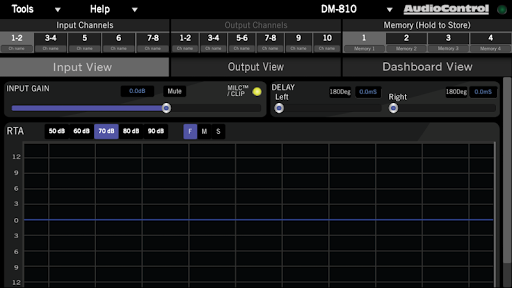
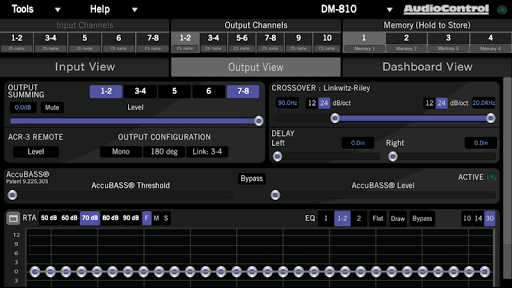
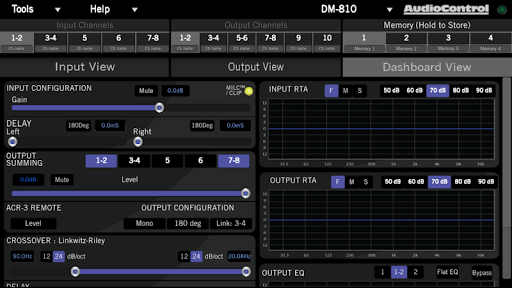
The user will be able to interact with the following AudioControl products via BlueTooth®:
* DM-810
* DM-608
* D-6.1200
For this, a Bluetooth dongle attached to the processor via its Option Port is required.

What's New with DM Smart DSP 1.0.15

- Important stability and connectivity improvements.
- Now checking for firmware version on the DM processor in order to guarantee you're always connecting to the right one.
- Bug fixes.

Information

  • Category:
    Music & Audio
  • Latest Version:
    1.0.15
  • Updated:
    2021-01-14
  • File size:
    12.5MB
  • Requirements:
    Android 5.1 or later
  • Developer:
    AudioControl Inc.
  • ID:
    com.manuelpeirone.com.audiocontrol
  • Available on:
Reviews
  • avatar
    Phone detects AC-BT24, once paired, app still doesn't detect. I do get a prompt to connect to a Bluetooth device, but the AC-BT24 isn't in the list, just my Bose speaker. I've tried this on a Tab S3, S10+, S20+, and a iPad Air WITH THE SAME EXACT RESULTS. I'm so disappointed right now. NOT what I expect from AudioControl, let alone a $1200 amp and a $150 bluetooth device. I don't have a laptop, now I need to find someone that does or buy one and return the AC-BT24. GAH!
    2020-11-06 04:18
  • avatar
    When you update the app and the update makes it impossible to connect with your equipment with a device that is meant to be messed with you ruin the user experience. Currently looking for a different DSP.
    2020-11-03 07:53
  • avatar
    Does the app need a little improvement..yes. It does have a few quirks and can fight you when trying to connect. However it works well on supported phones. It didn't connect to my s20 ultra but it did to my s10+. Thanks to Josh one of audio controls techs the amp is dialed in perfectly. The app has a learning curve. Give it a chance before bashing it. It's VERY CAPABLE. Audio Control makes FANTASTIC equipment made in the USA. You wont get that anywhere else! Plus they are VERY knowledgeable. Be patient before talking bad about it
    2020-10-07 05:24
  • avatar
    Better off using USB to PC. Easier to tune that way. And seemingly more reliable. When I do BT connect its harder to fine tune with the sliders, won't let you dial in numbers with the keypad, and won't let you adjust certain parameters at all. And all of that IF I can even get it to connect to my Note 10+. Wont connect to my Tab A 10.1 at all. And not positive, but when i did BT to my phone it automatically changed all my settings to an older saved tune which can be VERY bad for my current setup
    2020-06-09 08:39
  • avatar
    Keeps stopping on my Samsung Galaxy Tab A 10.1 I have uninstalled and reinstalled the app many times I cleared the caches I restarted the tablet I have updated the firmware thru hard wire Still keeps on stopping Only worked 1 time with 1 stoppage other than that I have to use my surface and hard wire to tune or change settings
    2020-05-14 03:34
  • avatar
    Update 4/22/2020 After talking to tech support they helped me figure out how to update the software and now my system sounds beautiful! And it saves my tune. You have to update the firmware by installing the latest program on a PC. Then connect via USB it will automatically update firmware and the Bluetooth will function again. 5 stars!
    2020-04-22 11:56