


What makes me unbelievable is that 30,000+ users downloaded Free ActiveDir Manager latest version on 9Apps for free every week! You'll found many people are using it. This hot app was released on 2019-08-13. 9Apps allows you to download more apps and updated daily!
ActiveDir Manager is a network admin tool for windows active directory user and computer management.
Similar to Active Directory Users and Computers (ADUC).
Admin windows network user accounts and computers from any android phone or tablet (wifi, vpn or other network connection).
Main Features:
-Set user Passwords
-Undo Password Lockouts
-Enable or Disable users
-Edit User attributes (address, phone #, misc contact attribs)
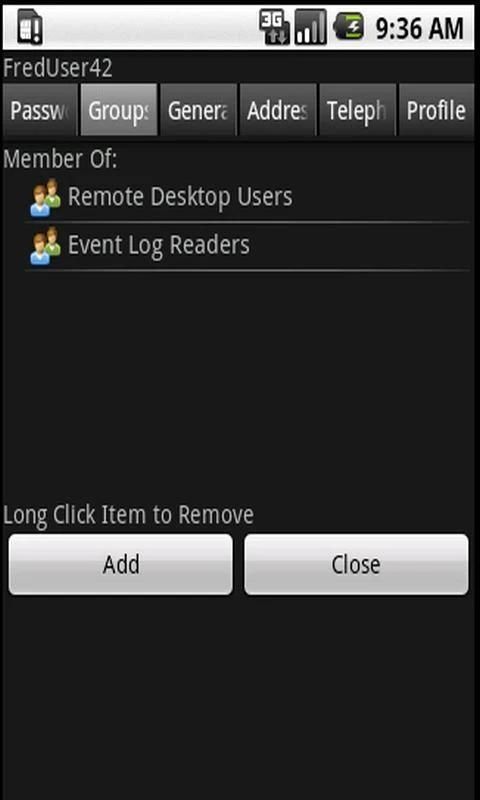
-Adjust Group Membership (members and memberOf)
-Use computer objects to remote control domain computers (RDP/VNC apps supported; see additional info)
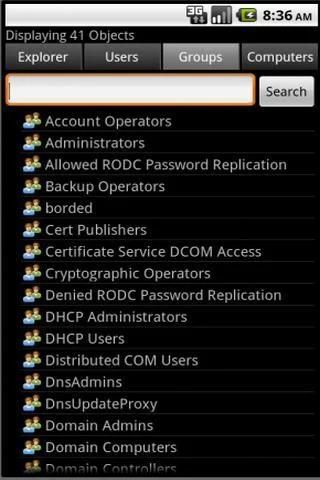
-Directory Search for User/Group/Computer
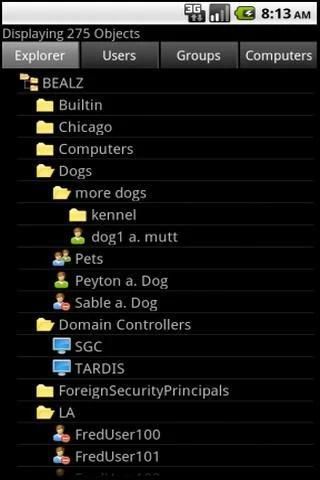
-Explorer "Tree Style" view
-Move, Delete and Undelete Objects (tombstone objects)
-Simple find only Locked users
-Supports TLS, SSL, or non-encrypted sessions
-Supports all current AD versions and functional modes
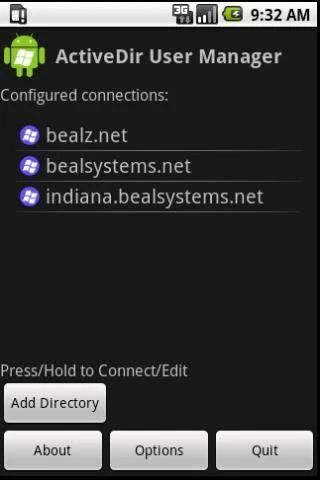
-Save connection settings for multiple directories.
-Unlimited directory size (result size adjustable)
-No server software required; utilizes Native Active Directory LDAP provider.
-Standard Wifi or VPN network access, no abnormal firewall configurations.
*Free version does not save connection definitions or settings long term(forgetful free version). Full version is availiable here: https://market.android.com/details?id=net.bealsystems.ADUserManager
*If you experience problems, please email me using the contact form http://www.activedir.mobi/?page_id=15
This is a Windows Admin tool, intended for use by network administrators and various IT professionals. Valid credentials are required to connect to a windows domain.
ActiveDir connects to any Windows Server Active Directory via an LDAP connection. No additional software is required; however Active Directory Services does require a basic certificate configuration to enable encryption (req'd to set passwords). This is typical started by adding the AD Certificate or Certificate Services role.
*RDP and VNC functions are provided by Yongtao Wang's remote tools. All 5 rdp/vnc tools are supported and auto-detected when present, selecting pro over lite/ad supported. Passing the current credentials (effectively SSO) only functions on Pro and Enterprise versions. http://www.remotespark.com/android_solution.html (also available on Android Market)
*TLS Unavailable Error most likely indicates the domain controller isn't capable of LDAP encryption. A connection can usually be made by disabling TLS and SSL in the connection profile. This will allow a non-encrypted connection with the drawback that AD LDAP will not perform password updates without encryption.
To enable LDAP Encrpytion (TLS and SSL):
*Active Directory Certificate Services should be added to one domain controller to provide SSL/TLS security, which is needed to set passwords. In many environments this requirement may already be in place, if not adding a private Enterprise-CA for your organization is a fairly simple process. More information is availiable in our FAQ here: http://www.activedir.mobi/?page_id=12
*ActiveDir is bound by the Active Directory Security policies that regulate directory security, authentication and object visibility. Valid credentials must be used to gain required access to the AD system, standard (non-admin) user accounts can be used, under normal security permissions standard accounts cannot alter data without being granted Administrator or Special access.
(*)Active Directory and Windows Server are a trademark of Microsoft Corp.
ActiveDir प्रबंधक खिड़कियों सक्रिय निर्देशिका उपयोगकर्ता और कंप्यूटर के प्रबंधन के लिए एक नेटवर्क व्यवस्थापक उपकरण है.
सक्रिय डायरेक्ट्री उपयोगकर्ता और कंप्यूटर (ADUC) के समान है.
व्यवस्थापक खिड़कियों नेटवर्क उपयोगकर्ता खातों और किसी भी एंड्रॉयड फोन या टैबलेट (वाईफाई, वीपीएन या अन्य नेटवर्क कनेक्शन) से कंप्यूटर.
मुख्य विशेषताएं:
उपयोगकर्ता पासवर्डों सेट
पासवर्ड तालाबंदी-पूर्ववत्
-सक्षम या उपयोगकर्ताओं को अक्षम करें
प्रयोक्ता विशेषताएँ (पता, फोन #, विविध संपर्क गुण) संपादित करें
समूह सदस्यता (सदस्यों और memberOf) समायोजित करें
रिमोट कंट्रोल डोमेन कंप्यूटरों के लिए कंप्यूटर वस्तुओं का प्रयोग (आरडीपी / वीएनसी क्षुधा का समर्थन किया, अतिरिक्त जानकारी देखें)
उपयोगकर्ता / समूह / कंप्यूटर के लिए निर्देशिका खोज
-एक्सप्लोरर "ट्री शैली" दृश्य
हटो, हटाएँ और हटाना रद्द ऑब्जेक्ट (समाधि वस्तुओं)
सरल लॉक्ड उपयोगकर्ताओं को केवल खोजने
-समर्थन टीएलएस, एसएसएल, या गैर एन्क्रिप्टेड सत्र
सभी मौजूदा ई. संस्करणों और कार्यात्मक मोड का समर्थन करता है
एकाधिक निर्देशिका के लिए कनेक्शन सेटिंग्स सहेजें.
असीमित निर्देशिका आकार (परिणाम आकार समायोज्य)
-नहीं सर्वर सॉफ्टवेयर की आवश्यकता है, मूल निवासी सक्रिय निर्देशिका को LDAP प्रदाता का इस्तेमाल करता है.
मानक वाईफ़ाई या वीपीएन नेटवर्क का उपयोग, कोई असामान्य फ़ायरवॉल विन्यास.
* मुफ्त संस्करण दीर्घकालिक (भुलक्कड़ मुक्त संस्करण) कनेक्शन परिभाषाओं या सेटिंग नहीं बचा है. पूर्ण संस्करण यहाँ availiable है: https://market.android.com/details?id=net.bealsystems.ADUserManager
आप समस्याओं का अनुभव * यदि संपर्क फार्म http://www.activedir.mobi/?page_id=15 का उपयोग कर कृपया मुझे ईमेल
यह नेटवर्क प्रशासकों और विभिन्न आईटी पेशेवरों द्वारा उपयोग के लिए एक Windows व्यवस्थापक उपकरण है. वैध क्रेडेंशियल्स एक विंडोज़ डोमेन से कनेक्ट करने के लिए आवश्यक हैं.
ActiveDir किसी LDAP कनेक्शन के माध्यम से किसी भी विंडोज सर्वर सक्रिय निर्देशिका को जोड़ता है. कोई अतिरिक्त सॉफ्टवेयर की आवश्यकता है, लेकिन सक्रिय निर्देशिका सेवा एन्क्रिप्शन (पासवर्ड सेट करने के लिए req'd) सक्षम करने के लिए एक बुनियादी प्रमाणपत्र विन्यास की आवश्यकता होती है. इस ई. प्रमाणपत्र या प्रमाणपत्र सेवा भूमिका जोड़कर शुरू खासियत है.
* आरडीपी और VNC कार्यों Yongtao वांग के दूरदराज के उपकरण द्वारा प्रदान की जाती हैं. सभी 5 RDP / vnc उपकरणों का समर्थन किया और लाइट / विज्ञापन समर्थित से अधिक समर्थक का चयन, जब वर्तमान ऑटो का पता चला रहे हैं. प्रो और एंटरप्राइज संस्करणों पर ही कार्य चालू क्रेडेंशियल्स (प्रभावी एसएसओ) पासिंग. http://www.remotespark.com/android_solution.html (भी Android बाजार पर उपलब्ध है)
* टीएलएस अनुपलब्ध त्रुटि की संभावना सबसे अधिक डोमेन नियंत्रक एलडीएपी एन्क्रिप्शन में सक्षम नहीं है इंगित करता है. एक कनेक्शन आमतौर पर टीएलएस अक्षम और कनेक्शन प्रोफाइल में एसएसएल द्वारा बनाया जा सकता है. इस ई. एलडीएपी एन्क्रिप्शन बिना पासवर्ड अद्यतन प्रदर्शन नहीं करेंगे कि दोष के साथ एक गैर एन्क्रिप्टेड कनेक्शन की अनुमति देगा.
एलडीएपी Encrpytion (टीएलएस और एसएसएल) को सक्रिय करने के लिए:
* सक्रिय निर्देशिका प्रमाणपत्र सेवाएँ पासवर्ड सेट करने की जरूरत है जो एसएसएल / टीएलएस सुरक्षा प्रदान करने के लिए एक डोमेन नियंत्रक के लिए कहा जाना चाहिए. एक काफी सरल प्रक्रिया है अपने संगठन के लिए एक निजी उद्यम सीए जोड़कर नहीं तो कई वातावरण में इस आवश्यकता को पहले से ही जगह में हो सकता है. अधिक जानकारी यहां हमारे सवाल जवाब में availiable है: http://www.activedir.mobi/?page_id=12
* ActiveDir निर्देशिका सुरक्षा, प्रमाणीकरण और वस्तु दृश्यता को नियंत्रित करने वाले सक्रिय निर्देशिका सुरक्षा नीतियों से बंधे है. वैध साख ई. प्रणाली के लिए आवश्यक पहुँच प्राप्त करने के लिए इस्तेमाल किया जाना चाहिए, मानक (गैर व्यवस्थापक) उपयोगकर्ता खातों का इस्तेमाल किया जा सकता है, सामान्य सुरक्षा अनुमतियों के तहत मानक खातों प्रशासक या विशेष पहुंचने की अनुमति दी जा रही है बिना डेटा को बदल नहीं सकते.
(*) सक्रिय निर्देशिका और विंडोज सर्वर माइक्रोसॉफ्ट कार्पोरेशन के एक ट्रेडमार्क हैं
1.23:
-Raw Attribute View and Advanced Mode
-Set a Search Base to search through only a portion of the directory tree.
-Fixes for abstract screen and theme incompatibilities.







9Apps 4.9














