

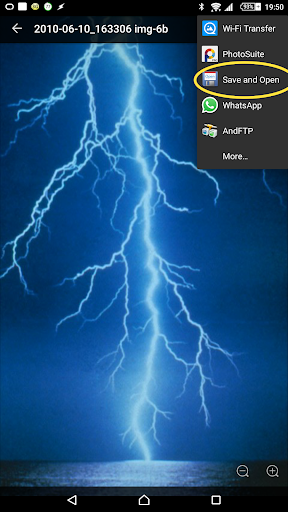
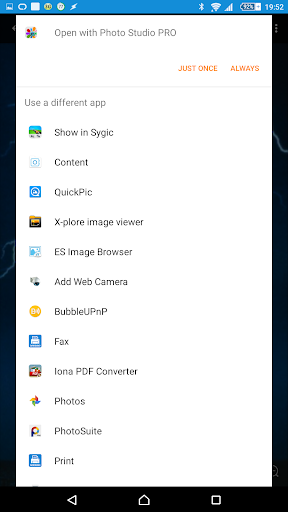
၎င်းသည်အခြားအက်ပ်တစ်ခုမှမျှဝေထားသောဖိုင် (E.G. ပုံ, စကားလုံးစာရွက်စာတမ်း, အီးမေးလ်ပူးတွဲဖိုင်) ကိုယူမည့်အလွန်ရိုးရှင်းသော app တစ်ခုဖြစ်သည်။ သင်၏ဖုန်း၏သိုလှောင်မှုရှိ "download" ဖိုင်တွဲကိုသိမ်းပါ။ Bluetooth မှတဆင့်ပေးပို့ရန်ရွေးချယ်စရာလည်းရှိပါသည်။
ဒီအက်ပ်မှာ Shortcut icon မရှိဘူး - ဖိုင်တခုကိုသင်သိမ်းထားလိုတဲ့နေရာကနေသင်ကြိုက်နှစ်သက်သောအက်ပလီကေးရှင်းရှိ Share Share Menu မှရယူနိုင်ပါသည်။ ရွေးချယ်စရာနှစ်ခုကို "Save and Open" သို့မဟုတ် "Save and Bluetooth" သို့မဟုတ် "Save and Bluetooth" သို့မဟုတ် "Save bluetooth" သို့မဟုတ် "Save Bluetooth" ကိုပြသသည်။
ဒီအက်ပလီကေးရှင်းကဖိုင်ကိုဖွင့်နိုင်တဲ့အက်ပလီကေးရှင်းတွေအားလုံးကိုစာရင်းမသွင်းပါဘူး။ အကယ်. ဖိုင်တစ်ခုကိုတည်းဖြတ်လိုသို့မဟုတ်ပို့လိုပါက၎င်းကို ဦး စွာသိမ်းရန်ကြိုးစားခြင်းကိုရှောင်ရှားလိုပါက၎င်းသည်အသုံးဝင်သည်, ထို့နောက်၎င်းကိုရှာ။ ပို့ပါ။
Shared file ကိုသင့်အတွက်သိမ်းဆည်းထားပါသည် ဖိုင်တွဲကို download လုပ်ပါ။ ၎င်းသည် / sdcard / download / download / download / sdcard0 / download သို့မဟုတ်အလားတူဖြစ်ကောင်းဖြစ်နိုင်သည်။ တူညီသောဖိုင်တစ်ခုရှိပြီးသားနေရာတွင်သိမ်းဆည်းထားသည့်ဖိုင်နောက်ဆက်အနေဖြင့်သိမ်းဆည်းထားသည့်ဖိုင်တွင်နံပါတ်တစ်ဆက်ဆက်ကိုထည့်သွင်းပါလိမ့်မည် (ဥပမာ - Test.pdf ") ထက်" Test.pdf ")) ။
သင်ခွင့်ပြုချက်ကိုပေးရန်လိုအပ်လိမ့်မည် ဖိုင်ကိုသိမ်းဆည်းရန် app ။
2.0: Now also supports "Save and Bluetooth".
It will save the file and immediately prompt to share via Bluetooth.
Now requires Android 4.0 due to Google requirements.
1.4: Where a file of the same name already exists, a suffix will now be added rather than overwriting.
1.3: Allowing SaveAndOpen to intercept a wider range of intents.
(n.b. the app will try to intercept, but if there's no file to save and open, an error will be shown).





9Apps 4.9












