
Floating Brightness Control icon

Floating Brightness Control

1.4.4 for Android
4.2 | 5,000+ インストール | レビュー

Captain Code

¥120

説明 Floating Brightness Control

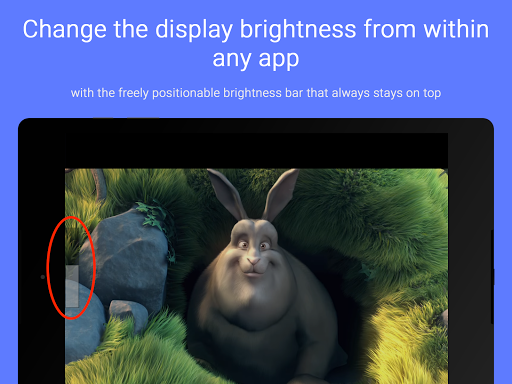
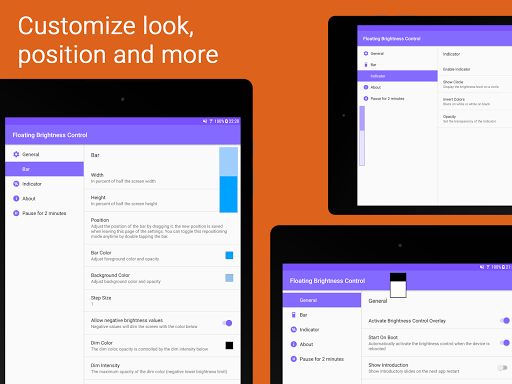
フローティングブライドネスコントロールは、常に他のアプリの上にある画面に明るさレベルバーオーバーレイを追加します。これにより、映画を見たりフルスクリーンのゲームをプレイしたりするように、表示の明るさを即座に変更することができます。バーがあなたの好みに大きすぎるならば、代わりに明るさのトリガを試してみてください。バーは自由に配置することができます、スケールされて着色された、あなたがそれを完全に透明にすることさえできるようにすることもできます。
その他の設定には、デバイスを再起動するときにバーの追加、現在の表示明るさを示すインジケータを追加し、インジケータの外観をスタイリングします。
機能:
- 輝度バー/トリガー不透明度色調整可能
- 現在の明るさのインジケータ
- 再配置モードを有効にするためのダブルタップ
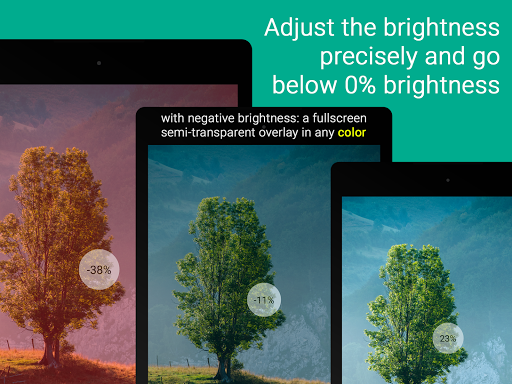
- 薄暗い色のオーバーレイの負の明るさを許可
- 自動的に再起動
- 広告なし、追加のアプリ内購入なし
必要な権限:
write_settings - 現在の表示明るさレベルを更新するには
receive_boot_completed - 起動時のフローティングの明るさコントロールを自動的に開始するためのオーバーレイ権限は、アプリケーションのインストールやAndroidのバージョンで失敗する権限の付与などの安全なアクションを引き起こす可能性があります。この奇妙な行動を経験した場合は、メイン設定画面の「2分間の一時停止」ボタンを使用してフローティングの明るさ制御を一時停止でき、安全な操作を実行できます。

情報

  • カテゴリー:
    ツール
  • 最終のバージョン:
    1.4.4
  • 更新日:
    2018-06-16
  • サイズ:
    3.1MB
  • 動作環境:
    Android 4.0.3 or later
  • 開発元:
    Captain Code
  • ID:
    me.klooz.dominik.floatingbrightnesscontrol
  • Available on:
レビュー
  • avatar
    The auto brightness adjuster on my phone would dim my screen too much whenever I tilted it wrong, so this app was exactly what I was looking for. I was able to customize the slider to be immediately accessible on the left side of my screen, yet thin and transparent enough to not bother me. I also love how it can dim your screen below 0%. Crazy that this wasn't a default setting on my phone, but hey at least this app fills that hole really well. Kudos to the dev! You're a lifesaver!
    2020-12-14 06:42
  • avatar
    [2019/06/09] Thank you for your reply. As I'm not a developer, I only speculate that the OS version (mine is 9) should be responsible. According to your recommendation, I set the brightness steps manually (0,1,2,3,4,5,6,7,8,9,12,15,20,25,31,40,50,63,80,100). Now the steps are distributed more evenly. However, the rough steps in the dark range still make me somewhat annoying. The brightness change in the dark range is much noticeable and I want to control in small steps especially within that range. Anyway, I appreciate this app even for the current behavior. Please consider improving it if you have enough time and energy. [2019/06/08] Works well. But, it'd be much better if the value of this app changes linearly with the system brightness value. Currently it seems a logarithmic relationship. For example, 9% of this app sets the system brightness 50%. This makes the brightness control in the dark range difficult and too-large steps.
    2019-06-09 11:20
  • avatar
    逐一画面輝度を調整したい人にとっては素晴らしいアプリ オーバーレイ設置されるバー・トリガーをスライドすることで輝度を調整出来る様になるアプリです. バー・トリガーについては一方のみ・併用の選択が可能で、バーはスライド方向を水平・垂直のどちらかに設定出来ます. バー・トリガーの色・透明度・大きさ・位置等を高い自由度で設定可能な他、輝度割合変更の連続的か離散的かの選択、離散値設定、輝度割合のポップアップ表示、擬似的最低輝度低下用フィルタの設定等、オプションも充実しています. 設定用のUIは英語ですが、直感的に分かり易いので簡単な単語さえ理解出来れば苦になりません.
    2018-04-03 10:15