

※It can be used only dodol launcher.
*** How to change dodol launcher font***
1. Install Dodol Launcher (if you haven't yet).
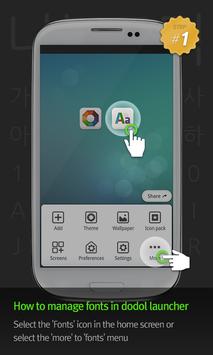
2. Select the 'Fonts' icon in the home screen or select the 'more > fonts'menu.
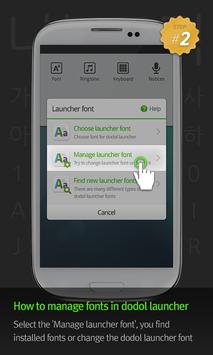
3. Select the 'Manage launcher font', you can find or change installed fonts.
***Customer Support***
- Google+ Community:
http://goo.gl/amXEzP
- Facebook:
http://www.facebook.com/dodolhome
- Instagram:
http://instagram.com/dodollauncher
***Precaution***
- Is available only in Android ver. 4.0.3 and above (ICS, Jellybean)
- Some functions cannot be applied in certain devices.

9Apps 4.9











