
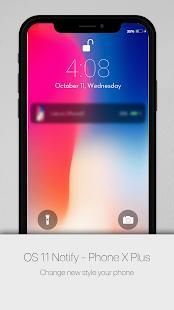
Are you looking for some free apps? 30,000+ users downloaded iNoty - Phone X Plus Notification Stylish latest version on 9Apps for free every week! Once you've used it, you'll be attracted. This hot app was released on 2018-07-31. Why not download and have a try?
#This app is not designed by apple company
WE HAS MADE EVERY EFFORT TO ENSURE NOT INFRINGE OTHER'S COPYRIGHTS OR TRADEMARKS.
If any content violates copyright, please let us know and we will remove that content.
Do you love
iphone X Plus
, you want inoty ios 11 in iPhone X Plus !
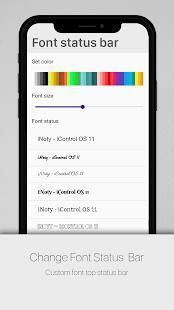
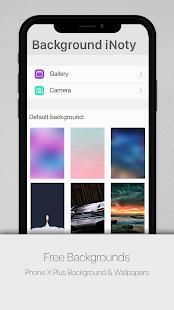
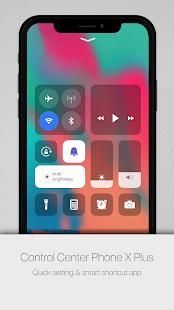
You can change background control panel OS 12 and change background inoty, change font, change font size and change text on notification, change color on notification. Change style notification and change style icontrol easy. Easy change app control in icontrol in setting, turn on camera very fast. change data 3G/4G easy, change volume on control pane íõs 11 easy. you can open any app if you create in setting.
With iNotify do not miss any notifications.
Notification Message : Get message noti on lockscreen and on notifcaiton on app.
Notify Call: call now on inotify if you have miss call.
Notification everywhere, and easy feedback
Now, ápplè have just release OS 11 , phone X Plus ( the next version of os 9)
You can't buy íphòné 6s and you want style of OS10 design ?
You want use inoty íós 10 of android with style os 10 phone?
Can are you using Android phone but you use some features of OS 10?
iNoty style OS 11 , Phone X Plus iNoty
is the perfect combination of inoty (lock screen notification of os 10, ilauncher, control panel, control center) and iControl (Control Panel os 10 theme íphòné). You will have the experience to be using OS10 with inoty.
iNoty style OS 10 have lots of features :
❖ Setting what notification you want to show with inoty (or inotify) os 10
❖ Customize your own inoty os10
❖ Display Carrier , Battery percent , network connection ....
❖ iNoty full version (free for all)
❖ iControl function of iNoty – inotify OS 10
❖ Quick search apps with search bar style ilauncher os 10
❖ From menu setting bar : open settings android, change airplane mode,
❖ Show missed call notification, you can call or sms back with one tap
❖ Design cardboard notification style íós 10, very beautiful and easy control
❖ Notifications center to show the notify you received like style OS10.
❖ Show today and notifications info.
❖ Custom notification bar like os 10 with iNoty style OS 10.
❖ Blur background HD wallpapers
❖ Display new inoty information ( title , description , icon ... )
❖ Display calendar , inoty events, note information
❖ Support Notification Lock Screen OS10
❖ Support Control Panel , Smart control OS 10
❖ iNoty – inotify style OS 10 show tomorrow event to remind you of what to do tomorrow.
❖ Show event note next from your current time.
❖ Show weather forecast realtime.
❖ iNoty support set time 12h or 24h format.
❖ More beautiful and smooth look like theme íós 10.
❖ Show carrier, signal strength and wifi signal look like theme os 10
❖ The information and alert showing on the Notification center like on os 10.
❖ Show battery percent, time date, carrier wave.
❖ Blur background, simple flat design.
❖ Download background hd beautiful, and custom background iNoty
❖ Small size but powerful.
❖ Smooth animation style inoty on íphònè.
❖ Not only show notification but also this app change notify become very beauty.
Remember, you will can settings everything inoty to conformity you want.
❖ iNoty – inotify ỉỌS 10 support quick setting with Turn on/off wifi, mobile data, Bluetooth, flash light, orientation, control panel, control center
❖ Swipe down to open notification to check notify.
❖ Swipe to appear inoty or event calendar for tomorrow, feature,...
❖ Show today and notifications info.
❖ Toggle for Data Connection
❖ Toggle for Portrait Orientation Lock
❖ Toggle turn on/off flashlight
❖ Toggle for Airplane Mode
❖ Toggle for Silent mode
❖ Toggle for Bluetooth
❖ Toggle for Battery saver
❖ Toggle for brightness
❖ Toggle for location
❖ Toggle for Wi-Fi
Feedback to us your feel to help us improve this app
aplikasi #This tidak dirancang oleh perusahaan apple
KAMI TELAH DIBUAT SETIAP UPAYA UNTUK MEMASTIKAN TIDAK MELANGGAR HAK CIPTA LAIN ATAU MEREK DAGANG.
Jika konten yang melanggar hak cipta, silakan beritahu kami dan kami akan menghapus konten tersebut.
Apakah Anda mencintai
iphone X Ditambah , Anda ingin ios inoty 11 di iPhone X Plus!
Anda dapat mengubah kontrol latar belakang panel OS 12 dan mengubah inoty latar belakang, mengubah font, ukuran font perubahan dan mengubah teks pemberitahuan, berubah warna pemberitahuan. Ubah pemberitahuan gaya dan perubahan iControl gaya mudah. Mudah perubahan kontrol aplikasi di iControl dalam pengaturan, menyalakan kamera sangat cepat. Perubahan data 3G / 4G mudah, perubahan volume pada panel kontrol iOS 11 mudah. Anda dapat membuka aplikasi apapun jika Anda membuat dalam pengaturan.
Dengan baris tidak valid jangan lewatkan pemberitahuan apapun.
Pemberitahuan Pesan: Dapatkan pesan noti pada lockscreen dan pada notifcaiton pada aplikasi.
Beritahu Panggilan: panggilan sekarang inotify jika Anda memiliki miss call.
Pemberitahuan di mana-mana, dan umpan balik mudah
Sekarang, Apple baru saja merilis OS 11, telepon X Plus (versi berikutnya dari os 9)
Anda tidak dapat membeli iPhone 6s dan Anda ingin gaya desain OS10?
Anda ingin menggunakan inoty iOS 10 dari android dengan gaya os 10 ponsel?
Dapat Anda menggunakan ponsel Android tetapi Anda menggunakan beberapa fitur dari OS 10?
gaya iNoty OS 11, Telepon X Ditambah iNoty adalah kombinasi sempurna dari inoty (mengunci pemberitahuan layar os 10, ilauncher, panel kontrol, pusat kendali) dan iControl (Control Panel os 10 tema iPhone). Anda akan memiliki pengalaman menjadi menggunakan OS10 dengan inoty.
iNoty gaya OS 10 memiliki banyak fitur:
❖ Menetapkan apa pemberitahuan yang ingin Anda tampilkan dengan inoty (atau baris tidak valid) os 10
❖ Sesuaikan os10 inoty Anda sendiri
❖ Pembawa Display, Battery persen, koneksi jaringan ....
❖ iNoty versi lengkap (gratis untuk semua)
❖ iControl fungsi iNoty - inotify OS 10
❖ aplikasi Pencarian cepat dengan search bar gaya ilauncher os 10
❖ Dari menu pengaturan bar: pengaturan terbuka android, mode pesawat perubahan,
❖ Tampilkan terjawab pemberitahuan panggilan, Anda dapat menghubungi atau sms kembali dengan satu tekan
❖ Desain kardus gaya pemberitahuan iOS 10, sangat indah dan kontrol yang mudah
pusat ❖ Pemberitahuan untuk menunjukkan memberitahu Anda diterima seperti gaya OS10.
❖ Tampilkan hari ini dan pemberitahuan info.
❖ bar pemberitahuan kustom seperti os 10 dengan gaya iNoty OS 10.
❖ Blur wallpaper latar belakang HD
❖ Menampilkan informasi inoty baru (judul, deskripsi, ikon ...)
❖ Tampilan kalender, peristiwa inoty, perhatikan informasi
❖ Dukungan Pemberitahuan Lock Screen OS10
❖ Dukungan Control Panel, kontrol Cerdas OS 10
❖ iNoty - inotify gaya OS 10 acara acara besok untuk mengingatkan Anda tentang apa yang harus dilakukan besok.
❖ Tampilkan acara catatan berikutnya dari waktu Anda saat ini.
❖ Tampilkan cuaca perkiraan realtime.
dukungan ❖ iNoty mengatur waktu 12 jam atau format 24h.
❖ Lebih indah dan halus terlihat seperti tema iOS 10.
❖ Tampilkan carrier, kekuatan sinyal dan sinyal wifi terlihat seperti tema os 10
❖ Informasi dan menunjukkan peringatan di pusat Pemberitahuan seperti pada os 10.
❖ Tampilkan persen baterai, tanggal waktu, gelombang pembawa.
background ❖ Blur, desain datar sederhana.
❖ Ambil latar belakang hd indah, dan latar belakang kustom iNoty
❖ Ukuran kecil tapi kuat.
❖ Halus gaya animasi inoty pada iPhone.
❖ Tidak hanya menampilkan notifikasi tetapi juga perubahan aplikasi ini Beritahu menjadi sangat cantik.
Ingat, Anda akan dapat pengaturan segalanya inoty untuk sesuai yang Anda inginkan.
❖ iNoty - inotify iOS 10 dukungan cepat pengaturan dengan Turn on / off wifi, mobile data, Bluetooth, lampu flash, orientasi, panel kontrol, pusat kontrol
❖ Gesek ke bawah untuk membuka pemberitahuan untuk memeriksa memberitahu.
❖ Babatan tampil inoty atau acara kalender untuk besok, fitur, ...
❖ Tampilkan hari ini dan pemberitahuan info.
❖ Beralih untuk Sambungan Data
❖ Beralih untuk Lock Orientasi Portrait
❖ Beralih turn on / off lampu senter
❖ Beralih untuk Mode pesawat
❖ Beralih untuk mode Diam
❖ Beralih untuk Bluetooth
❖ Beralih untuk Penghemat baterai
❖ Beralih untuk kecerahan
❖ Beralih untuk lokasi
❖ Beralih untuk Wi-Fi
Umpan balik kepada kami merasa Anda untuk membantu kami meningkatkan aplikasi ini




9Apps 4.9









