
Free and secured download of Android apps on 9Apps. 20,000+ users downloaded Wifi Calling latest version on 9Apps for free every week! One thing you need to know that this app is unique. This hot app was released on 2019-01-29. If you want it so go head and download it and enjoy your app.
IF IT DOES NOT WORK ON YOUR DEVICE, PLEASE DO NOT RATE! IT IS NOT SUPPOSED TO WORK ON EVERY DEVICE.
Why need the APP?
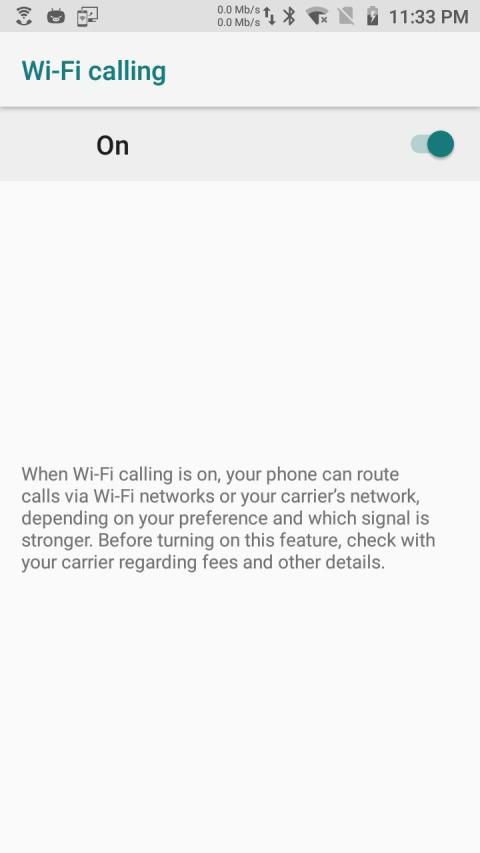
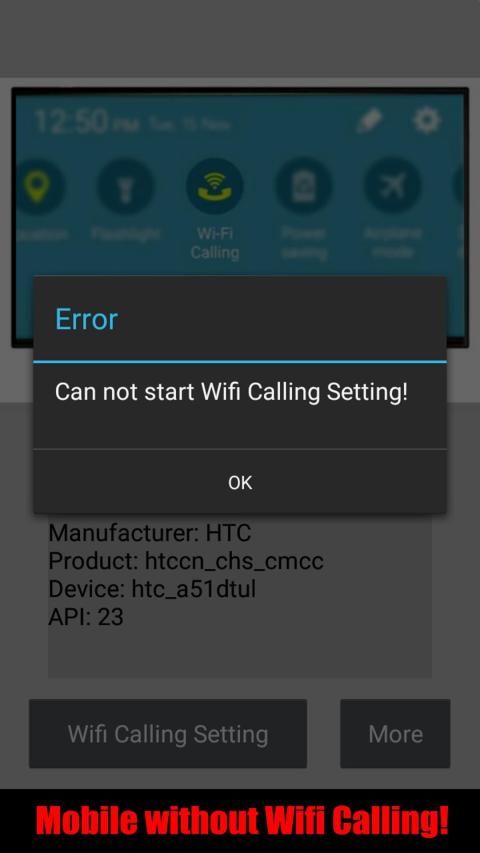
Today , Many retail mobiles have "Wifi Calling" / "Vowifi" function but not any menu entry to enable , The APP can check the hidden function and enable it if can use.
How to use the APP?
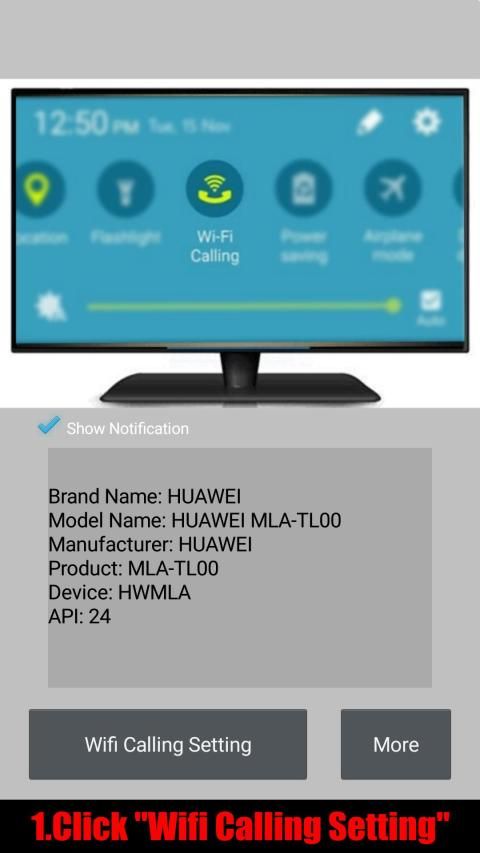
1.Start the app and click "Wifi Calling Setting"
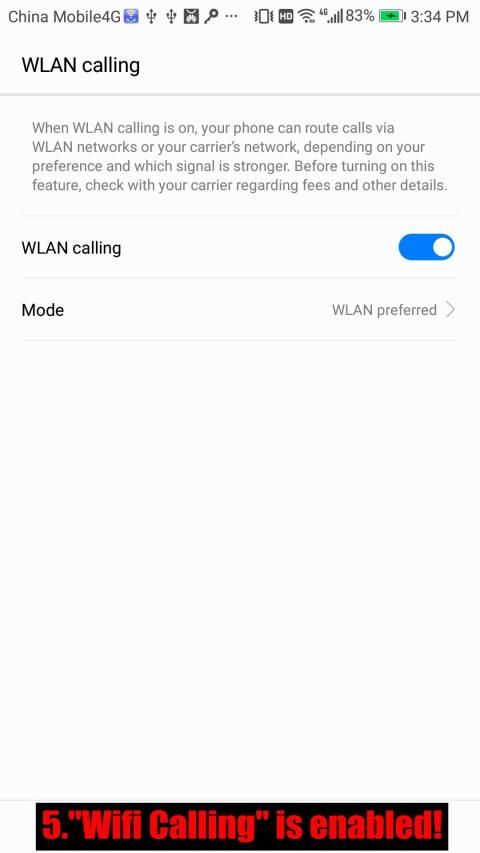
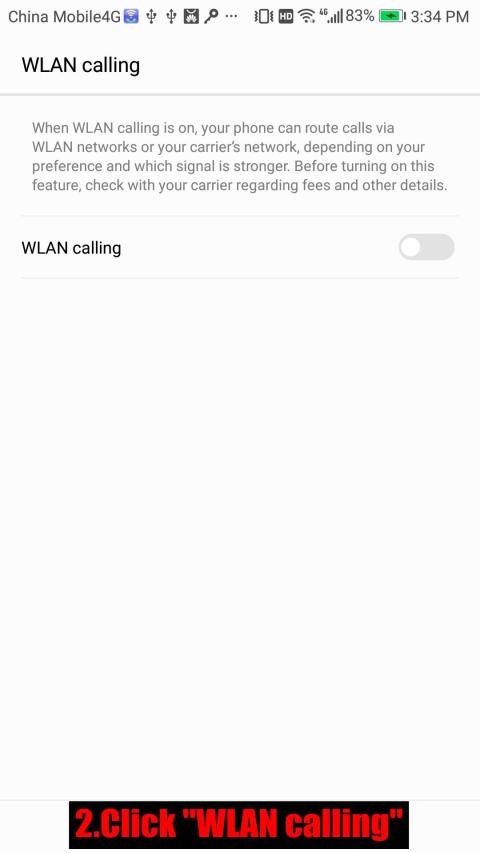
2.Click "WLAN calling"
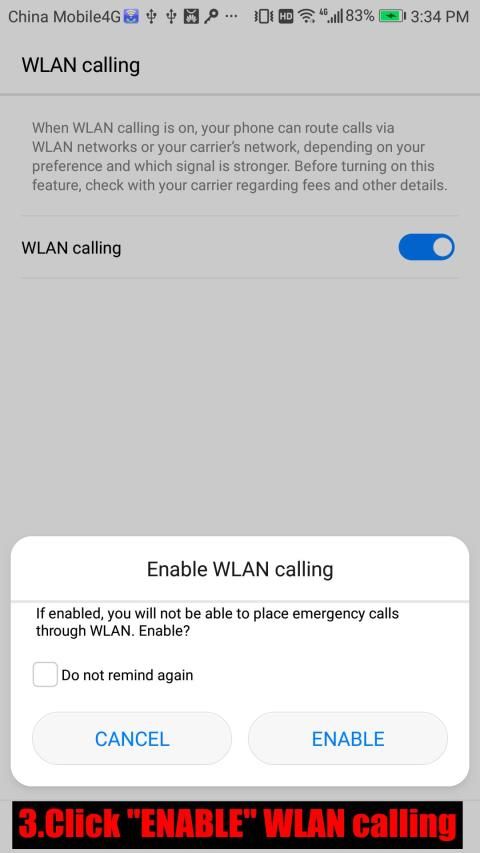
3.Click "ENABLE" WLAN calling
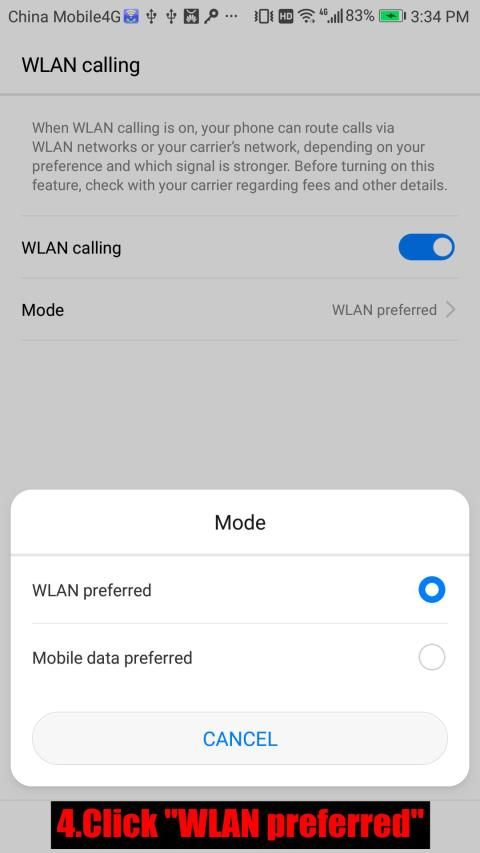
4.Click "WLAN preferred"
5."Wifi Calling" is enabled!
We welcome users to report compatible and incompatible phone models, and incompatible phenomena, Please send us an email: yjy837@gmail.com.
What is WiFi calling?
Instead of using your carrier's network connection, you can make voice calls via a Wi-Fi network. That could mean using a Wi-Fi connection you have set up at home, or whatever Wi-Fi hotspot you happen to be on when you're out and about, such as at a cafe or library. In most ways, it's like any other phone call, and you still use regular phone numbers.
Why would I want that?
WiFi calling is especially useful when you're in an area with weak carrier coverage. For example, when you're traveling to the residential countryside, or you're in a building with spotty reception. You may already be familiar with using Wi-Fi to send messages when SMS texting is unavailable (apps like Kik and Facebook Messenger provide these services) -- and the same applies when you're trying to place a call. With Wi-Fi, you can call a friend up even if you're in a dingy, underground bar (assuming you can connect to the bar's Wi-Fi, that is).
What carriers and phones support this service?
All four major US carriers (T-Mobile, Sprint, AT&T and Verizon) provide built-in Wi-Fi calling. Republic Wireless and Google Project Fi provide Wi-Fi calling on certain phones too. The former carries eight Android phones, while five phones (including the Google Pixel, Pixel XL and Nexus 6P) work on the latter. Republic Wireless gets support from Sprint's network if connection is unavailable, while Google uses T-Mobile, Sprint and US Cellular.
All of T-Mobile phones offer Wi-Fi calling built-in. As for Sprint, Wi-Fi calling is available on a number of iPhone models that run iOS 9.1 or higher. Several Android devices have the service as well, but you'll need to check through your phone's Settings menu to see if you have it.
Does it cost more?
For domestic calls, it doesn't cost any extra as such. But making calls over Wi-Fi can come out of your regular minutes allowance depending on your carrier and your phone plan.
A full list of carriers that supported Wi-Fi calling -
Canada:Bell,Telus,eastlink,Rogers,Fido,Virgin Mobile
United States:Alaska GCI,T-Mobile USA,Appalachian Wireless,Unlocking,AT&T,Metro PCS,Ting,C Spire,Simple Mobile,Verizon Wireless,Sprint Wireless
Austria:A1
Belgium:Telenet
Czech Republic:T-Mobile,Vodafone
Denmark:3,TDC,Telenor
France:Orange,Bouygues
Germany:O2,Telekom,Vodafone
Greece:Cosmote
Ireland:Eir
Liechtenstein:Swisscom
Netherlands:Vodafone
Norway:Telia,Telenor
Poland:Orange,Play,T-Mobile
Romania:Orange
Spain:Orange
Sweden:3
Switzerland:Salt,Swisscom,Sunrise
Turkey:Turkcell,Vodafone
United Kingdom:3,O2,Vodafone,EE
Australia:Optus,Telstra
Hong Kong:3,SmarTone,1O1O and CSL,China Mobile Hong Kong
India:Reliance Jio
Malaysia:Digi,U Mobile
Singapore:Singtel
Taiwan:APT,FarEasTone
Thailand:AIS,True Move,dtac
Argentina:Claro
Brazil:Claro,Vivo
Panama:+Móvil
Puerto Rico:AT&T,T-Mobile USA,Sprint Wireless
U.S. Virgin Islands:AT&T,Sprint Wireless
South Africa:CellC,Vodacom
Israel:Partner
Saudi Arabia:Zain
United Arab Emirates: Etisalat
A list of mobiles that supported Wi-Fi calling -
Samsung Galaxy S9, S9+, S8, S8+, S7, S7 edge, S6, S6 edge, S6 edge+, A3 (2017), A5 (2017), Note 8
Nexus 5X, 6P
Nokia 3, 5, 8
Lumia 550, 650, 950, 950XL
HTC 10, U11, U11 Life
BlackBerry Priv, Dtek 50, Dtek 60, KEYone
Google Pixel, Pixel XL, Pixel 2, Pixel 2 XL
Huawei P10, P10 Lite, P10 Plus, P Smart
Sony Xperia XZ1, Xperia XZ1 Compact
JIKA TIDAK BEKERJA PADA PERANGKAT ANDA, JANGAN RATE! IT IS NOT SEHARUSNYA BEKERJA PADA SETIAP PERANGKAT.
Mengapa perlu APP?
Hari ini, Banyak ponsel ritel memiliki "Wifi Calling" / "VoWiFi" fungsi tapi tidak masuk menu untuk mengaktifkan, The APP dapat memeriksa fungsi tersembunyi dan mengaktifkannya jika dapat digunakan.
Cara menggunakan APP itu?
1.Start aplikasi dan klik "Wifi Calling Setting"
2.Click "WLAN panggilan"
3.Click "ENABLE" WLAN panggilan
4.Click "WLAN disukai"
5. "Wifi Calling" diaktifkan!
Kami menyambut pengguna untuk melaporkan model ponsel yang kompatibel dan tidak kompatibel, dan fenomena yang tidak kompatibel, Silahkan kirim email: yjy837@gmail.com.
Apa panggilan WiFi?
Alih-alih menggunakan koneksi jaringan operator Anda, Anda dapat membuat panggilan suara melalui jaringan Wi-Fi. Itu bisa berarti menggunakan koneksi Wi-Fi Anda telah mengatur di rumah, atau apa pun Wi-Fi hotspot Anda kebetulan berada di ketika Anda keluar dan sekitar, seperti di sebuah kafe atau perpustakaan. Dalam kebanyakan hal, itu seperti panggilan telepon lain, dan Anda masih menggunakan nomor telepon biasa.
Mengapa saya ingin itu?
panggilan WiFi ini sangat berguna ketika Anda berada di daerah dengan cakupan operator lemah. Sebagai contoh, ketika Anda bepergian ke pedesaan perumahan, atau Anda berada di sebuah bangunan dengan penerimaan jerawatan. Anda mungkin sudah akrab dengan menggunakan Wi-Fi untuk mengirim pesan saat SMS SMS tidak tersedia (aplikasi seperti Kik dan Facebook Messenger menyediakan layanan ini) - dan yang sama berlaku ketika Anda mencoba untuk menempatkan panggilan. Dengan Wi-Fi, Anda dapat menghubungi teman bahkan jika Anda berada di suram, bar bawah tanah (dengan asumsi Anda dapat terhubung ke Wi-Fi bar ini, yang).
operator apa dan telepon mendukung layanan ini?
Semua empat operator besar di Amerika Serikat (T-Mobile, Sprint, AT & T dan Verizon) menyediakan built-in Wi-Fi calling. Republik Wireless dan Project Fi Google menyediakan Wi-Fi menelepon pada ponsel tertentu juga. Mantan membawa delapan ponsel Android, sementara lima ponsel (termasuk Google Pixel, Pixel XL dan Nexus 6P) bekerja pada yang terakhir. Republik Wireless mendapat dukungan dari jaringan Sprint jika koneksi tidak tersedia, sementara Google menggunakan T-Mobile, Sprint dan US Cellular.
Semua T-Mobile ponsel menawarkan Wi-Fi memanggil built-in. Adapun Sprint, Wi-Fi calling tersedia pada sejumlah model iPhone yang menjalankan iOS 9.1 atau lebih tinggi. Beberapa perangkat Android memiliki layanan juga, tetapi Anda harus memeriksa melalui menu Settings ponsel Anda melihat jika Anda memilikinya.
Biayanya lebih?
Untuk panggilan domestik, tidak biaya tambahan apapun seperti itu. Tapi membuat panggilan melalui Wi-Fi dapat keluar dari biasa penyisihan menit Anda tergantung pada operator Anda dan rencana telepon Anda.
Daftar lengkap operator yang mendukung Wi-Fi calling -
Canada: Bell, Telus, Eastlink, Rogers, Fido, Virgin Mobile
Amerika Serikat: Alaska GCI, T-Mobile USA, Appalachian Wireless, Unlocking, AT & T, Metro PCS, Ting, C Spire, Simple Mobile, Verizon Wireless, Sprint Wireless
Austria: A1
Belgia: Telenet
Republik Ceko: T-Mobile, Vodafone
Denmark: 3, TDC, Telenor
Prancis: Orange, Bouygues
Jerman: O2, Telekom, Vodafone
Yunani: Cosmote
Irlandia: Eir
Liechtenstein: Swisscom
Belanda: Vodafone
Norwegia: Telia, Telenor
Polandia: Orange, Putar, T-Mobile
Romania: Jeruk
Spanyol: Jeruk
Swedia: 3
Swiss: Salt, Swisscom, Sunrise
Turki: Turkcell, Vodafone
United Kingdom: 3, O2, Vodafone, EE
Australia: Optus, Telstra
Hong Kong: 3, SmarTone, 1O1O dan CSL, China Mobile Hong Kong
India: Reliance Jio
Malaysia: Digi, U Mobile
Singapura: Singtel
Taiwan: APT, FarEasTone
Thailand: AIS, True Move, dtac
Argentina: Claro
Brasil: Claro, Vivo
Panama: + Móvil
Puerto Rico: AT & T, T-Mobile USA, Sprint Wireless
AS Kepulauan Virgin: AT & T, Sprint Wireless
Afrika Selatan: CellC, Vodacom
Israel: Partner
Arab Saudi: Zain
Uni Emirat Arab: Etisalat
Daftar ponsel yang mendukung Wi-Fi calling -
Samsung Galaxy S9, S9 +, S8, S8 +, S7, S7 tepi, S6, S6 tepi, tepi S6 +, A3 (2017), A5 (2017), Catatan 8
Nexus 5X, 6P
Nokia 3, 5, 8
Lumia 550, 650, 950, 950XL
HTC 10, U11, U11 Hidup
BlackBerry Priv, DTEK 50, DTEK 60, KEYone
Google Pixel, Pixel XL, Pixel 2, Pixel 2 XL
Huawei P10, P10 Lite, P10 Plus, P Pintar
Sony Xperia XZ1, Xperia XZ1 Compact
1.0.1 First release
1.0.2 Remove some AD
1.0.3 Native AD
1.0.4 EU consent and Oreo support
1.0.5 Update Native AD



9Apps 4.9











