

Do you believe? 20,000+ users downloaded WiFi Analyzer latest version on 9Apps for free every week! This makes the app feel more like a popular merchandise, which is very positive in my opinion. This hot app was released on 2018-09-12. You’ll want to use it on your own phones after you know more.
Use WiFi Analyzer to Optimize your WiFi network using WiFi Analyzer by examining surrounding WiFi networks, measuring their signal strength as well as identifying crowded channels.
Features:
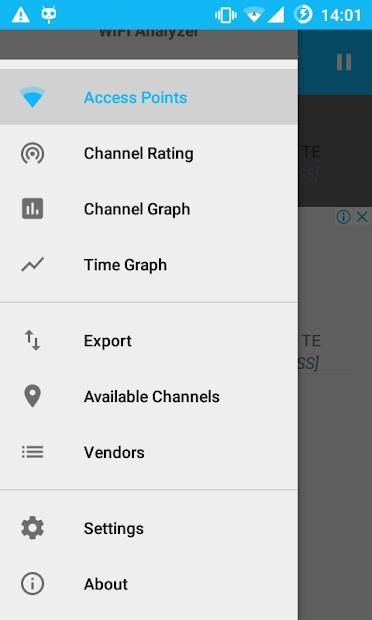
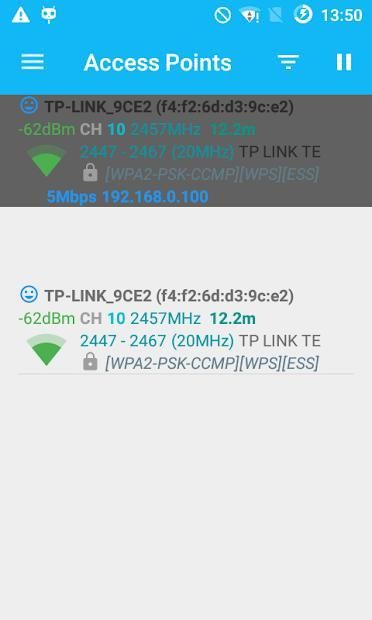
- Identify nearby Access Points
- Graph channels signal strength
- Graph Access Point signal strength over time
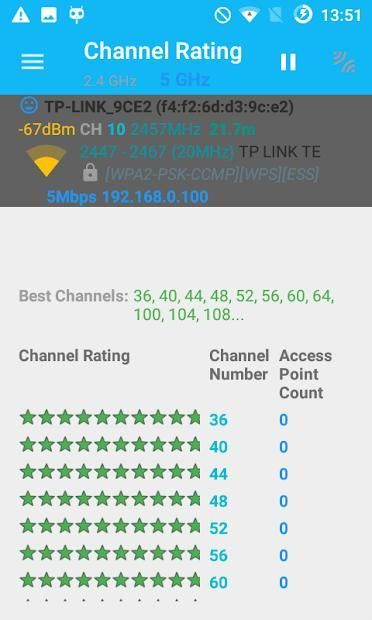
- Analyze WiFi networks to rate channels
- HT/VHT Detection - 40/80/160MHz (Requires Android OS 6+)
- Access Point view complete or compact
- Estimated Distance to the Access Points
- Export access points details
- Dark or Light theme available
- Pause/Resume scanning
- Available filters: WiFi band, Signal strength, Security and SSID
- Vendor/OUI Database Lookup
Usage Tips:
- Tap the title bar to switch between 2.4 and 5 GHz WiFi band.
- Swipe to manually refresh screen content.
- Swipe left/right at the bottom of the screen to navigate to the next/previous screen
- SSID with (***) means it is hidden.
Please visit our website for more helpful information:
https://vremsoftwaredevelopment.github.io/WiFiAnalyzer
Features:
https://vremsoftwaredevelopment.github.io/WiFiAnalyzer/#features
Usage Tips:
https://vremsoftwaredevelopment.github.io/WiFiAnalyzer/#usage-tips
How-to:
https://vremsoftwaredevelopment.github.io/WiFiAnalyzer/#how-to
FAQ:
https://vremsoftwaredevelopment.github.io/WiFiAnalyzer/#faq
GitHub is the place to go for bug reports and code contributions:
https://vremsoftwaredevelopment.github.io/WiFiAnalyzer/#feedback
Gunakan WiFi Analyzer untuk Mengoptimalkan jaringan WiFi Anda menggunakan WiFi Analyzer dengan memeriksa jaringan WiFi di sekitarnya, mengukur kekuatan sinyal mereka serta mengidentifikasi saluran yang padat.
Fitur:
- Identifikasi Titik Akses terdekat
- Grafik kekuatan sinyal saluran
- Kekuatan sinyal Titik Akses Grafik dari waktu ke waktu
- Menganalisis jaringan WiFi untuk menilai saluran
- HT / VHT Detection - 40/80 / 160MHz (Membutuhkan Android OS 6+)
- Tampilan Access Point lengkap atau ringkas
- Perkiraan Jarak ke Titik Akses
- Mengekspor rincian jalur akses
- Tema Gelap atau Terang tersedia
- Jeda / Lanjutkan pemindaian
- Filter yang tersedia: Band WiFi, Kekuatan sinyal, Keamanan, dan SSID
- Vendor / OUI Database Lookup
Kiat Penggunaan:
- Ketuk baris judul untuk beralih antara pita 2,4 GHz dan 2,4 GHz.
- Geser untuk menyegarkan konten layar secara manual.
- Geser ke kiri / kanan di bagian bawah layar untuk menavigasi ke layar berikutnya / sebelumnya
- SSID dengan (***) berarti tersembunyi.
Silakan kunjungi situs web kami untuk informasi yang lebih bermanfaat:
https://vremsoftwaredevelopment.github.io/WiFiAnalyzer
Fitur:
https://vremsoftwaredevelopment.github.io/WiFiAnalyzer/#features
Kiat Penggunaan:
https://vremsoftwaredevelopment.github.io/WiFiAnalyzer/#usage-tips
Bagaimana caranya:
https://vremsoftwaredevelopment.github.io/WiFiAnalyzer/#how-to
FAQ:
https://vremsoftwaredevelopment.github.io/WiFiAnalyzer/#faq
GitHub adalah tempat untuk mencari laporan bug dan kontribusi kode:
https://vremsoftwaredevelopment.github.io/WiFiAnalyzer/#feedback
![Top 5 WiFi Analyzer Apps I Use [Android Version] screenshot 1](https://i.ytimg.com/vi/vQYPKh32PDE/mqdefault.jpg)




9Apps 4.9










