






News : WhatsApp group video calling upcoming feature.
If you are interested to make WhatsApp group video calling then update your WhatsApp.
WhatsApp messenger user?
WhatsWeb is a tool to use for open another WhatsApp account in same phone.
You have multiple account?
Don't worry. Relax. We have solution WhatsWeb
WhatsWeb for WhatsApp Messenger - Dual WhatsApp Account on 1 device
WhatsApp messenger for chat like skype, viber, kik, facebook and tango
clone another WhatsApp in seconds
Stay in touch with your friends by WhatsApp group video calling.
Run 2 WhatsApp messenger accounts in 1 device!
Multi WhatsApp messenger : Multiple WhatsApp account in one phone.
Sync your WhatsApp account to your mobile or tablet
With WhatsWeb you can:
1. Open the same WhatsApp account on multiple devices
- WhatsWeb. Finally! You can run WhatsApp spy on your phone & tablet!
- Scan the QR code to sync your account to WhatsWeb.
- Dual WhatsApp . Use your WhatsApp Account on dual devices. on your phone, tablet or multiple devices simultaneously.
- Multi WhatsApp. Run multiple WhatsApp accounts on a single device. You can have 2 WhatsApp in 1 device.
- While at home, sync from your phone to tablet, so you can chat and reply from your tablet. Tablet for WhatsApp spy.
- OGWhatsApp Clone. You can clone your work account to your personal phone/tablet or vice versa.
2. Full access:
- Use WhatsApp Spy to get all your contacts, chats list, chat history, messages, photos and files on multiple devices.
4. Easy-to-use, Easy-to-setup.
5. Works on ALL devices!
6. No need to Parallel Space
7. Alternative to Parallel Space
WhatsWeb for WhatsApp allows you to run two WhatsApp accounts in a single device OR You can also run the same WhatsApp account on multiple devices. It is entirely up to you!
- Double WhatsApp, double the fun!
- You can have dual WhatsApp in 1 device!
- You can have your WhatsApp account on dual devices!
Enjoy with your friends by WhatsApp group video calling.
HOW IT WORKS ??
To ensure best performance to use:
1. Ensure that the main phone with the WhatsApp account you wish to sync to is connected to the internet. Wifi is best.
2. Remove un-used chat list and chat groups. This reduces the data required to transfer, therefore speeding up performance.
HOW TO USE
1. Install and Open WhatsWeb on device (Phone/Tablet) you want to sync/clone your WhatsApp to
2. Open WhatsApp on your main phone (the account you want to clone)
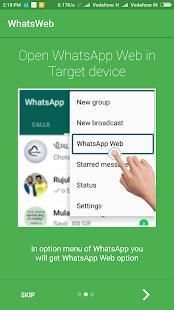
-> On Android: Scroll to the Chats screen -> Menu -> WhatsApp Web.
-> On iPhone: Click Settings -> WhatsApp Web.
-> On Nokia S60 and Windows Phone: Go to Menu -> WhatsApp Web.
-> On Nokia S40: Swipe up from bottom of screen -> WhatsApp Web.
-> On BlackBerry: Go to Chats -> Menu -> WhatsApp Web.
-> On BlackBerry 10: Swipe down from top of the screen -> WhatsApp Web.
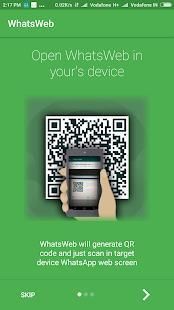
3. After clicking "WhatsApp web", you should see a camera QR scanning screen.
4. Now scan the QR code displayed on WhatsWeb spy.
5. Done! Sync complete! Now you can access the same WhatsApp spy account on both devices!
6. Enjoy 2 WhatsApp Spy in 1 device!
7. Enjoy Parallel Space for WhatsApp.
PS: This app is an independent one and is not affiliated with any other company including WhatsApp inc.This app(simulation) is used only for personal use.
Rate, Share and leave a good review
Notice : This application is not affiliated by WhatsApp & WhatsApp is a Registered Trademark of WhatsApp only.
Berita: WhatsApp kelompok video calling fitur yang akan datang.
Jika Anda tertarik untuk membuat WhatsApp kelompok panggilan video kemudian memperbarui WhatsApp Anda.
WhatsApp Messenger pengguna?
WhatsWeb adalah alat yang digunakan untuk membuka akun WhatsApp lain di telepon yang sama.
Anda memiliki beberapa akun?
Jangan khawatir. Bersantai. Kami memiliki solusi WhatsWeb
WhatsWeb untuk WhatsApp Messenger - Akun WhatsApp Dual On 1 perangkat
WhatsApp Messenger untuk chatting seperti skype, Viber, kik, facebook dan tango
mengkloning WhatsApp lain di detik
Tetap berhubungan dengan teman-teman Anda dengan WhatsApp group video calling.
Jalankan 2 WhatsApp rekening utusan dalam 1 perangkat!
Multi WhatsApp Messenger: akun WhatsApp Beberapa dalam satu ponsel.
Sinkronisasi akun WhatsApp Anda ke ponsel atau tablet
Dengan WhatsWeb Anda dapat:
1. Buka akun WhatsApp yang sama pada beberapa perangkat
- WhatsWeb. Akhirnya! Anda dapat menjalankan WhatsApp mata-mata di ponsel & tablet!
- Scan kode QR untuk melakukan sinkronisasi akun Anda untuk WhatsWeb.
- Ganda WhatsApp. Gunakan Akun WhatsApp Anda pada perangkat dual. pada ponsel, tablet atau beberapa perangkat secara bersamaan.
- Multi WhatsApp. Menjalankan beberapa account WhatsApp pada satu perangkat. Anda dapat memiliki 2 WhatsApp di 1 perangkat.
- Sementara di rumah, sinkronisasi dari ponsel ke tablet, sehingga Anda dapat chatting dan membalas dari tablet. Tablet untuk WhatsApp mata-mata.
- OGWhatsApp Clone. Anda dapat mengkloning akun pekerjaan Anda ke telepon pribadi Anda / tablet atau sebaliknya.
2. Akses penuh:
- Gunakan WhatsApp Spy untuk mendapatkan semua kontak Anda, chatting daftar, riwayat chatting, pesan, foto dan file pada beberapa perangkat.
4. Mudah digunakan, Mudah-to-setup.
5. Bekerja pada SEMUA perangkat!
6. Tidak perlu Paralel Ruang
7. Alternatif ke Space Paralel
WhatsWeb untuk WhatsApp memungkinkan Anda untuk menjalankan dua account WhatsApp dalam satu perangkat atau Anda juga dapat menjalankan akun WhatsApp yang sama pada beberapa perangkat. Hal ini sepenuhnya terserah Anda!
- Double WhatsApp, ganda menyenangkan!
- Anda dapat memiliki ganda WhatsApp dalam 1 perangkat!
- Anda dapat memiliki akun WhatsApp Anda pada perangkat dual!
Nikmati dengan teman-teman Anda dengan WhatsApp group video calling.
BAGAIMANA ITU BEKERJA ??
Untuk memastikan kinerja terbaik dengan penggunaan:
1. Pastikan bahwa telepon utama dengan WhatsApp rekening Anda ingin sync ke terhubung ke internet. Wifi adalah yang terbaik.
2. Lepaskan un-digunakan daftar chat dan chatting kelompok. Hal ini mengurangi data yang dibutuhkan untuk mentransfer, karena itu mempercepat kinerja.
BAGAIMANA CARA MENGGUNAKAN
1. Instal dan Buka WhatsWeb pada perangkat (Telepon / Tablet) yang ingin Anda sinkronkan / mengkloning WhatsApp untuk
2. Buka WhatsApp pada ponsel utama Anda (akun yang Anda ingin mengkloning)
-> Pada Android: Gulir ke layar Chatting -> Menu -> WhatsApp Web.
-> Pada iPhone: Klik Settings -> WhatsApp Web.
-> Pada Nokia S60 dan Windows Phone: Masuk ke Menu -> WhatsApp Web.
-> Pada Nokia S40: Geser dari bawah layar -> WhatsApp Web.
-> Pada BlackBerry: Pergi ke Chats -> Menu -> WhatsApp Web.
-> Pada BlackBerry 10: Gesek ke bawah dari atas layar -> WhatsApp Web.
3. Setelah mengklik "WhatsApp web", Anda akan melihat kamera QR layar pemindaian.
4. Sekarang memindai kode QR yang ditampilkan pada WhatsWeb mata-mata.
5. Selesai! Sinkronisasi lengkap! Sekarang Anda dapat mengakses akun mata-mata WhatsApp yang sama pada kedua perangkat!
6. Nikmati 2 WhatsApp Spy dalam 1 perangkat!
7. Nikmati Ruang Paralel untuk WhatsApp.
PS: Aplikasi ini merupakan salah satu independen dan tidak berafiliasi dengan perusahaan lain termasuk WhatsApp inc.This aplikasi (simulasi) hanya digunakan untuk penggunaan pribadi.
Rate, Share dan meninggalkan review yang baik
Perhatikan: Aplikasi ini tidak berafiliasi dengan WhatsApp & WhatsApp adalah merek dagang terdaftar dari WhatsApp saja.
Small bugs added to further resolution.



9Apps 4.9










