

Following is the introduction of a wonderful App. 30,000+ users downloaded Whatsapp Offline latest version on 9Apps for free every week! It truly does not offer any money. This hot app was released on 2018-06-07. Download and play this free app for android mobile phone now!
Want to avoid the permanent control of when you connect?
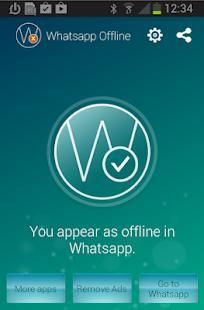
Hide your status in WhatsApp is possible with WhatsApp Offline. You can use WhatsApp without showing that you are online. This app don't update your connection time and everything automatically from an icon in WhatsApp. Very simple and easy.
Our app automates all processes by you turning on and off the connections when you enter in WhatsApp refreshing the sending and receiving messages preventing that WhatsApp servers capture your connection time. Just activate the application and when you enter in WhatsApp, you will not be online.
INSTRUCTIONS:
Enter the App ' Whatsapp hide status ' and click on the 'Enable ' icon in the " W " to launch WhatsApp directly from the application. This will enter in WhatsApp but you will not be visible. You can now read posts , write , etc ... When you're done and want your messages sent but not to update your status in whatsapp simply use the update icon in the WhatsApp Whatsapp or go out of WhatsApp. Also so, coming out of the messaging app, the messages will be sent automatically but you will be invisible in WhatsApp to all people.
- If you use a phone with Android 2.2, it is recommended not to use the option of "mobile data", only use it via WiFi.
Ingin menghindari kontrol permanen dari saat Anda terhubung?
Menyembunyikan status Anda di WhatsApp adalah mungkin dengan WhatsApp Offline. Anda dapat menggunakan WhatsApp tanpa menunjukkan bahwa Anda sedang online. Aplikasi ini tidak memperbarui waktu koneksi Anda dan semuanya secara otomatis dari sebuah ikon di WhatsApp. Sangat sederhana dan mudah.
aplikasi kita mengotomatisasi semua proses oleh Anda menghidupkan dan mematikan koneksi ketika Anda memasukkan di WhatsApp menyegarkan pesan mengirim dan menerima mencegah bahwa server WhatsApp menangkap waktu koneksi Anda. Hanya mengaktifkan aplikasi dan ketika Anda masukkan dalam WhatsApp, Anda tidak akan online.
PETUNJUK:
Masukkan App 'Whatsapp menyembunyikan statusnya' dan klik pada 'Enable' icon di "W" untuk memulai WhatsApp langsung dari aplikasi. Ini akan masuk di WhatsApp tetapi Anda tidak akan terlihat. Sekarang Anda dapat membaca posting, menulis, dll ... Setelah selesai dan ingin pesan Anda dikirim tapi tidak untuk memperbarui status Anda di whatsapp hanya menggunakan ikon pembaruan di WhatsApp Whatsapp atau pergi keluar dari WhatsApp. Juga begitu, keluar dari aplikasi pesan, pesan akan dikirim secara otomatis tetapi Anda akan terlihat di WhatsApp untuk semua orang.
- Jika Anda menggunakan ponsel dengan Android 2.2, dianjurkan untuk tidak menggunakan opsi "mobile data", hanya menggunakannya melalui WiFi.






9Apps 4.9










