Find most popular android apps here! 30,000+ users downloaded Web Programming: PHP and MySql latest version on 9Apps for free every week! The app can be the quickest one to play if you get used to it. This hot app was released on 2018-05-30. It is available as a free download on 9Apps.
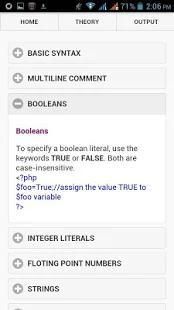
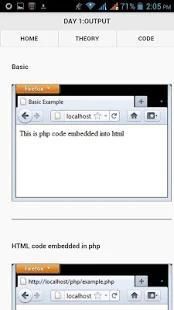
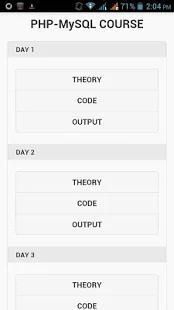
"Web Programming: PHP and MySql" makes it easy to learn PHP, it shows both the PHP source code and the HTML output of the code.
PHP is a server scripting language, and a powerful tool for making dynamic and interactive Web pages. PHP is a widely-used, free, and efficient alternative to competitors such as Microsoft's ASP.
Learn PHP fast and in easy way in just 5 days for beginners in Web Application.Its a crash course on PHP and MySQL developed to enhance learners to learn PHP quickly.
The application is very user-friendly.
It doesn't require any net access, you just need to download it and that's it.
Does not require internet access except for ADs.
App has crossed 50,000+ downloads in 12 months
Thanks for all your love and support!!
The AD Free version can be found on the link below
https://play.google.com/store/apps/details?id=com.taiijas.php_mysql
The PHP & MySQL APP will enlighten you on how to install and setup PHP along with the MySQL for running the php scripts.
Installation on windows using wamp server -
Download WAMP server from any internet site(e.g www.wampserver.com – official site)
Run the installation
Start all the services of wamp server
First steps to run php scripts -
After you have installed php on your system you can check if installation is successful or not by steps given below -
Put your scripts into www folder of wamp(otherwise scripts will not run)
Open the web browser
Type http://localhost
you will see the wamp server home page if not then your installation is not successful
To run the php script you should save the file with .php extension into www folder. Thus you can create your own folder into www directory and save your scripts into your own folder. To run the scripts directly without creating folder you can simply write file name after localhost for e.g suppose your file name is first.php then you should write http://localhost/first.php into your web browser as URL and easily run your script without putting it into your separate folder but it should be saved into www directory(Main directory to run the php script).
"Web Programming: PHP dan MySql" membuatnya mudah untuk belajar PHP, hal itu menunjukkan kedua kode sumber PHP dan output HTML dari kode.
PHP adalah bahasa server scripting, dan alat yang ampuh untuk membuat halaman Web dinamis dan interaktif. PHP adalah banyak digunakan, bebas, dan alternatif efisien untuk pesaing seperti Microsoft ASP.
Belajar PHP cepat dan dengan cara mudah hanya dalam 5 hari untuk pemula di Web Application.Its kursus kilat pada PHP dan MySQL dikembangkan untuk meningkatkan peserta didik untuk belajar PHP dengan cepat.
Aplikasi ini sangat user-friendly.
Ini tidak memerlukan akses jaringan, Anda hanya perlu men-download dan hanya itu.
Tidak membutuhkan akses internet kecuali untuk ADS.
App telah melintasi 50.000 download dalam 12 bulan
Terima kasih untuk semua cinta dan dukungan !!
AD Versi gratis dapat ditemukan pada link di bawah
https://play.google.com/store/apps/details?id=com.taiijas.php_mysql
PHP & MySQL APP akan mencerahkan Anda pada cara menginstal dan setup PHP bersama dengan MySQL untuk menjalankan script php.
Instalasi pada windows menggunakan server yang wamp -
Men-download WAMP server dari situs internet (mis www.wampserver.com - situs resmi)
Jalankan instalasi
Mulai semua layanan server wamp
langkah pertama untuk menjalankan script php -
Setelah Anda menginstal php pada sistem Anda, Anda dapat memeriksa apakah instalasi berhasil atau tidak dengan langkah-langkah yang diberikan di bawah -
Menempatkan script Anda ke folder www dari wamp (jika script tidak akan berjalan)
Buka browser web
Jenis http: // localhost
Anda akan melihat halaman rumah wamp server yang jika tidak maka instalasi Anda tidak berhasil
Untuk menjalankan script php Anda harus menyimpan file dengan ekstensi php ke folder www. Dengan demikian Anda dapat membuat folder Anda sendiri ke direktori www dan menyimpan script Anda ke folder Anda sendiri. Untuk menjalankan script langsung tanpa membuat folder Anda hanya dapat menulis nama berkas setelah localhost untuk misalnya kira nama file Anda adalah first.php maka Anda harus menulis http: //localhost/first.php ke browser web Anda sebagai URL dan mudah menjalankan script Anda tanpa memasukkannya ke folder terpisah Anda tetapi harus disimpan ke dalam direktori www (direktori utama untuk menjalankan script php).
Easy to learn PHP, it shows both the PHP source code and the HTML output of the code.

9Apps 4.9