I would like to recommend you an application with large number of downloaders. 20,000+ users downloaded UPA latest version on 9Apps for free every week! It is an excellent app and the fact it is! This hot app was released on 2018-09-22. If you wanna more apps besides this, turn to 9Apps.
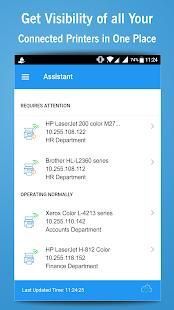
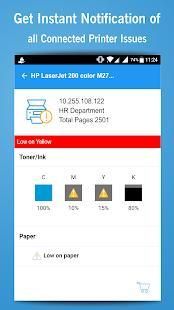
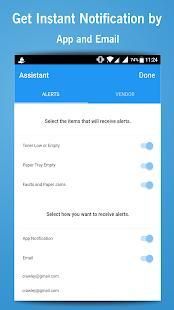
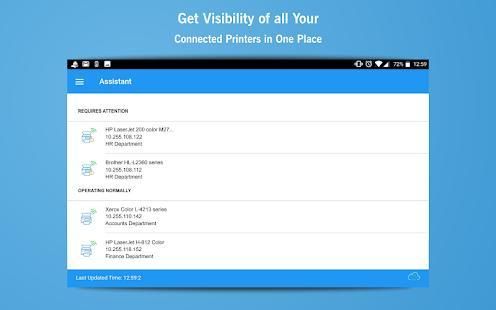
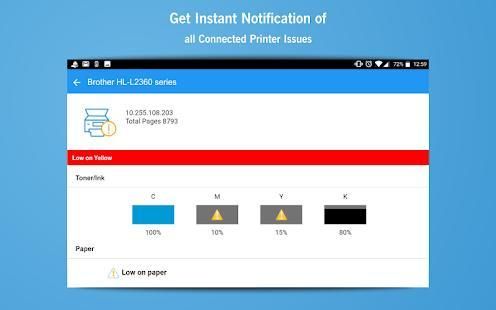
The free Universal Printing Assistant (UPA) is the easiest way to monitor network printers from your mobile device. Simply tap to see operating status and alert conditions (low/empty paper tray, low toner). You can even configure UPA to automatically email and/or display a notification if a printer enters an alert state.
HOW IT WORKS
UPA lets you keep ahead of your printers by providing real-time status every time you open the app and by actively notifying you if a printer requires attention.
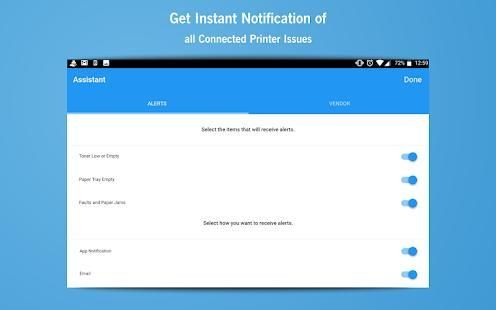
Upon installation, UPA securely scans your network and identifies all SNMP-capable network printers. You can expand your printer search by entering a broader IP Address range, and you can delete printers from monitoring at any time. You’re able to configure the app to identify the conditions that will cause an alert (toner/paper low, paper jams), and whether you want to enable active alerts via email and app notifications.
SIMPLIFIED TONER ORDERING
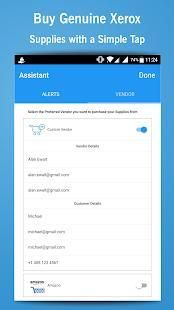
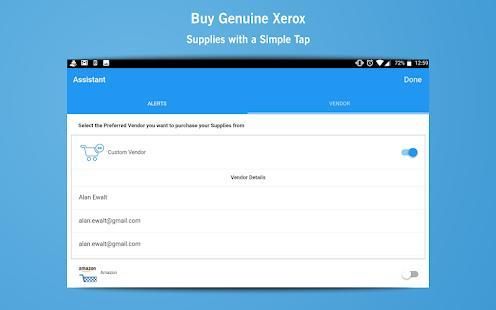
UPA tells you when toner is running low makes it easy to re-order with just a couple taps. During setup you can specify a vendor to purchase printer supplies. There are two types
• Preferred Vendors: By selecting from the list of Preferred Vendors, you’ll enjoy One-Click ordering and a routine e-commerce experience.
• Custom Vendors: By setting up a Custom Vendor (just enter your vendor’s business name and email address), UPA will create an email pre-populated specifying the supplies you need.
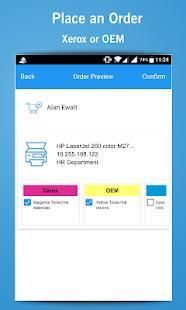
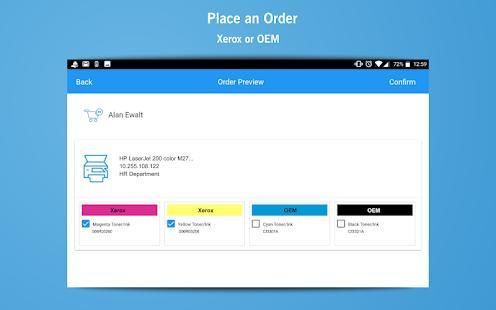
In either instance, UPA takes the guesswork out of ordering by identifying the part number for the toner cartridge needing replacing. The app also gives you the option of purchasing original supplies (OEM) or lower-cost Xerox-brand for HP and Brother.
NETWORK ENVIRONMENT
Universal Printing Assistant is designed to work within a Local Area Network (LAN) that typically connect computers, printers and other peripherals in a relatively small area such as a business, school, etc. Modern LANs predominantly use either Wi-Fi or Ethernet to connect their devices together.
UPA is not well suited to large enterprise (e.g., corporate) network environments as these commonly utilize wide area network (WAN) to connect several LANs as well as proxy servers, which among other things provide firewall and network data filtering support.
Note: Your mobile device must connect to the same network as the printers for UPA to discover to the printers.
MOBILE DEVICE INTERNET CONNECTION VIA WIFI
For UPA to function, your mobile device must have a strong/consistent WIFI connection to the Internet.
SUPPORTED PRINTERS
Universal Printing Assistant 1.0 is optimized to support Brother, HP, and Xerox printers.
UPA will interface with other printer brands (e.g., Lexmark, Epson, Canon, etc.) though One-Click ordering will not be available until Fall 2018.
Note: Entry level home-office/personal printers (laser, inkjet, all-in-ones) are likely not able to provide adequate information to UPA about paper tray levels, supplies levels, or operational status due to their limited reporting capabilities.
• This is a limitation of entry-level printing devices – not the UPA App itself.
SUPPORTED COUNTRIES
Version 1.0 will support United States only. A subsequent UPA release will be available for download and use in other countries in Fall 2018.
Bebas Universal Printing Assistant (UPA) adalah cara termudah untuk memonitor printer jaringan dari perangkat mobile Anda. Cukup tekan untuk melihat status operasi dan kondisi alert (rendah / baki kertas kosong, toner rendah). Anda bahkan dapat mengkonfigurasi UPA untuk secara otomatis email dan / atau menampilkan pemberitahuan jika printer memasuki sebuah negara peringatan.
BAGAIMANA ITU BEKERJA
UPA memungkinkan Anda tetap di depan printer Anda dengan menyediakan status real-time setiap kali Anda membuka aplikasi dan secara aktif memberitahu Anda jika printer membutuhkan perhatian.
Setelah instalasi, UPA aman memindai jaringan Anda dan mengidentifikasi semua printer jaringan SNMP-mampu. Anda dapat memperluas pencarian printer Anda dengan memasukkan lebih luas jangkauan IP Address, dan Anda dapat menghapus printer dari pemantauan setiap saat. Anda dapat mengkonfigurasi aplikasi untuk mengidentifikasi kondisi yang akan menyebabkan peringatan (toner / kertas rendah, kemacetan kertas), dan apakah Anda ingin mengaktifkan alert aktif melalui pemberitahuan email dan aplikasi.
SEDERHANA TONER PEMESANAN
UPA memberitahu Anda ketika toner hampir habis memudahkan untuk re-order dengan hanya beberapa keran. Selama setup Anda dapat menentukan vendor untuk membeli perlengkapan printer. Ada dua jenis
• Vendor yang dipilih: Dengan memilih dari daftar Preferred Vendor, Anda akan menikmati Satu-Klik pemesanan dan pengalaman e-commerce rutin.
• Custom Vendor: Dengan mendirikan Custom vendor (cukup masukkan nama bisnis vendor Anda dan alamat email), UPA akan membuat email pra-diisi menentukan perlengkapan yang Anda butuhkan.
Dalam kedua contoh, UPA mengambil menebak dari pemesanan dengan mengidentifikasi nomor komponen kartrid toner perlu mengganti. Aplikasi ini juga memberikan Anda pilihan untuk membeli perlengkapan asli (OEM) atau lebih rendah-biaya Xerox-merek untuk HP dan Brother.
JARINGAN LINGKUNGAN
Universal Printing Asisten dirancang untuk bekerja dalam Local Area Network (LAN) yang biasanya menghubungkan komputer, printer dan peripheral lainnya di daerah yang relatif kecil seperti bisnis, sekolah, dll LAN modern dominan menggunakan Wi-Fi atau Ethernet untuk menghubungkan perangkat mereka bersama-sama.
UPA tidak cocok untuk perusahaan besar (misalnya, perusahaan) lingkungan jaringan seperti ini umumnya memanfaatkan wide area network (WAN) untuk menghubungkan beberapa LAN serta server proxy, yang antara lain menyediakan firewall dan jaringan data penyaringan dukungan.
Catatan: Ponsel Anda harus terhubung ke jaringan yang sama dengan printer untuk UPA untuk menemukan ke printer.
MOBILE PERANGKAT INTERNET CONNECTION VIA WIFI
Untuk UPA berfungsi, perangkat mobile Anda harus memiliki / konsisten koneksi WIFI kuat ke Internet.
PRINTERS DIDUKUNG
Universal Printing Asisten 1,0 dioptimalkan untuk mendukung saudara, HP, dan printer Xerox.
UPA akan antarmuka dengan merek lain printer (misalnya, Lexmark, Epson, Canon, dll) meskipun Satu-Klik pemesanan tidak akan tersedia sampai musim gugur 2018.
Catatan: printer Entry level rumah-kantor / pribadi (laser, inkjet, all-in-one) kemungkinan tidak dapat memberikan informasi yang memadai untuk UPA tentang tingkat baki kertas, tingkat persediaan, atau status operasional karena kemampuan pelaporan mereka yang terbatas.
• Ini adalah keterbatasan dari perangkat pencetakan entry-level - tidak App UPA itu sendiri.
NEGARA DIDUKUNG
Versi 1.0 akan mendukung Amerika Serikat saja. Sebuah rilis UPA berikutnya akan tersedia untuk di-download dan digunakan dalam negara-negara lain di Fall 2018.
We update the app regularly so that you have the best experience. Get the latest version for all features and enhancements. Thanks for using the free Universal Printing Assistant (UPA), the easiest way to monitor network printers from your mobile device.

9Apps 4.9