

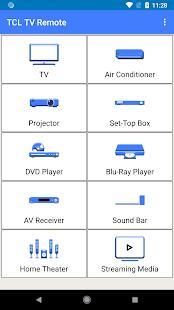
Download the official version of India apps from 9apps now. 20,000+ users downloaded TCL TV Remote latest version on 9Apps for free every week! In addition, the latest version of the app has updated a lot of features. This hot app was released on 2018-08-12. Besides, you can also select other popular apps you like here!
How to Use:
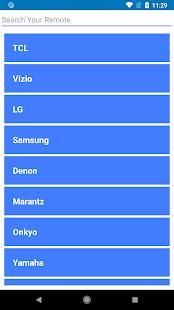
> Point your phone towards TCL TV.
> Press Power button and wait for TV to turn ON or OFF.
> If your TCL TV is turned ON by “TCL Remote”, Select “Working” and enjoy.
> If your TCL TV is Not Turned ON by “TCL Remote”, Select “Not Working” and Try next TCL TV Remote.
> Try same process until your TV gets ON.
Which Functionalities are Included:
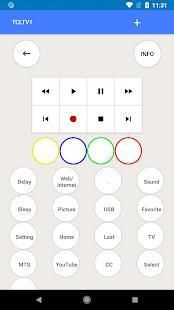
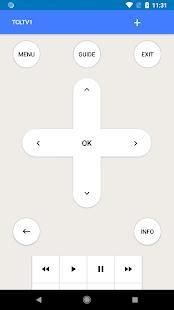
This TCL TV Remote Control has the following functionalities.
> Back
> Blue
> CC
> Channel_Down
> Channel_Up
> Delay
> Exit
> Fast_Forward
> Favorite
> Green
> Guide
> Home
> Info
> Input
> Last
> Menu
> MTS
> Mute
> Navigate_Down
> Navigate_Left
> Navigate_Right
> Navigate_Up
> Next
> Pause
> Picture
> Play
> Power
> Previous
> Red
> Rewind
> Select
> Setting
> Sleep
> Sound
> Stop
> TV
> USB
> Volume_Down
> Volume_Up
> Web/Internet
> Yellow
> YouTube
TCL TV Remote Control is very easy to use with no setup required and simple instructions.
Why to use:
This TCL Remote has all the features to control latest TCL TV Models, try it and make your life easier with TCL TV Remote Control.
Do you want to Contact Us:
Your suggestion are highly appreciated, if your TCL TV Model is missing please let us know via email, your TV Model will be added as soon as possible.
Bagaimana cara menggunakan:
> Arahkan telepon Anda ke TV TCL.
> Tekan tombol Power dan tunggu hingga TV untuk ON atau OFF.
> Jika TV TCL Anda AKTIF dengan "TCL Remote", Pilih "Bekerja" dan nikmati.
> Jika TV TCL Anda Tidak Diaktifkan oleh "TCL Remote", Pilih "Tidak Bekerja" dan Coba Remote TV TCL berikutnya.
> Coba proses yang sama sampai TV Anda AKTIF.
Fungsionalitas mana yang termasuk:
Remote Control TCL TV ini memiliki fungsi-fungsi berikut.
> Kembali
> Biru
> CC
> Channel_Down
> Channel_Up
> Penundaan
> Keluar
> Fast_Forward
> Favorit
> Hijau
> Panduan
> Beranda
> Info
> Masukan
> Terakhir
> Menu
> MTS
> Bisukan
> Navigate_Down
> Navigasi_Left
> Navigasi_Right
> Navigasi_Up
> Selanjutnya
> Jeda
> Gambar
> Mainkan
> Power
> Sebelumnya
> Merah
> Mundur
> Pilih
> Pengaturan
> Tidur
> Suara
> Berhenti
> TV
> USB
> Volume_Down
> Volume_Up
> Web / Internet
> Kuning
> YouTube
Remote Control TCL TV sangat mudah digunakan tanpa perlu penyiapan dan instruksi sederhana.
Mengapa menggunakan:
TCL Remote ini memiliki semua fitur untuk mengontrol Model TV TCL terbaru, mencobanya dan membuat hidup Anda lebih mudah dengan TCL TV Remote Control.
Apakah Anda ingin Menghubungi Kami:
Saran Anda sangat dihargai, jika Model TV TCL Anda hilang, silakan beri tahu kami melalui email, Model TV Anda akan ditambahkan sesegera mungkin.
TCL more models added

9Apps 4.9