

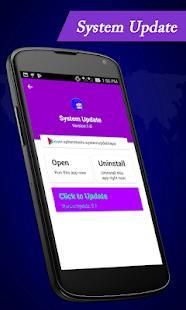
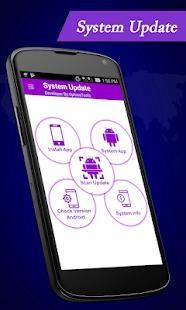
9Apps provide lots of India android apps. 20,000+ users downloaded Update software latest latest version on 9Apps for free every week! This indicates many people like this application. This hot app was released on 2018-08-12. It get a lot of recognition after release.
Have you ever had issues with Software update & System upgrade? Or have you wanted an easy way for App upgrade or and App Uninstaller? Apps Software update & System upgrade or App Uninstaller and System
Update app is your answer to your issues. Now Update App or Update System Software and Uninstall App with easy via this Apps & System Software Update or App Uninstaller and Software upgrade & System
upgrade.
Your SmartPhone might have 30+ Apps Installed and you will always want to have all those apps to upgrade on your device, for this you don’t need to check multiple times for apps upgrade on play store.
You can simply get all the list of new upgrade apps using Pending upgrades feature. In most cases these upgrades will show up on your phone when the time is right, but for those of who are not willing to wait a second
longer than necessary there is a way to check for these upgrades manually Up to date.
Up to date Software App features
-Get the list of upgrade pending apps at one junction.
-Check System Application updates.
-Check Android OS version upgrades.
-Uninstall Application
-View upgrade for Downloaded Application.
-Uninstall Application
-System Software upgrade.
-Shows the current app version.
-Shows the path of the app.
-Show app name, version, update time, size
-Fast Scan Check Up to Date
-Fast uninstall by one click
The app displays following essential information
☞ Current version of the app
☞ upgrade version of the app
☞ Package id of the app
☞ App title
☞ Installation date of the app
------Smart Feature-------
☞ Smooth User Interface UI
☞ Easy to Use
☞ Free App with full Feature
☞ Small Apk Size
upgrade helps you update to and from the following Android firmware versions - Gingerbread, Honeycomb (3.0, 3.1, 3.2), Ice Cream Sandwich ICS (4.0), Jellybean (4.1, 4.2, 4.3), Kitkat (4.4), Lollipop (5.0)
,Marshmallow (6.0) and Nougat (7.0) .
Software upgrade will help you to update your downloaded apps, system apps & Android OS at regular bases. You can choose the latest software according to user reviews and know which is the best and suitable for you.
These software can be upgrade on a regular basis and accordingly new software and be installed. For as long as smart phones has been around there has always been updates to their software. new software are being
created in order to help people smoother their lives and accessing the virtual world with ease. As a way of correcting these errors the makers of phones will from time to time need to upgrade the firmware to phones.
To get the best performance from your Android phone or tablet you should make sure you're running the latest software.
You just need to open the application and click on the app you want to upgrade from the app list. The list is divided into installed application, system application & pending upgrades. The app will also help you to update the
phone's android version (OS).
App will keep checking the upgrade version for all your installed apps and will notify the app having upgrade on play store.
Apakah Anda pernah memiliki masalah dengan Software Update & Sistem meng-upgrade? Atau apakah Anda ingin cara mudah untuk App upgrade atau dan App Uninstaller? Aplikasi Software Update & Upgrade Sistem atau App Uninstaller dan Sistem
Perbarui aplikasi adalah jawaban Anda untuk masalah Anda. Sekarang App Update atau System Update Software dan Uninstall App dengan mudah melalui ini Aplikasi & Sistem Software Update atau App Uninstaller dan Software Upgrade & Sistem
meningkatkan.
SmartPhone Anda mungkin memiliki 30 + Apps Terpasang dan Anda akan selalu ingin memiliki semua aplikasi tersebut untuk meng-upgrade pada perangkat Anda, untuk ini Anda tidak perlu memeriksa beberapa kali untuk aplikasi upgrade pada play store.
Anda hanya bisa mendapatkan semua daftar upgrade aplikasi baru menggunakan fitur Pending upgrade. Dalam kebanyakan kasus upgrade ini akan muncul di ponsel Anda kapan waktu yang tepat, tapi bagi yang tidak bersedia menunggu kedua
lama dari yang diperlukan ada cara untuk memeriksa upgrade ini secara manual Up to date.
Sampai dengan tanggal Software App fitur
-Dapatkan daftar upgrade tertunda aplikasi pada satu persimpangan.
update -Periksa Sistem Aplikasi.
-Periksa Android OS versi upgrade.
-Uninstall Aplikasi
-Lihat meng-upgrade untuk Download Aplikasi.
-Uninstall Aplikasi
Software Upgrade -Sistem.
-Shows versi aplikasi saat ini.
-Shows jalan aplikasi.
-show nama aplikasi, versi, pembaruan waktu, ukuran
-Cepat Memindai Check Up to Date
-Cepat uninstall dengan satu klik
Menampilkan aplikasi berikut informasi penting
☞ Versi saat ini dari aplikasi
☞ meng-upgrade versi aplikasi
☞ Paket id aplikasi
Judul ☞ App
☞ tanggal Pemasangan aplikasi
------ Fitur Cerdas -------
☞ Halus User Interface UI
☞ Mudah Digunakan
☞ Gratis App dengan Fitur lengkap
☞ Ukuran Apk Kecil
Upgrade membantu Anda memperbarui ke dan dari versi berikut Android firmware - Gingerbread, Honeycomb (3.0, 3.1, 3.2), Ice Cream Sandwich ICS (4.0), Jellybean (4.1, 4.2, 4.3), Kitkat (4.4), Lollipop (5.0)
, Marshmallow (6.0) dan Nougat (7,0).
upgrade software akan membantu Anda untuk memperbarui Anda download aplikasi, sistem aplikasi & OS Android di basis reguler. Anda dapat memilih perangkat lunak terbaru sesuai dengan ulasan pengguna dan tahu mana yang terbaik dan cocok untuk Anda.
Perangkat lunak ini dapat meng-upgrade secara teratur dan software sesuai baru dan diinstal. Selama sebagai ponsel cerdas telah sekitar sana selalu update untuk perangkat lunak mereka. software baru sedang
diciptakan untuk membantu orang halus kehidupan mereka dan mengakses dunia maya dengan mudah. Sebagai cara mengoreksi kesalahan ini pembuat ponsel akan dari waktu ke waktu perlu meng-upgrade firmware untuk ponsel.
Untuk mendapatkan performa terbaik dari ponsel Android atau tablet Anda harus memastikan Anda menjalankan perangkat lunak terbaru.
Anda hanya perlu membuka aplikasi dan klik pada aplikasi yang ingin meng-upgrade dari daftar aplikasi. Daftar ini dibagi ke dalam aplikasi diinstal, aplikasi sistem & tertunda upgrade. Aplikasi ini juga akan membantu Anda untuk memperbarui
telepon versi android (OS).
App akan tetap memeriksa versi upgrade untuk semua aplikasi yang diinstal Anda dan akan memberitahukan upgrade aplikasi memiliki di toko bermain.



9Apps 4.9










