

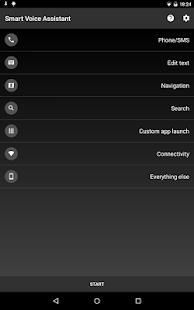
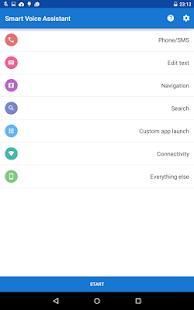
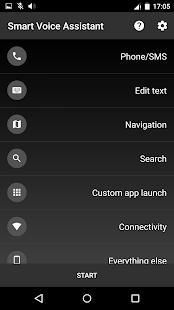
Believe it or not! 20,000+ users downloaded Smart Voice Assistant latest version on 9Apps for free every week! More functions were added in this app. This hot app was released on 2018-06-14. And it takes your phone small room to run it.
Give voice command & use top voice control of the personal Smart Voice Assistant.
Smart Voice Assistant
is the only assistance you’ll need to manage your day to day tasks with your voice.
▶️ Make your life easier now – get a fast, powerful personal voice assistant for free!
INCREASE PRODUCTIVITY
Smart Voice Assistant is pretty useful personal voice command app, which let you control your phone by voice. Think of the time you’ll save in typing and tapping while you are working, studying or doing creative/productive work!
HELPFUL IN MANY LIFE SITUATIONS
This app ideally suited while you drive a car. Thanks to it, you won’t endanger your and other people's lives. When you receive message, this app will display and even read it if you want it. In case you want make a call, Just say key-word and your contact’s name. This personal assistance app can activate loudspeaker if you want. So download this incredible app and explore more features which were implemented for you.
FEATURES OF THE PERSONAL VOICE ASSISTANT:
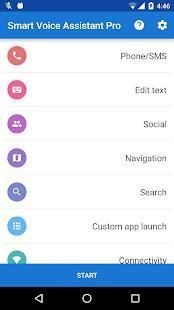
☑️ VOICE DIALLING
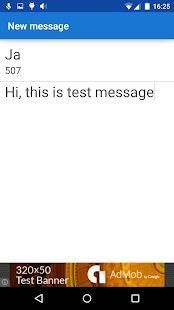
☑️ WRITING SMS (EASY TO USE TEXT EDITOR)
☑️ DISPLAYING RECEIVE SMS WINDOW AND READING IT (TEXT-TO-SPEECH ENGINE IS REQUIRED)
☑️ START NAVIGATION WITH SETTING DESTINATION
☑️ SEARCHING WEB
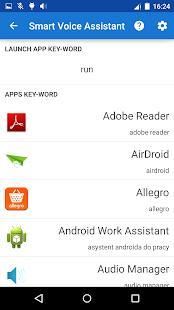
☑️ LAUNCHING CUSTOM APPS
☑️ MAKING NOTES
☑️ SWITCH ON/OFF WI-FI, MOBILE DATA, BLUETOOTH
☑️ READING BATTERY LEVEL
☑️ WRITING AND POST TWEETS (PRO VERSION)
☑️ WRITING AND PUBLISHING ON FACEBOOK WALL (PRO VERSION)
IMPORTANT:
Voice recognition in some languages need access to Internet. If new message window doesn’t display make sure that other message apps don’t block SMS notifications.
HOW TO USE SMART VOICE ASSISTANT AS YOUR PERSONAL ASSISTANT?
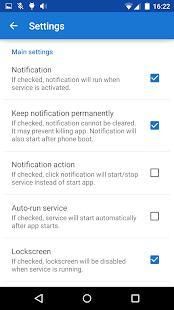
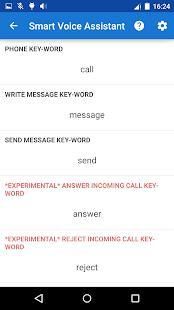
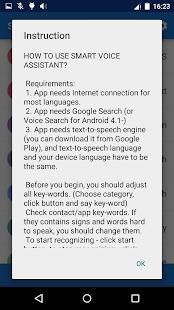
Before you begin, you should adjust all key-words. (Choose category, click button and say key-word)
Check contact/app key-words. If they contains signs and words hard to speak, you should change them.
To start recognizing - click start button, to stop recognizing - click stop button.
HOW TO SPEAK THE VOICE COMMANDS?
Calling: *phone key-word* + *contact key-word*
Example: "call john"
Writing SMS: *write SMS key-word* + *contact key-word*
Example: "write to john"
✍️ Writing Note: *write note key-word* + *name*
Example: "new note first"
️ Open Note: *open note key-word* + *name*
Example: "open note first"
Navigation: *navigation key-word* + *destination* - Google Maps is required or other navigation app which react for navigation intent
Example: "navigation new york aberdeen street"
Searching: *searching key-word* + *target*
Example: "search restaurant berlin"
Launching apps: *aunch app key-word* + *app key-word*
Example: "launch mail"
While you are editing text, you can delete one word, whole text message or text after the word which you said...
Example for key-word: "delete since"
Text message:
Hi, what's up?I am *playing a fantastic game.
To delete words after *:
"delete since playing"
Requirements to make it your personal assistant app:
1. App needs Internet connection for most languages.
2. App needs Google Search (or Voice Search for Android 4.1-)
3. App needs text-to-speech engine (you can download it from Google Play), and text-to-speech language and your device language have to be the same.
4. "Ok Google" should be disabled.
5. Contacts should be synchronized with Google Account.
Note:
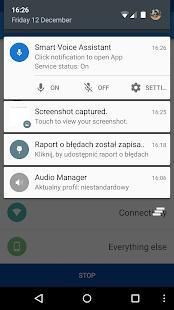
If you use BT headset you can start recognizing by single clicking BT button. Click again to start recognizing your voice by mobile device microphone. If you click once more, app will stop service.
This app supports bluetooth headset (Android 3.0+ is required). You can run/stop service by clicking Bluetooth headset button!
DOWNLOAD this personal voice command app and take your Android smartphone to another level.
Berikan perintah suara & menggunakan kontrol suara atas Asisten Pintar Voice pribadi.
Smart Voice Assistant adalah satu-satunya bantuan yang Anda akan perlu untuk mengelola hari ke hari tugas dengan suara Anda.
▶ ️ Membuat hidup Anda sekarang lebih mudah - mendapatkan, asisten suara pribadi yang kuat cepat gratis!
MENINGKATKAN PRODUKTIVITAS
Cerdas Voice Assistant cukup berguna perintah aplikasi suara pribadi, yang memungkinkan Anda mengontrol ponsel dengan suara. Pikirkan waktu Anda akan menghemat dalam mengetik dan menekan sementara Anda bekerja, belajar atau melakukan kreatif / produktif bekerja!
MEMBANTU DALAM SITUASI KEHIDUPAN BANYAK
Aplikasi ini cocok saat Anda mengendarai mobil. Terima kasih untuk itu, Anda tidak akan membahayakan Anda dan kehidupan orang lain. Bila Anda menerima pesan, aplikasi ini akan menampilkan dan bahkan membacanya jika Anda menginginkannya. Jika anda ingin membuat panggilan, Katakan saja kunci-kata dan nama kontak Anda. Aplikasi bantuan pribadi ini dapat mengaktifkan loudspeaker jika Anda ingin. Jadi download aplikasi ini luar biasa dan mengeksplorasi lebih banyak fitur yang diimplementasikan untuk Anda.
FITUR DARI PRIBADI VOICE ASISTEN:
☑️ Pemanggilan Suara
☑️ MENULIS SMS (MUDAH UNTUK MENGGUNAKAN TEXT EDITOR)
☑️ MENAMPILKAN MENERIMA SMS WINDOW DAN BACAAN IT (TEXT-TO-SPEECH ENGINE IS REQUIRED)
☑️ MULAI NAVIGASI DENGAN SETTING TUJUAN
☑️ SEARCHING WEB
APPS CUSTOM ☑️ LAUNCHING
☑️ PEMBUATAN CATATAN
SWITCH ☑️ ON / OFF WI-FI, MOBILE DATA, BLUETOOTH
☑️ MEMBACA BATERAI LEVEL
☑️ MENULIS DAN POST tweets (PRO VERSION)
MENULIS ☑️ DAN PENERBITAN DI FACEBOOK WALL (PRO VERSION)
PENTING:
pengenalan suara dalam beberapa bahasa membutuhkan akses ke Internet. Jika jendela pesan baru tidak menampilkan memastikan bahwa aplikasi pesan lain tidak memblokir pemberitahuan SMS.
CARA PAKAI SMART VOICE ASISTEN AS ASISTEN PRIBADI ANDA?
Sebelum Anda mulai, Anda harus menyesuaikan semua kunci-kata. (Pilih kategori, klik tombol dan mengatakan kunci-kata)
Periksa kontak / app kunci-kata. Jika mereka mengandung tanda-tanda dan kata-kata sulit untuk berbicara, Anda harus mengubahnya.
Untuk memulai mengakui - klik tombol start, untuk menghentikan mengakui - klik tombol stop.
CARA BERBICARA THE VOICE PERINTAH?
Calling: * telepon kunci-kata * + * kunci kontak-kata *
Contoh: "sebut john"
Menulis SMS: * menulis SMS kunci-kata * + * kunci kontak-kata *
Contoh: "menulis ke john"
✍️ Menulis Catatan: * menulis catatan kunci-kata * + * nama *
Contoh: "catatan baru pertama"
️ Terbuka Catatan: * terbuka catatan kunci-kata * + * nama *
Contoh: "open catatan pertama"
Navigasi: * tombol navigasi-kata * + * tujuan * - Google Maps diperlukan atau aplikasi navigasi lainnya yang bereaksi untuk maksud navigasi
Contoh: "navigasi new york aberdeen jalan"
Pencarian: * mencari kunci-kata * + * sasaran *
Contoh: "pencarian restaurant berlin"
Peluncuran aplikasi: * Aplikasi aunch kunci-kata * + * aplikasi kunci-kata *
Contoh: "peluncuran mail"
Ketika Anda mengedit teks, Anda dapat menghapus satu kata, pesan teks keseluruhan atau teks setelah kata yang Anda katakan ...
Misalnya untuk kunci-kata: "hapus karena"
Pesan teks:
Hi, ada apa? Saya * memainkan permainan yang fantastis.
Untuk menghapus kata-kata setelah *:
"Menghapus sejak bermain"
Persyaratan untuk membuatnya asisten aplikasi pribadi Anda:
1. App membutuhkan koneksi internet untuk sebagian besar bahasa.
2. App membutuhkan Google Search (atau Voice Search untuk Android 4.1-)
3. App perlu text-to-speech engine (Anda dapat men-download dari Google Play), dan text-to-speech bahasa dan bahasa perangkat Anda harus sama.
4. "Ok Google" harus dinonaktifkan.
5. Kontak harus disinkronkan dengan Akun Google.
catatan:
Jika Anda menggunakan BT headset Anda dapat mulai mengenali dengan mengklik tunggal tombol BT. Klik lagi untuk memulai mengenali suara Anda dengan mikrofon perangkat mobile. Jika Anda klik sekali lagi, aplikasi akan menghentikan layanan.
Aplikasi ini mendukung headset bluetooth (Android 3.0+ diperlukan). Anda dapat menjalankan / menghentikan layanan dengan mengklik tombol headset Bluetooth!
DOWNLOAD perintah aplikasi suara pribadi ini dan mengambil smartphone Android Anda ke tingkat lain.
Update




9Apps 4.9










