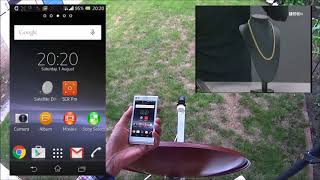
Recently, we found a very popular application. 20,000+ users downloaded Satfinder 2018 pro - Dish Pointer latest version on 9Apps for free every week! It shouldn't be surprising to find a app popular faithfully This hot app was released on 2018-08-01. If you still need more information collecting extra factors, read below.
Satellite Finder - Satellite Director While dish setup, don’t rely on a compass, its accuracy is limited.☝ This satellite finder app, however, provides you with a high-precision instrument to create a landmark and avoid a compass and calculation of magnetic azimuth.
The app does NOT require a camera, motion sensors or a digital compass to help you with satellite antenna set up.
WHAT ELSE YOU GET? A whole bunch of other useful features:
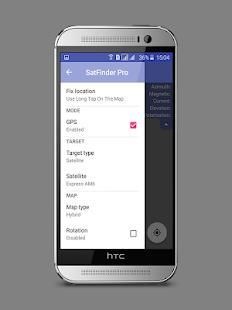
- 2 modes: GPS-OFF (take advantage of satellite maps to off-site express check intended location for possible satellite signal blocks before you actually setup the dish) and GPS-ON (aligning the dish);
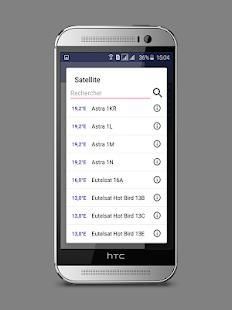
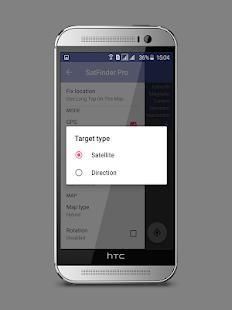
- 2 types of target: Satellite (choose a certain satellite from a list) and Direction (set specific direction, which is good for aligning point-to-point wireless communication antennas);
- 4 map types;
- Easy to use search by either a satellite's own name or satellite provider's name;
- Access to a public transponder list;
- Magnetic azimuth display for hard-core compass fans!)
- Our love and care!☺We support you and answer all your questions, just send us feedback by pressing “Contact developer” button in the menu or send e-mail at artemkaxboy@gmail.com;
- Last but not least: we don’t run super-annoying huge ads in your face - good for nervous system and usability, friends!
HOW TO USE THE APP IN GPS-OFF MODE to express check any point on planet Earth for satellite signal blocks:
1) Turn off GPS in the menu;
2) Choose a satellite or set direction;
3) Find intended location of dish setup and fix it with a long tap → Direction indicator and alignment parameters will show up, now you can have a look at the map and decide if that location is adequate or it's better to find another one.
Now you are ready for the main part, let’s roll!
HOW TO USE THE APP TO ALIGN YOUR DISH (easy, really):
1. Make sure that the internet and GPS are enabled on your phone; bear in mind that for best accuracy you should be outdoor, or at least come close to a window;
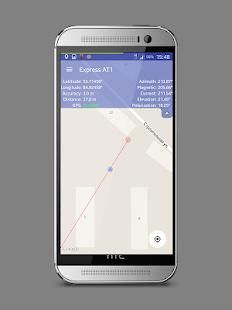
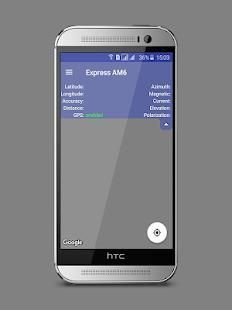
2. In the menu go to «Target» and choose a satellite/set direction → You will see your location and direction indicator on the map, and your coordinates, GPS status along with alignment parameters in the info panel at the top of your display;
3. Wait for max accuracy of GPS (it may take some time to determine your location). Accuracy depends on surroundings, good range is <5m/15ft;
4. Bring your phone to the dish as close as possible, no matter above or under it (you can stand right under the dish if it's fixed on a wall, just don’t step away);
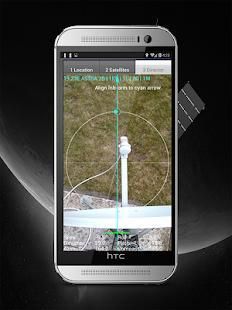
5. Look at the map, if direction indicator runs across a landmark that is easy to spot from the dish location (a house, a lake, a big tree etc.) you can point the dish at the landmark, set elevation according to its value in the info panel and then proceed to fine-tuning the dish using a satellite receiver settings.
If satellite images are of poor quality or there are no landmarks in sight, do the following trick:
6. Fix the dish location with a long tap on the display or select the respective option in the menu → Coordinates will be saved and direction indicator will now be coming from the fixed location, not your actual one;
7. Following the direction indicator step about 100-300m (300-1000 ft) away from the dish, the farther you move away the better → You will see the azimuth for aligning your dish (“ Azimuth”) and azimuth calculated for your current location (“Current Azimut”), make sure the two values match as closely as possible;
8. At the point of closest azimuth match, place a landmark. For instance, it can be a stick/twig forced in the ground or a chair if you bring it, or even a person who is willing to stay still for a while;
9. Go back to your satellite dish, point it at the new landmark and set elevation;
10. Proceed to fine-tuning the dish using satellite receiver settings.
There now, your satellite dish is well aligned! Directv, dish network, all sorts of dish tv and internet are there - enjoy!
Satelit Finder - Direktur satelit Sementara pengaturan hidangan, tidak bergantung pada kompas, akurasinya limited.☝ finder aplikasi satelit ini, bagaimanapun, menyediakan Anda dengan alat presisi tinggi untuk membuat tengara dan menghindari kompas dan perhitungan magnetik azimut.
Aplikasi ini TIDAK memerlukan kamera, sensor gerak atau kompas digital untuk membantu Anda dengan antena satelit mengatur.
APA ELSE ANDA DAPATKAN? Sebuah sejumlah besar fitur yang berguna lainnya:
- 2 mode: GPS-OFF (mengambil keuntungan dari peta satelit untuk off-site cek ditujukan lokasi ekspres untuk kemungkinan blok sinyal satelit sebelum Anda benar-benar menyiapkan hidangan) dan GPS-ON (menyelaraskan hidangan);
- 2 jenis sasaran: Satelit (memilih satelit tertentu dari daftar) dan Arah (mengatur arah tertentu, yang baik untuk menyelaraskan antena komunikasi nirkabel point-to-point);
- 4 jenis peta;
- Mudah digunakan pencarian dengan baik nama satelit sendiri atau nama penyedia satelit;
- Akses ke daftar transponder publik;
- display azimuth magnetik untuk para penggemar kompas hard-core)!
- Cinta kita dan peduli ☺We dukungan Anda dan menjawab semua pertanyaan Anda, hanya mengirim tanggapan dengan menekan “Hubungi pengembang” tombol dalam menu atau mengirim e-mail di artemkaxboy@gmail.com;!
- Last but not least: kita tidak menjalankan iklan besar super-menyebalkan di wajah Anda - baik untuk sistem saraf dan kegunaan, teman-teman!
CARA MENGGUNAKAN APP DALAM MODE GPS-OFF untuk check setiap titik di planet bumi untuk blok sinyal satelit:
1) Matikan GPS di menu;
2) Pilih satelit atau menentukan arah;
3) Cari lokasi yang dituju setup piring dan memperbaikinya dengan keran panjang indikator → Arah dan parameter keselarasan akan muncul, sekarang Anda dapat memiliki melihat peta dan memutuskan apakah lokasi yang memadai atau lebih baik untuk menemukan satu sama lain.
Sekarang Anda siap untuk bagian utama, mari kita gulung!
CARA MENGGUNAKAN APP UNTUK ALIGN DISH ANDA (mudah, benar-benar):
1. Pastikan bahwa internet dan GPS diaktifkan pada ponsel Anda; diingat bahwa untuk akurasi terbaik Anda harus luar ruangan, atau setidaknya mendekati jendela;
2. Dalam menu pergi ke «Sasaran» dan memilih satelit / mengatur arah → Anda akan melihat lokasi Anda dan arah indikator pada peta, dan koordinat Anda, status GPS bersama dengan parameter keselarasan di panel info di bagian atas layar Anda ;
3. Tunggu akurasi max dari GPS (mungkin diperlukan beberapa waktu untuk menentukan lokasi Anda). Akurasi tergantung pada lingkungan, rentang yang baik adalah <5m / 15ft;
4. Bawalah telepon Anda ke piring sedekat mungkin, tidak peduli di atas atau di bawahnya (Anda dapat berdiri tepat di bawah piring jika itu tetap di dinding, hanya tidak menjauh);
5. Lihatlah peta, jika indikator arah berjalan di tengara yang mudah dikenali dari lokasi hidangan (rumah, danau, pohon besar dll) Anda bisa mengarahkan hidangan di landmark, mengatur elevasi menurut nya nilai dalam panel info dan kemudian lanjutkan untuk fine-tuning hidangan menggunakan pengaturan penerima satelit.
Jika citra satelit yang berkualitas buruk atau tidak ada landmark terlihat, lakukan trik berikut:
6. Memperbaiki lokasi hidangan dengan tap panjang di layar atau pilih opsi yang terkait dalam menu → Koordinat akan disimpan dan arah indikator sekarang akan datang dari lokasi tetap, tidak Anda yang sebenarnya satu;
7. Setelah langkah arah indikator tentang 100-300m (300-1000 ft) dari piring, semakin jauh Anda menjauh lebih baik → Anda akan melihat azimuth untuk menyelaraskan hidangan Anda ( “Azimuth”) dan azimuth dihitung untuk saat ini Anda lokasi ( “Azimut Current”), pastikan dua nilai cocok sedekat mungkin;
8. Pada titik pertandingan azimuth terdekat, tempat tengara. Misalnya, itu bisa menjadi tongkat / ranting paksa di tanah atau kursi jika Anda membawanya, atau bahkan orang yang bersedia untuk tinggal diam untuk sementara waktu;
9. Kembali ke parabola Anda, titik itu pada tengara baru dan mengatur elevasi;
10. Lanjutkan untuk fine-tuning hidangan menggunakan pengaturan penerima satelit.
Ada sekarang, parabola Anda sangat sejalan! DirecTV, hidangan jaringan, segala macam hidangan tv dan internet yang ada - menikmati!

9Apps 4.9